Our selection of AI tools for content creators in 2026.
We reviewed the most robust solutions on the market in 2026, focusing on those that deliver real value: measurable time savings, professional-quality output, and pricing that fits the budgets of entrepreneurs small teams. This comparison deliberately covers several Categories AI video, synthetic voice, image generation, SEO content optimization, and distribution management.
AI-generated content: a turning point that many have not yet fully grasped.
By 2026, creating content without AI assistance is almost like printing your own airline tickets. It’s possible, but clearly suboptimal. The question is no longer really whether AI tools deserve a place in your creative workflow—they do, and have for quite some time. The real question is which of these dozens of solutions to choose based on what you actually do.
From YouTube creators juggling editing and storytelling, to community managers posting to three platforms a day, to consultants churning out presentations, to startup founders creating their own ads due to a lack of agency budget, needs vary considerably. And the market has fragmented accordingly: one tool for avatar video, another for automatic clipping, another for voice-overs, another for advertising visuals...
According to a HubSpot study published in early 2025, more than 73% of marketers now incorporate an AI tool into their content creation process. That figure was just 48% two years earlier. The adoption curve is skyrocketing, pushing SaaS publishers to innovate at a pace that renders comparisons obsolete within a matter of months.
We reviewed the most robust solutions on the market in 2026, focusing on those that deliver real value: measurable time savings, professional-quality output, and pricing that fits the budgets of entrepreneurs small teams. This comparison deliberately covers several Categories AI video, synthetic voice, image generation, SEO content optimization, and distribution management.
#1 - HeyGen AI: the video avatar that speaks for you, in any language.
Benefit from our free deal on HeyGen AI.
20% off on annual plan
Find over 300 free deals as well as over 850 Premium deals right now with HeyGen AI and save on your software subscriptions. Whether you're an entrepreneur, a startup or a solo freelancer, save hundreds of euros thanks to our discounts and promo codes.
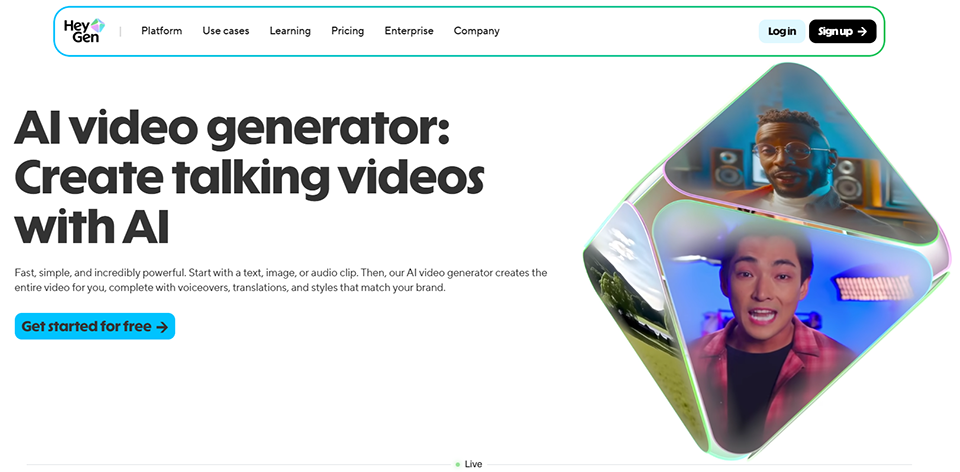
HeyGen has established itself as one of the must-have platforms must-have generating videos featuring realistic AI avatars. The concept seems simple: you enter some text, choose an avatar (or upload your own likeness), and the platform generates a video with voiceover in just a few minutes. But behind this simplicity lies a remarkable technical infrastructure.
What sets HeyGen apart in 2026 is, above all, the quality of its lip-syncing and the expressiveness of its avatars. Early versions of these technologies produced a slightly robotic look, which was often a deal-breaker. HeyGen has resolved many of these issues, particularly with its state-of-the-art rendering engine that handles microexpressions and head movements.
The video translation feature deserves special attention. By uploading an existing video, you can have it automatically dubbed into more than 40 languages while maintaining lip-sync with your original face. For teams targeting international markets without a post-production budget, this is a capability that few tools can match today.
Key features:
A library of over 300 customizable AI avatars.
Create personalized avatars from a short video of yourself.
Automatic translation and dubbing in over 40 languages.
A scene editor with backgrounds, animated text, and transitions.
Integration with PowerPoint to turn presentations into narrated videos.
Pricing:
The free plan allows you to generate 3 video credits per month.
The Creator plan starts at $29/month for 15 credits.
The Business Plan ( $59/month) includes custom avatars and API access.
👤 Who is this for?
The consultant or trainer:
Anyone who produces e-learning modules or explainer videos on a large scale will find that HeyGen saves them a considerable amount of time. Recording a polished presentation video with good lighting and no stuttering can take several hours. HeyGen reduces that time to just the time it takes to write the script.
International marketing teams:
They primarily use the translation feature. Creating a campaign in English and then adapting it into Spanish, French, German, and Portuguese without having to reshoot the footage results in significant cost savings.
Solo content creators:
On LinkedIn or YouTube, users can use it to create short-form content without appearing on camera: this is handy for those just starting out or who want to scale up their production.
✅ Key features of HeyGen AI:
The quality of the avatars is among the best currently available on the market.
The multilingual video translation is truly impressive.
User-friendly interface; no technical skills required.
API available for integration into automated workflows.
⚠️ Limitations of HeyGen AI:
The cost can rise quickly if the credit requirements are substantial.
Custom avatars require a paid plan and take some time to create.
For very long or complex videos, the rendering may look unnatural in certain sequences.
The generated content remains recognizable to the trained eye.
Benefit from a on HeyGen AI .
Additional 20% off on annual plan
Find our best discount right now with HeyGen AI and save on your software subscriptions. We offer over 850 promo codes and discounts on the best software and SaaS on the market.
2# - Synthesia: The enterprise solution for large-scale AI video.
Benefit from our free deal on Synthesia.
Up to 38% off on annual plan
Find over 300 free deals as well as over 850 Premium deals right now with Synthesia and save on your software subscriptions. Whether you're an entrepreneur, a startup or a solo freelancer, save hundreds of euros thanks to our discounts and promo codes.
Synthesia occupies a unique position in this landscape: it is the tool that large organizations are adopting to scale up their in-house video production. From team training and HR onboarding to product tutorials and corporate communications, Synthesia addresses these use cases with a level of reliability and control that makes it the go-to solution for digital services firms and Learning & Development (L&D) departments.
Launched in 2017 and based in London, Synthesia now boasts more than 55,000 corporate clients, including Accenture, Reuters, and Zoom. These references clearly indicate its positioning: it’s not a tool for solo creators looking to create viral content, but rather a solution for teams that need to produce hundreds of consistent videos at a lower cost.
The interface is built around a slide editor, making it familiar to anyone who has used PowerPoint. Each slide can contain text, media, a talking avatar, and graphic elements. The use of templates facilitates visual standardization, a significant advantage for brands with strict visual identity guidelines.
Export to MP4, LMS integration (SCORM-compatible).
Pricing:
The Starter Plan at $29/month for 10 videos/month.
The Creator plan for $89/month.
Enterprise plans are available upon request.
👤 Who is this for?
Training coordinators:
SMEs and mid-sized companies are the core target audience. Updating an existing training module no longer requires reshooting the video: simply modify the script and regenerate the content.
Startups in the growth phase:
Use it for scalable onboarding: a company introduction video, product tutorials, and welcome videos for new hires—without having to involve the team every time someone is hired.
Communication agencies:
Those who manage multiple clients can produce corporate videos at a production cost significantly lower than that of traditional filming.
✅ Key features of Synthesia:
Among the best rendering quality options for corporate use cases.
Well-designed team collaboration, ideal for organizations with multiple contributors.
Compatible with LMS platforms, a key requirement for online training.
Responsive customer support, essential for mission-critical business applications.
⚠️ Limitations of Synthesia:
Less creative and flexible than HeyGen for non-corporate formats.
The Starter plan has a volume limit; rates increase rapidly for large volumes.
Although there are many avatars, they remain more static than those of competing new generations
Less suitable for dynamic or emotional content (storytelling, lifestyle advertising).
Benefit from a on Synthesia .
An additional 25% off during 12 months
Find our best discount right now with Synthesia and save on your software subscriptions. We offer over 850 promo codes and discounts on the best software and SaaS on the market.
3# - Description: When video can be edited just like a text document.
Benefit from our free deal on Descript.
35% off on annual plan
Find over 300 free deals as well as over 850 Premium deals right now with Descript and save on your software subscriptions. Whether you're an entrepreneur, a startup or a solo freelancer, save hundreds of euros thanks to our discounts and promo codes.
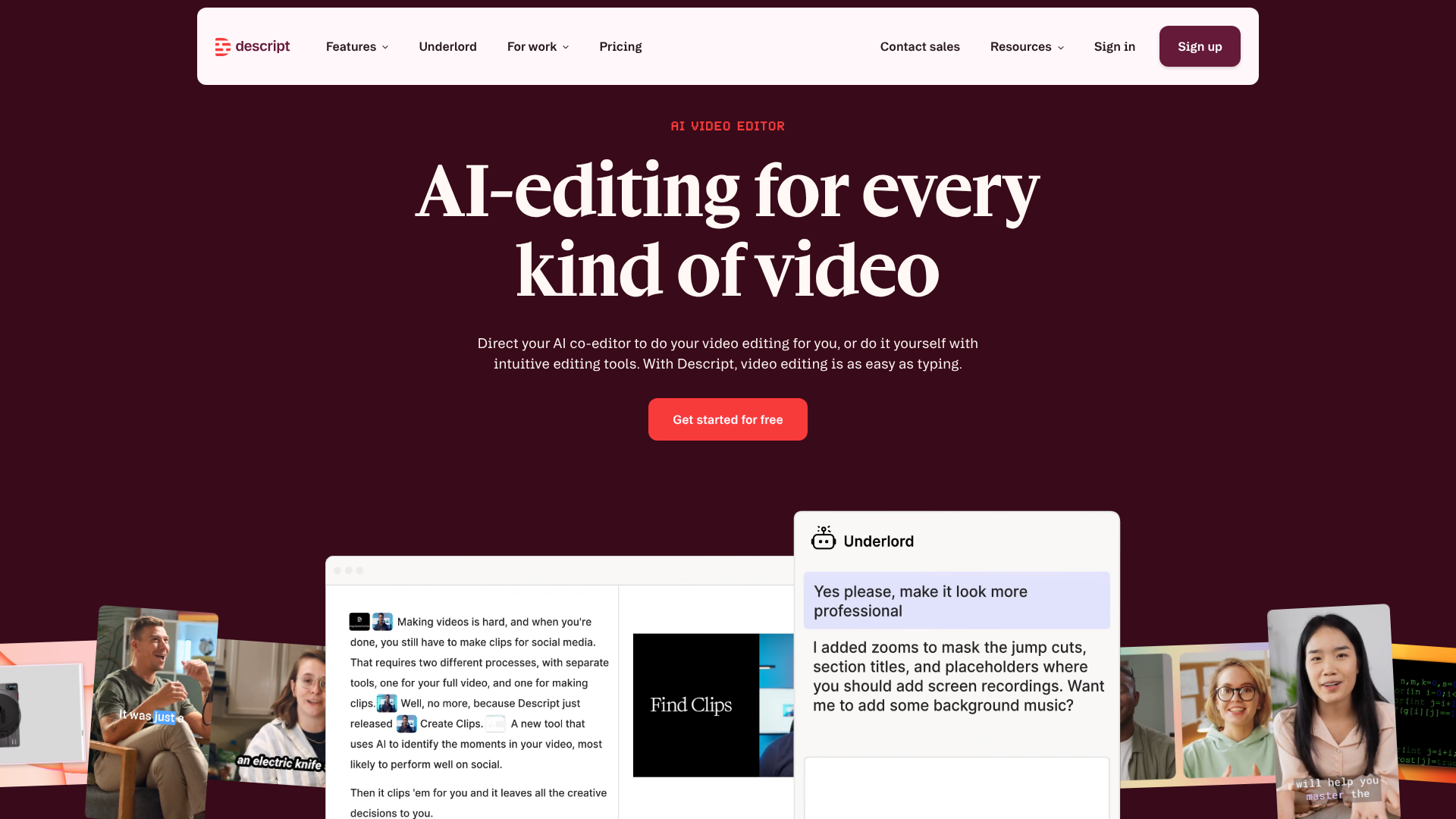
Descript is in a league of its own. It isn’t an AI generator in the strict sense: it’s a video and audio editor built around the concept of automatic transcription. In practice, your recording is transcribed in real time, and any changes to the text automatically update the corresponding media. Deleting a word from the transcript removes the associated audio or video clip. Correcting a sentence re-records it with a synthetic voice that mimics your own.
This approach is changing the way podcasters, videographers, and creators of long-form content work. There’s no longer any need to scrub frame by frame to find a mistake: you search the text, select the section, and cut it out.
The Overdub feature deserves a special mention: after recording about 10 minutes of speech, Descript clones your voice and can generate new sentences spoken "by you" based on the text. This is useful for correcting a mistake without having to record a new session.
Key features:
Automatic transcription with support for over 23 languages.
Text-based video editing (cutting text = cutting the video).
Overdub: Custom voice cloning.
Remove pauses and verbal tics with a single click.
Direct publishing to YouTube, Wistia, and Riverside.
Pricing:
The Free plan with 1 hour of transcription per month.
The Creator plan for $24/month.
The Pro plan for $40/month.
👤 Who is this for?
Podcasters and audio content creators:
They have access to a comprehensive suite of tools: recording, editing, audio cleanup, and publishing. The automatic removal of "ums," silences, and mispronunciations saves a significant amount of time on each episode.
YouTube video creators:
Those who produce long-form content (tutorials, interviews, vlogs) particularly appreciate the efficiency of transcription-based editing. What used to take 3 hours of editing can now be reduced to 45 minutes.
Internal communications teams:
They can use it to create short update videos, interviews, or testimonials without needing a professional video editor.
✅ Key features of Descript:
A truly innovative editing paradigm that saves a tremendous amount of time on long-form content.
The transcription quality is among the best on the market.
Overdub works well for making minor corrections.
A clean, well-designed interface, even for those who aren't video editors.
⚠️ Descript Limits:
Less suitable for complex creative editing (transitions, effects, motion design).
Voice cloning requires a high-quality source recording to produce a convincing result.
Exports can take a long time for large projects.
Some advanced features require the Pro plan.
Benefit from a on Descript .
Additional $25 off on your subscription
Find our best discount right now with Descript and save on your software subscriptions. We offer over 850 promo codes and discounts on the best software and SaaS on the market.
#4 - OpusClip: automatic clipping that turns your long-form videos into viral shorts.
Benefit from our free deal on OpusClip.
Up to 50% off on annual plan
Find over 300 free deals as well as over 850 Premium deals right now with OpusClip and save on your software subscriptions. Whether you're an entrepreneur, a startup or a solo freelancer, save hundreds of euros thanks to our discounts and promo codes.
OpusClip tackles one of the most time-consuming challenges for content creators: repurposing long-form content ( webinars, interviews, video podcasts, conferences) into a series of short clips optimized for TikTok, Instagram Reels, and YouTube Shorts. The process relies on an AI model that analyzes your content and identifies the most engaging moments, impactful phrasing, and segments likely to generate reactions.
In practice, you upload a video or paste a YouTube URL, and OpusClip automatically generates 5 to 10 clips with stylized subtitles, smart cropping for vertical format, and an estimated virality score for each clip.
The automatic cropping feature is worth highlighting. Adapting a 16:9 video to a 9:16 aspect ratio isn’t just a matter of cropping the sides: it requires tracking the speaker, managing changes in interviewees during interviews, and ensuring that faces don’t end up out of frame. OpusClip’s AI handles all of this with reasonable reliability.
Key features:
Automatic detection of key moments.
AI cropping for vertical formats (TikTok, Reels, Shorts).
Generation of stylized and animated subtitles.
Estimated "virality" score per video.
Multi-platform publishing schedule.
Pricing:
The Free plan with 60 minutes of processing time per month.
The Starter plan for $15/month.
The Pro plan for $29/month.
👤 Who is this for?
Long-form content creators:
Clearly have the most to gain. A one-hour lecture can generate 8 to 12 usable clips in just a few minutes, whereas doing this manually would take several hours.
Community managers:
Managers of accounts across multiple platforms can populate their publishing calendars from a single source of long-form content, without having to create multiple content sessions.
The agencies:
Those who manage their clients' social media presence can offer this repurposing service at a minimal cost.
✅ Key features of OpusClip:
Significant time savings when repurposing content.
The detection of key moments is generally accurate.
Automatic framing works well for interviews and solo talks.
Very user-friendly interface; easy to get started with.
⚠️ Limitations of OpusClip:
The virality score is an estimate, not a guarantee.
The quality of the clips may vary depending on the type of source content (highly technical or static content yields poorer results).
Generated subtitles often require proofreading and minor corrections.
The free plan has a monthly data limit.
Benefit from a on OpusClip .
An additional 25% off during 12 months
Find our best discount right now with OpusClip and save on your software subscriptions. We offer over 850 promo codes and discounts on the best software and SaaS on the market.
#5 - ElevenLabs: the text-to-speech technology that has rendered years of technological progress obsolete.
Benefit from our free deal on ElevenLabs.
2 months free on annual plan
Find over 300 free deals as well as over 850 Premium deals right now with ElevenLabs and save on your software subscriptions. Whether you're an entrepreneur, a startup or a solo freelancer, save hundreds of euros thanks to our discounts and promo codes.
ElevenLabs has made a significant breakthrough in the field of synthetic speech. Whereas previous solutions produced results that were instantly recognizable, ElevenLabs generates voices of such high quality that they regularly fool even attentive listeners. The prosody, the pauses, the subtle variations in intonation—all contribute to a result that sounds more like a recorded human voice than traditional text-to-speech.
For content creators, there are numerous use cases: video narration without a microphone recording, voice-overs for commercials, dubbing content into other languages, creating podcasts entirely with synthetic voices, and voice characters for games and interactive experiences.
The voice cloning feature is probably the most widely used. Using just a few minutes of audio, ElevenLabs clones your voice with uncanny accuracy. You can then generate any phrase in your own voice simply by typing the text.
Key features:
More than 3,000 voices in 32 languages.
Instant, professional voice cloning.
Check for consistency, clarity, and writing style.
Comprehensive API for integration into applications.
ElevenLabs Studio for long-form audio projects (audiobooks, podcasts).
Pricing:
The Free plan with 10,000 characters per month.
The Creator plan at $11/month (100,000 characters).
The Pro plan at $99/month for heavy users.
👤 Who is this for?
YouTube or TikTok video creators:
Those who do not wish to (or are unable to) record their voices—whether for privacy reasons, environmental constraints, or simply out of personal preference—will find ElevenLabs to be a viable alternative.
Podcast producers:
Those exploring AI-native formats or who want to localize their content into other languages to reach new audiences.
Developers and product teams:
Who incorporate voice into their applications, whether they are voice assistants, conversational interfaces, or immersive experiences.
✅ Key features of ElevenLabs:
Voice quality that far surpasses that of standard competitors.
Fast and convincing voice cloning.
High-quality multilingual support, including French.
A robust and well-documented API for technical integrations.
⚠️ Limitations of ElevenLabs:
The free plan quickly becomes insufficient for regular use.
Voice cloning raises legitimate ethical questions about its misuse.
For very long scripts or specific emotional tones, manual adjustments are often still necessary.
Some cloned voices lose quality when used on texts that differ significantly from the training corpus.
Benefit from a on ElevenLabs .
12 months free (33 million characters included)
Find our best discount with ElevenLabs and save on your software subscriptions. We offer over 850 promo codes and discounts on the best software and SaaS on the market.
#6 - Runway AI: AI video generation that pushes the boundaries of what's possible.
Runway is one of the most ambitious platforms in the field of AI-generated video. While HeyGen and Synthesia focus on talking avatars, Runway tackles the creation of general-purpose video content based on text prompts or images—a process known as text-to-video or image-to-video.
Runway's Gen-2 and Gen-3 models can generate short video clips (4 to 10 seconds) with impressive visual quality. Whether it's a misty forest at sunrise, a bustling street scene, or an evolving visual abstraction, Runway produces clips that are perfect for video intros, transitions, animated backgrounds, or artistic creations.
Beyond mere image generation, Runway includes a suiteof AI-powered video editing tools: background removal, automatic rotoscoping, image interpolation, upscaling, and the removal of unwanted elements from a scene. It is a comprehensive suite for creatives working in post-production.
Key features:
Text-to-video and image-to-video generation (Gen-3).
Tools for removing and replacing backgrounds.
Video inpainting (removing elements from a scene).
Upscaling and video quality enhancement.
Motion Brush: Animate specific areas of an image.
Pricing:
The Free plan with 125 credits.
The Standard Plan at $15/month (625 credits/month).
The Pro plan for $35/month.
👤 Who is this for?
Art directors and motion designers:
have adopted Runway to explore new creative directions at a lower cost. Generating multiple visual variations of a single idea in just a few minutes can significantly enrich the design process.
Content creators on YouTube and TikTok:
They use it to create AI-generated B-roll, unique transitions, or illustrative visuals that they wouldn't have been able to produce otherwise without a filming budget.
Advertising agencies and content studios:
They incorporate it into their workflow to deliver results quickly on tight budgets, particularly for digital content, where production constraints differ from those of television.
✅ Key features of Runway AI:
Video quality that ranks among the best available.
A comprehensive suite of AI editing tools—not just for content generation.
Active community, plenty of tutorials and resources.
Frequent updates and continuously improved templates.
⚠️ Limitations of Runway AI:
Credits run out quickly, especially with Gen-3, which uses more.
The generated clips remain short (10 seconds maximum in standard generation).
A learning curve for mastering video prompting and achieving consistent results.
Not always suitable for uses that require narrative consistency in long-form content.
Benefit from a on Runway AI .
25% off on any plan
Find our best discount right now with Runway AI and save on your software subscriptions. We offer over 850 promo codes and discounts on the best software and SaaS on the market.
7# - AdCreative.ai: Mass-generated ad creatives optimized for conversion.
Benefit from our free deal on AdCreative.ai.
40% off on annual plan
Find over 300 free deals as well as over 850 Premium deals right now with AdCreative.ai and save on your software subscriptions. Whether you're an entrepreneur, a startup or a solo freelancer, save hundreds of euros thanks to our discounts and promo codes.
AdCreative.ai addresses a very specific yet extremely common need: creating large volumes of advertising visuals quickly, without the need for a designer. The platform combines AI-powered generation with optimization based on performance data to deliver creative assets (images and text) that are statistically more likely to convert.
The workflow is brand-centric: you upload your logo, brand colors, and a few reference visuals, and AdCreative.ai generates dozens of ad variations formatted for each platform (Facebook Ads, Google Display, LinkedIn, TikTok). Each variation is accompanied by a creativity score estimated by the tool.
The feature for generating complete ad copy (headline + description + CTA) is built-in, allowing you to produce complete, ready-to-use creative packages.
Key features:
Creation of multi-format advertising visuals.
Automatically adapts to the formats of each platform.
Estimated performance score by creative.
Generation of advertising copy (headlines, descriptions).
Direct integrations with Facebook Ads and Google Ads.
Pricing:
The Starter plan at $21/month (10 credits/month).
The Professional plan at $141/month.
👤 Who is this for?
E-commerce retailers and dropshippers:
Those who regularly test new ads have a huge need for a wide variety of low-cost creative assets. AdCreative.ai directly addresses this need.
Performance marketing agencies:
They can generate design variations for their clients without having to assign a designer to every project, thereby reducing production time and costs.
Startup founders:
Those who manage their own digital campaigns without a creative team find a way to produce presentable visuals without any graphic design skills.
✅ Key features of AdCreative.ai:
Fast production: dozens of designs in just a few minutes.
The integration of performance data is a real differentiator.
Brand consistency is well maintained thanks to the integrated brand guidelines.
No training required; easy to learn.
⚠️ Limitations of AdCreative.ai:
The performance score is an algorithmic estimate, not a guarantee of results.
The generated visuals may lack the creative originality of a good designer.
The Starter plan quickly reaches its limits for high-volume campaigns.
Creatives who are highly distinctive or highly conceptual still require human input.
Benefit from a on AdCreative.ai .
Additional 50% off on annual plan
Find our best discount with AdCreative.ai and save on your software subscriptions. We offer over 850 promo codes and discounts on the best software and SaaS on the market.
#8 - Surfer SEO: Content optimization that bridges the gap between content creation and SEO performance.
Benefit from our free deal on SurferSEO.
16.5% off on annual plan
Find over 300 free deals as well as over 850 Premium deals right now with SurferSEO and save on your software subscriptions. Whether you're an entrepreneur, a startup or a solo freelancer, save hundreds of euros thanks to our discounts and promo codes.
Surfer SEO has become the go-to tool for SEO teams and professional writers for one simple reason: it directly links the writing process to an analysis of the pages currently ranking on Google for a given search query. The result is a "content score" that guides optimization in real time.
Specifically, you enter the target keyword, and Surfer analyzes the first 20 to 30 results and extracts structured data: content length, keyword density, heading structure, and semantic entities present. This data feeds into the built-in text editor, which suggests improvements as you write.
The tool was enhanced in 2024–2025 with AI-powered writing assistance features, but its real strength lies in comparative analysis and semantic optimization—tasks that would take a very long time to perform manually.
Key features:
Detailed SERP analysis by keyword.
Real-time Content Score in the editor.
Content audit for existing pages.
Surfer AI: Creating optimized drafts.
Integration with WordPress and Google Docs.
Pricing:
The Essential plan starting at $89/month.
The Scale plan at $129/month.
👤 Who is this for?
SEO writers and content managers:
Who produce content aimed at driving organic traffic. The immediate feedback loop on optimization is changing the way we work.
SEO agencies:
Those who manage audits and content production for multiple clients benefit from scalability and integrated client reporting.
entrepreneurs content creators:
Those who monetize through organic traffic (blogs, affiliate sites) would be well advised to incorporate Surfer into their workflow to improve the search rankings of their articles.
✅ Key features of Surfer SEO:
The SERP analysis is comprehensive and reliable, with a regularly updated database.
The Content Score has become an industry standard.
The integration of WordPress and Google Docs streamlines the workflow.
The audit feature helps improve existing content, not just new content.
⚠️ Limitations of Surfer SEO:
High cost for freelance individuals or small agencies with few SEO projects.
While the Content Score is useful, it does not capture all quality indicators.
Built-in AI writing remains inferior in quality to tools specifically designed for content generation.
Requires a basic understanding of SEO to properly interpret the recommendations.
Benefit from a on SurferSEO .
Additional 25% off on any plan
Find our best discount right now with SurferSEO and save on your software subscriptions. We offer over 850 promo codes and discounts on the best software and SaaS on the market.
#9 - Gamma: The AI presentation tool that handles the layout for you.
Gamma is a direct response to a frustration shared by many professionals: spending as much time formatting a presentation as they do designing it. The platform takes text or a brief and automatically generates a structured presentation with a consistent layout, visuals, and icons.
Where PowerPoint gives you a blank canvas that stares back at you, Gamma provides a pre-formatted starting point that you simply need to refine. The time savings are real, especially for work presentations or sales pitches that don’t require a custom design.
Gamma has also set itself apart by moving away from the traditional "slide-by-slide" format: presentations can take the form of scrollable documents, making them more natural to browse on mobile devices. This format is ideal for pitches, sales proposals, or visual newsletters.
Key features:
Generating complete presentations based on a prompt or an outline.
A variety of customizable templates (colors, fonts, logos).
Slide format or scrollable document.
Inclusion of images, videos, graphics, and web embeds.
Online sharing with view tracking.
Pricing:
The Free plan with 400 AI credits upon sign-up.
The Plus plan for $10/month.
The Pro plan for $20/month.
👤 Who is this for?
Consultants and freelancers:
Those who regularly produce sales proposals, client reports, or results presentations will find this tool helps reduce formatting time without compromising visual quality.
Content creators:
Who want to turn articles or threads into shareable presentations, or create visual content for LinkedIn.
Early-stage teams:
Who don't have a designer but need to pitch regularly and present their product to investors, clients, or partners.
✅ Gamma's strengths:
Impressively fast generation for "working" presentations.
The automatic layout is generally consistent and clean.
The scrollable format is a real innovation compared to traditional slides.
Great value for money, especially with the generous free plan.
⚠️ Gamma limits:
For highly visual or highly customized presentations, a tool like Figma or a professional designer is still necessary.
Less granular control over the layout than PowerPoint or Keynote.
The generated presentations all look alike if they aren't customized enough.
Online sharing depends on the availability of the Gamma platform.
Comparison Chart 📋
The prices listed are for reference only and are subject to change. Please check each website directly before signing up.
Tool
Primary use
Free map
Entry-level price
Ideal for
HeyGen AI
AI Avatar Video + Translation
✅ (3 credits/month)
~$29/month
Freelance creators, marketing teams
Synthesia
AI Corporate Video
✅ (limited)
~$29/month
Training, HR, and L&D Teams
Descript
Video/Audio Editing via Text
✅ (1 hour/month)
~$24/month
Podcasters, long-form video creators
OpusClip
Automatic hem short pants
✅ (60 min/month)
~$15/month
Repurposing designers, CM
ElevenLabs
Voice synthesis and cloning
✅ (10,000 characters)
~$11/month
Narration, voice-over, dubbing
Runway AI
AI Video Generation and Editing
✅ (125 credits)
~$15/month
Motion design, AI-generated B-roll
AdCreative.ai
AI-generated advertising visuals
❌
~$21/month
E-commerce, performance agencies
Surfer SEO
SEO Content Optimization
❌
~$89/month
SEO, content managers
Gamma
AI Presentations
✅ (400 credits)
~$10/month
Consultants, pitches, creators
See all the software of this category: Rédaction et Création de contenu IA
Check out all the other software and discount we offer in this category. Explore other tools and choose the perfect solution to grow your business.
Here are the questions we are frequently asked about this topic.
1️⃣ Will AI tools replace human content creators?
This is probably the most frequently asked question, and the honest answer is: no, not in the near future, but they are radically changing what we expect from a creator. AI tools excel at speed, variation, and scalability. What they can’t replace is perspective, lived experience, and the ability to build an authentic connection with an audience. Creators who know how to use these tools as accelerators have a significant advantage over those who ignore or reject them.
2️⃣ Do you need technical skills to use these tools?
Most of the tools mentioned here are accessible without any technical expertise. HeyGen, Gamma, and OpusClip, in particular, have interfaces designed for non-technical users. ElevenLabs and Runway require a bit more practice to optimize results, but are still accessible to anyone comfortable with modern SaaS tools. Surfer SEO requires a basic understanding of SEO to be used effectively.
3️⃣ How do I choose between HeyGen and Synthesia for avatar videos?
The main factor is the intended use. HeyGen is more flexible, more creative, and offers better multilingual video translation capabilities: it’s ideal for solo creators and marketing teams looking for a variety of formats. Synthesia is more structured and corporate-oriented, with better LMS integration, making it the natural choice for training teams and organizations with standardized production needs.
4️⃣ Can an AI tool generate content that ranks well on Google?
Yes, provided that AI-generated content is combined with rigorous semantic optimization. Content that is generated and then refined using a tool like Surfer SEO can rank very well. What Google penalizes is low-value content lacking in discernible expertise, not the fact that it was created with the help of AI. Quality, relevance, and alignment with search intent remain the key criteria.
5️⃣ How should we address the ethical implications of voice cloning or AI avatars?
This is a genuine practical issue, not just a philosophical one. For voice cloning (ElevenLabs) or the creation of personalized avatars (HeyGen, Synthesia), you must have the explicit consent of the individuals involved. Using a third party’s voice or image without permission exposes you to increasing legal risks, particularly in Europe, where the regulatory framework surrounding deepfakes has become stricter. Always operate within the terms of service of each platform and applicable law.
6️⃣ Can we use several of these tools together in the same workflow?
Absolutely, and that’s actually the most effective way to use them. Here’s an example of a seamless workflow: write and optimize an article with Surfer SEO, turn it into a presentation with Gamma, record a voiceover with ElevenLabs, assemble everything into a video with Descript, and then create short clips with OpusClip for social media. Each tool handles a specific step, and together they form a complete content production pipeline.
7️⃣ Are these tools suitable for French content?
Most of them handle French well, with some variations. ElevenLabs and HeyGen offer excellent French language support. Surfer SEO works very well in French for SERP analysis. Descript supports French transcription with good accuracy. Gamma generates presentations in French without any issues. AdCreative.ai and OpusClip are less optimized for the French-speaking market but are still usable.