logo anime freelance stack white
Logo de l'outil Gamma sur Freelance Stack
All deals (850+)
Freelance Stack > Marketing > Content Creation >

Gamma Promo Code

Logo de l'outil Gamma sur Freelance Stack

Gamma

Free Deal
2 deals available
AI-powered presentation and website creator.
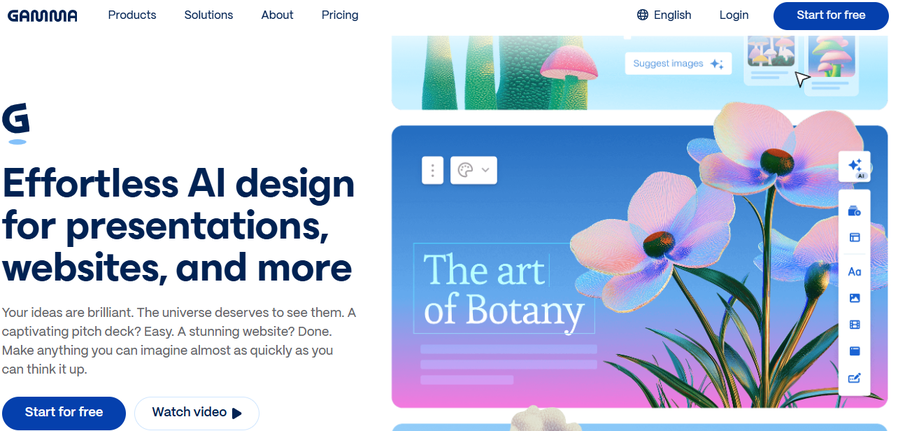
Gamma is your AI-powered design partner that lets you create presentations, websites, social media posts, and much more. Focus on what matters most, Gamma takes care of the rest.
Save big with 850+ deals 💶
Explore all deals
Illustration of Gamma on Freelance Stack's deal page
2 deals available
Free Deal
Premium Deal #1

24% off on annual plan

All our deals are negotiated by our team to give you the best discount and are updated regularly.
This deal requires you to create a new account to benefit from the discount. It is reserved for new customers

Additional 30% off on annual plan

All our deals are negotiated by our team to give you the best discount and are updated regularly.
This deal requires you to create a new account to benefit from the discount. It is reserved for new customers
Save Money !
Logo Freelance Stack blanc
Freelance Stack 
Premium
Access our 850+ exclusive promo code for $55/year.
and over 850 other deals.
and +850...
general information
ALTERNATIVES
YOU MAY ALSO LIKE...

📅 April 2026 -

 Our promo code verified with the software 

Gamma

Benefit from additional 30% off on annual plan on Gamma.

Save an additional 30% off on annual plan on Gamma thanks to our exclusive partnership.

Freelance Stack is the first deals platform to access best discounts, coupon codes and credits on 650+ software, SaaS and online services for entrepreneurs and startups. We offer exclusive and validated discounts that we negotiate directly with partners to help you to grow and save money. Our coupon codes enable thousands of entrepreneurs, startups, freelancers and consultants to save thousands of euros on the best software.

Don't wait any longer and save an additional 30% off on annual plan on Gamma.

📄 Information about 

Gamma

Gamma is an AI-powered solution that quickly transforms ideas into compelling visual content, such as presentations, documents, websites, or social media posts, without requiring any design or coding skills. By automatically generating layouts, themes, and content from simple text or outlines, Gamma helps users save time and create professional materials in minutes.

The platform includes advanced smart editing features, customizable templates, sharing and export options (PDF, PowerPoint, Google Slides, web formats), as well as API integration to automate content generation in your existing workflows. Gamma is ideal for entrepreneurs, marketing teams, educators, and content creators who want to produce clear, engaging, and visually appealing materials without manual effort.

Bring your ideas to life.

  • Presentations: Impactful slides that reflect your visual identity, in just a few minutes. Convert to PowerPoint, Google Slides, and many other formats.
  • Documents: Captivating proposals, visuals, PDFs, and much more, in an instant, whatever the subject.
  • Social media: Eye-catching visuals and engaging text, ready to be shared on social media.
  • Websites: Your company websites, homepages, portfolios, and much more. And all of this is ready in the blink of an eye, without a single line of code.
  • API: Connect to Gamma programmatically to automate creation, integrate your tools, and develop your storytelling.

Creative content in a flash.

  • Generate: Say goodbye to writer's block. Bring your ideas to life in an instant.
    • Start by pasting a plan, importing existing content, or simply starting from an idea.
    • Over 20 AI models for exceptional quality results.
    • Import your visual identity or choose from over 100 themes.
  • Form: Edit with AI, in just one click.
    • Easily insert optimized layouts, structured and translated content.
    • Generate images and enhance them with AI.
    • Collaborate with your team in real time.
  • Share: Content ready to share, wherever you want.
    • Export to PPT, PDF, PNG, or Google Slides format.
    • Publish your content as a website or social media post, or share it using a link.
    • Monitor engagement indicators.

📋 Gamma features:

In this section, you will find our opinion the main features of Gamma. All of these features are subject to regular updates. We recommend that you check that they are available before purchasing any software.

Gamma streamlines presentation creation by leveraginggenerative artificial intelligence to turn your ideas into professional visuals. This web-based platform stands out for its ability to automatically generate structured content, cohesive visuals, and harmonious layouts based on a simple textual description of your project.

The tool is specifically designed for professionals who want to save a significant amount of time on graphic design while maintaining high-quality results. Unlike traditional solutions that require design skills, Gamma allows you to create presentations, web documents, and landing pages without any prior technical expertise. Its generative AI-based approach analyzes your content and automatically suggests optimized narrative structures and consistent aesthetic choices.

Gamma's strength lies in its ability to understand the context of your presentation, enabling it to suggest not only appropriate formatting but also relevant supplementary content. This contextual intelligence clearly sets the platform apart from traditional presentation tools, which merely format existing content.

  • Automatic content generation: Gamma analyzes your initial brief and automatically generates structured text, compelling headlines, and logical subsections. The AI suggests a variety of angles and enriches your content with contextually relevant information, helping you avoid writer’s block.
  • AI-Generated Visuals: The platform generates images, graphics, and illustrations tailored to your theme without relying on an external image library. These visuals are created specifically for your presentation and maintain a consistent aesthetic throughout the document.
  • Adaptive Smart Templates: The templates provided dynamically adjust based on the presentation type detected by AI. Whether you’re preparing a sales pitch, an internal training session, or an analytical report, Gamma automatically adapts the structure, colors, and typography to match your industry’s standards.
  • Responsive layout: Your designs automatically adapt to all screen sizes without any manual intervention. This feature ensures optimal display whether your presentation is viewed on a computer, tablet, or smartphone, with smart adjustments to the content based on screen size.
  • Real-time collaboration: Multiple users can work on the same project simultaneously, using a built-in commenting system and a revision history. This feature facilitates collaborative reviews and allows you to track the project’s progress step by step.
  • Multi-format export: Gamma offers several export options, including high-resolution PDFs, interactive web pages, and direct sharing links. Each format preserves the visual quality and interactivity of your original presentation, giving you maximum flexibility for distribution.
  • Dynamic data integration: The platform allows you to embed charts that are automatically updated from external sources such as Google Sheets or third-party APIs. This feature is particularly useful for recurring reports and performance dashboards.
  • Customizing the visual identity: Although the AI handles the automatic creation process, you retain full control over the visual identity by defining your brand colors, specific fonts, and recurring graphic elements. Gamma then applies these settings consistently across all your designs.

This hybrid approach, combining intelligent automation with user control, makes Gamma an ideal tool for teams looking to quickly elevate their visual communication without investing in dedicated design resources.

📊 Gamma Pros and Cons:

This section provides a summary of the advantages and limitations of using Gamma on a daily basis. We are not paid or influenced by brands, and this content is solely our own. These features, their advantages and disadvantages are likely to change regularly, both positively and negatively. If you have complex needs, we invite you to contact the software publisher directly for more information about your requirements. 

👍 Pros with Gamma:

  • Intuitive and user-friendly interface: Gamma revolutionizes presentation creation by offering a conversational approach where you simply describe what you want to create. The tool automatically generates coherent and visually appealing slideshows, even for users without design skills. This ease of use allows you to focus on the content rather than the technical aspects of formatting, significantly reducing creation time while maintaining a high professional standard.
  • Automatic generation of structured content: Gamma’s artificial intelligence analyzes your needs and produces complete presentations with a logical structure, smooth transitions, and optimal visual balance. The system automatically provides content suggestions, relevant headings, and coherent outlines tailored to your industry. This feature is particularly valuable for entrepreneurs and consultants who regularly need to create pitch decks, client reports, or sales presentations without dedicated design resources.
  • Native multi-format adaptation: Unlike traditional tools, Gamma natively designs content that adapts seamlessly to various delivery platforms. Your presentations display optimally on computers, tablets, and smartphones, while maintaining their visual impact and readability. This technical flexibility allows you to effectively share your creations during in-person meetings, webinars, or mobile consultations, ensuring a consistent user experience regardless of the presentation context.
  • Instant, cohesive visual themes: The platform offers smart themes that apply a professional aesthetic to your entire presentation with a single click. Rather than choosing each font individually, you select a visual style that adapts to your content. This saves valuable time, allowing you to achieve a clean, modern look effortlessly—even if it means staying within the design guidelines set by the tool to ensure overall visual harmony.
  • Simplified sharing and review: Gamma facilitates teamwork with quick sharing and commenting features directly on content blocks. Instead of exchanging large files via email, you send a single link where your colleagues or clients can provide feedback in real time. This centralized approach is ideal for gathering quick approvals and making adjustments without creating multiple copies of the same document, which greatly streamlines the final phase of project completion.
  • Native media and data integration: The tool automatically handles the import and integration of various types of multimedia content, from images and videos to charts and data tables. Gamma automatically optimizes media quality and file size to ensure smooth playback, while offering layout suggestions that showcase these elements. This seamless integration capability allows you to create rich and engaging presentations without needing to master the technical intricacies of web optimization or image compression.

👎 Cons with Gamma:

  • Limited template customization: Although Gamma offers attractive designs, the customization options remain fairly limited compared to tools like Canva or Adobe Creative Suite. You cannot significantly alter the structure of the provided layouts or create your own templates from scratch. This limitation can be frustrating for users who want to create a very specific visual identity or who have unique branding needs. While color and font options are available, they remain within a predefined framework that may not suit all professional projects.
  • Basic collaboration features: Gamma’s real-time collaboration options are functional but fall short of specialized tools like Figma or even Google Slides for teamwork. Comments and suggestions aren’t as intuitive, and version control can become complicated on projects involving multiple contributors. This limitation is particularly noticeable for agencies or marketing teams that require sophisticated collaborative workflows with complex approval cycles.
  • Reliance on Artificial Intelligence: Paradoxically, Gamma’s main strength can also become a limitation. The tool automatically generates content and designs, which can sometimes produce generic results or ones that are ill-suited to the specific context of your project. You often have to spend time correcting and adjusting the AI’s suggestions, which can be counterproductive. For technical or highly specialized presentations, AI assistance may lack relevance and require significant rework.
  • Limited export and integration options: Gamma does not offer as many export formats as its established competitors. Integration with other office suite tools remains limited, which can pose problems in professional environments where interoperability is crucial. PDF export options can sometimes alter the original layout, and the lack of certain professional formats may constrain your workflow. This limitation is particularly problematic for consultants or salespeople who regularly need to share their presentations in specific formats.
  • A paradigm shift from traditional software: Switching from PowerPoint to Gamma requires letting go of total control over the layout. The logic of block-based and AI-driven creation is very different from manipulating objects on a blank slide. For users accustomed to adjusting every detail down to the pixel, this shift in approach may take a few hours to adjust to before they can regain optimal productivity and accept letting the algorithm handle part of the design.

💰 Gamma pricing:

All prices listed are taken from the Gamma software website. However, these prices are subject to change regularly. We recommend that you check them directly on each software's website to be sure. 

Gamma offers a simple pricing structure with three plans tailored to users' different needs. The platform provides free access to explore its basic features, as well as paid options to unlock advanced capabilities.

Our pricing plans are designed to adapt to your evolving needs, from creating occasional presentations to intensive professional use with extensive collaborative features.


Plan Rates Included
Free Free Unlimited designs, basic templates, PDF export, Gamma watermark
More $10/month 400 AI credits per month, no watermark, basic analytics, advanced export
Pro $20/month 800 AI credits per month, team collaboration, advanced analytics, custom domain

💬 Frequently asked questions about Gamma's promo:

In this section, you will find all the main questions you may have about accessing this discount. We wanted to provide you with as much information as possible to help you save as much as possible on your software subscriptions. 

1️⃣ How to access to the deal with Gamma?

This promo code allows you to save money and enjoy premium features on Gamma paid plans and subscriptions. Check the eligibility criteria on this page to see if you can benefit from this discount. Don't miss out on the opportunity to pay less for your subscription to one of the best tools on the market.

2️⃣ Why Freelance Stack can help you to access to Gamma discount?

As a partner of Gamma, you can easily save on your subscription to this software. Without us or another affiliate partner, you will have difficulties to activate the discount. We are the largest discount promo code platform for software and SaaS in the world.

3️⃣ How to use Gamma deal?

To use the discount with Gamma, you need to click on the various buttons that may be available on the right side of the deal page and follow the instructions to unlock this promotion.

4️⃣ What are Gamma's promo requirements?

We specify all the terms and conditions on each deal page. You must click on the various buttons on the deal page to view all the terms and conditions. This deal requires you to create a new account to benefit from the discount. It is reserved for new customers of Gamma.

🔄 Alternatives to Gamma software:

Find the right software with our suggestions for alternative solutions.

When growing a business, comparing the right tools is essential. With thousands of options available, these solutions are strong alternatives to Gamma 
Indeed, Gamma is a solution that can adapt according to your needs:

1️⃣ If you are a freelancer or consultant:

Canva remains your most accessible tool for quickly creating visually appealing presentations without any special technical skills. Its intuitive interface and thousands of templates let you produce professional content in just a few minutes—perfect when you need to deliver pitch decks under pressure. Beautiful.AI is an excellent middle-ground alternative, featuring artificial intelligence that automatically optimizes your slides during you type. This solution is particularly well-suited if you value design but lack the time to fine-tune every detail. For a more creative approach, Prezi lets you break away from the traditional format with its non-linear presentations and dynamic zoom effects—ideal for making a lasting impression during important sales presentations.

2️⃣ If you are a startup:

Pitch positions itself as a native collaborative solution, designed specifically for teams that need to iterate quickly on their presentations. Its strength lies in real-time collaboration and its templates optimized for investment pitch decks. Tome leverages generative artificial intelligence to create complete presentations from simple text prompts—a revolutionary approach that can save you hours of work when preparing for fundraising rounds. Figma, with its presentation plugins, offers a powerful alternative if your team is already proficient with this design tool, ensuring perfect consistency between your product mockups and your communication materials. This solution is particularly well-suited for tech startups that need to integrate interactive prototypes into their presentations.

3️⃣ If you are a small business or an SME:

PowerPoint remains must-have the Microsoft 365 ecosystem, offering seamless compatibility with your existing Word documents and Excel spreadsheets. Its robustness and advanced collaboration features meet the needs of structured teams working on complex presentations. Google Slides is a cloud-native alternative particularly well-suited for organizations that prioritize accessibility and remote work, with simplified sharing and real-time commenting. For companies looking to standardize their visual communication, Slidebean offers a unique approach by separating content from design, ensuring perfect visual consistency even when multiple contributors work on presentations. This solution automates formatting according to your guidelines, freeing your teams to focus on the message rather than the appearance.

Otherwise, these other software programs may also be a good alternative to Gamma

🆕 Our new Premium deals:

We offer discounts on 650+ different software. We regularly add new discounts on the best software for freelancers, consultants and entrepreneurs.

Discover these new software in addition to the deal we offer with Gamma.

👤 Our members have just used these other deals:

We offer on 850+ different software. That's both a lot and a little compared to all the software that exists and that could help you in your business as entrepreneur or business owner.

Discover new software and discounts to complement the deal we offer on Gamma