






Our selection of AI tools for content creators in 2026.
We reviewed the most robust solutions on the market in 2026, focusing on those that…
Read more

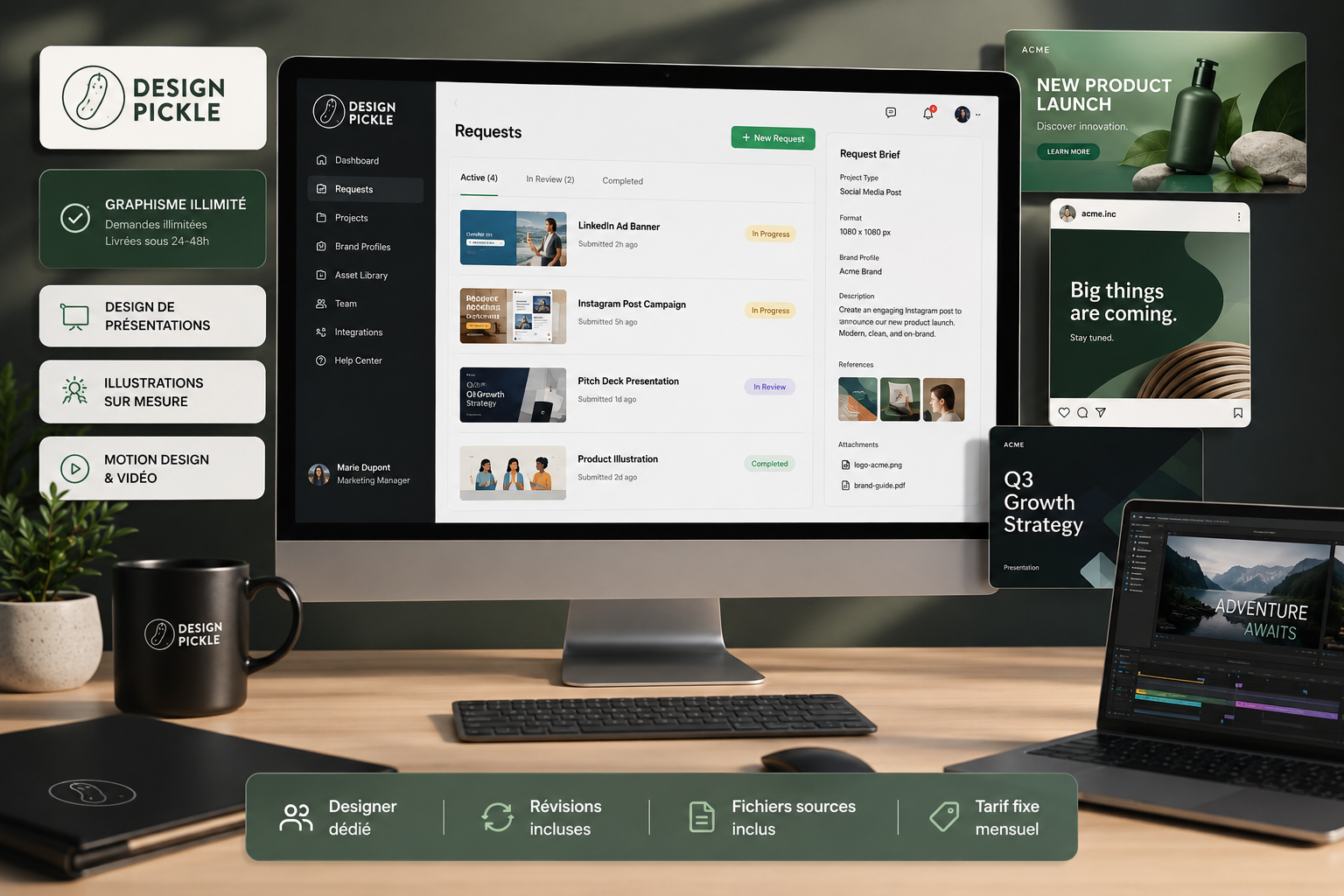
Design Pickle is an on-demand graphic design platform that operates on a monthly subscription basis. Here’s how it works: you pay a flat fee, submit as many design requests as you like, and a team of professional designers delivers your designs directly to a dedicated interface, usually within 24 hours.
Founded in 2015 in Scottsdale, Arizona, by Russ Perry, the platform has established itself as one of the leading providers of unlimited subscription-based design services. Today, it covers a wide range of services, from traditional marketing graphics to motion design, as well as custom illustration and video editing.
This guide will help you understand how the service works, who it's really for, how much it costs, and, most importantly, whether it's worth it for your business.
Design Pickle's value proposition appeals to very specific types of clients. If you manage a small marketing team without an in-house designer, or if you're entrepreneur regular needs for visuals, the fixed-subscription model makes sense. No need to negotiate a quote for every new request, and no surprises at the end of the month.
On the other hand, if you have one-time needs (a logo, a brand guide once a year), the monthly subscription probably won't be worth the cost. Design Pickle really pays off when you use it regularly and in large volumes.

This question comes up often. And it deserves an honest answer, not a sales pitch.
Working with a freelance graphic designer can be great, but it involves finding the right person, briefing them properly, and managing their availability and back-and-forth communication. For recurring needs, this is time-consuming. An agency, on the other hand, offers more structure but at rates that generally exceed the budget of a very small business or a freelancer.
✅ Short, predictable turnaround times, with a first draft delivered on average within 24 hours for standard graphic designs.
✅ An unlimited number of concurrent requests.
✅ A fixed monthly rate, with no unpleasant surprises.
✅ Source files provided (Adobe, Canva, Figma, depending on the plan).
✅ Revisions included, with no limit.
Compared to ManyPixels or Penji, Design Pickle is positioned in the mid-to-high end of the market. It’s more expensive than entry-level alternatives, but it has an established reputation, a more polished platform, and more experienced designers, according to the vast majority of user feedback.
Design Pickle revised its pricing model in 2025. Since June of this year, the structure has been shifting toward a modular system: a base platform to which users can add “creative hours” based on their daily needs.
| Plan | Monthly price | What's included |
|---|---|---|
| Graphics | ~$949/month | Standard marketing graphics, illustrations, unlimited requests, turnaround time: 24–48 hours |
| Graphics Pro | ~$1,349/month | The entire Graphics + Presentation Design plan, Zapier integration, Slack access, and dedicated designers |
| Premium Graphics | ~$2,049/month | The entire Pro plan + motion graphics, video editing, premium support, and a dedicated CSM |
With the new 2025 plan, you first choose between a Base or Pro platform subscription (access to the asset library, AI tools, and request history), then add creative hours starting at 2 hours per business day. This approach offers more flexibility to adjust the volume during peak periods.
Please note: Design Pickle offers a 14-day money-back guarantee on quarterly and annual subscriptions, with a full refund if requested within that time frame.
Onboarding is one of the strengths that users regularly mention. As soon as you sign up, you’ll be offered a call with a Customer Success Manager to set up your account and configure your brand profile.
📋 The application form:
You describe your project, upload your assets (logo, colors, reference images), and specify the desired formats. An AI assistant can help you write more precise briefs, which significantly improves the quality of the initial renderings.
🔍 Project tracking:
Every request is tracked. You can view the progress in real time, prioritize certain projects, and leave comments directly on the deliverables using an annotation feature.
📁 The asset library:
Your source files are stored and organized by project. This is handy when you need to find a previous version or reuse elements.
The interface is accessible via a web browser, with no installation required. Slack integration is available starting with the Pro plan, making it easy to communicate directly with your design team.
Design Pickle has established itself as the go-to "production hub" for businesses that need a steady stream of creative work without the hassles of traditional hiring or the unpredictable rates of freelancers.
This is the heart of the platform. Advertising banners, social media graphics, flyers, brochures, infographics, print materials, illustrations for your blog posts... The platform covers more than 50 Categories creative work. The estimated turnaround time is 24 to 48 hours for the vast majority of standard graphic design requests.
Design Pickle has in-house illustrators who can create original visuals: characters, stylized icons, brand mascots, and cohesive visual styles. This service is included in the higher-tier plans and is also available as a standalone subscription.
Available starting with the Graphics Pro plan. Your PowerPoint or Google Slides presentations are redesigned by specialists. Useful for investor pitches, client presentations, or training sessions. The turnaround time is a bit longer (48 to 72 hours) due to the complexity of the work.
Available with the Premium plan. Design Pickle supports short-form animations (animated GIFs, explainer videos, video ads) and video editing. This is a less common offering in the design subscription space, and it’s one of the features that sets the platform apart from its direct competitors.
The team can create Canva templates that are fully customized to your brand guidelines, which your teams can then use without having to go through a designer every time. For franchises, agencies, or brands with multiple employees, this is a particularly useful feature.
Design Pickle acts as an extension of your team, transforming design from a "bottleneck" into a smooth and consistent workflow.
You regularly create presentations for your clients, illustrated reports, and LinkedIn posts. Instead of spending hours dabbling in design on Canva, you outsource everything to Design Pickle using quick briefs. The result: more polished client deliverables, and more time for you to focus on what you do best.
You don't have an in-house designer yet, but you need to post content on social media, prepare a pitch deck, and create visuals for your customer acquisition campaigns. Design Pickle gives you professional-quality design at a predictable cost, without the hassle of hiring.
Your two-person team is swamped with requests for visuals from various teams. Design Pickle handles day-to-day production, allowing you to focus on strategy and coordination rather than creative execution.
You’re experiencing a surge in workload across multiple clients at the same time. Rather than hiring freelancers on the fly—with all the uncertainties that entails—you outsource projects to Design Pickle with detailed briefs. The platform’s consistency helps avoid unpleasant surprises.
Design Pickle's ecosystem in 2026 is designed so that design is no longer a disruption to your day, but rather an automated data stream that integrates directly into your management tools.
Slack (Pro plan and up): You can communicate directly with your designers, receive delivery notifications, and provide feedback without leaving your usual workspace.
Zapier (Pro plan and above): Automate workflows between Design Pickle and your other tools. For example, automatically trigger a new design request based on an event in your CRM or project management tool.
Make: For more advanced automations, you can connect Design Pickle to your entire tech stack via Make (formerly Integromat).
Deliverables are provided in formats compatible with Adobe Photoshop, Adobe Illustrator, Canva, and Figma, depending on your plan. Source files are always included, which means you retain full control over everything that is produced.
Design Pickle is far from perfect. And it's important to make that clear so you can make an informed decision.
Starting at approximately $949/month for the basic plan, you need to have a sufficient volume of requests to justify the investment. If you only need two or three visuals per month, the cost-effectiveness is highly questionable.
Several users on G2 and Trustpilot have reported that when a campaign is divided among different designers, the final designs may lack consistency. Having a lead designer assigned to your account helps mitigate this issue, but does not eliminate it entirely.
Design Pickle isn't a creative agency in the traditional sense: the designers carry out your briefs; they don't come up with them. If you provide vague directions, the initial drafts will reflect that. The quality of the final product is directly proportional to the quality of the brief.
For the basic plans, some users report turnaround times that exceed the promised 24 hours, particularly during periods of high demand or on more complex projects. The plan with more daily hours reserves more capacity, but at a higher cost.
After the 14-day satisfaction guarantee period (available only for quarterly and annual subscriptions), the service does not refund unused periods.
Who Design Pickle is probably not a good fit for: solopreneurs with occasional, minimal design needs; those who require strong, proactive creative direction; or those with budgets under $1,000 per month.
The design market in 2026 is vast: with generative AI, self-publishing tools, and subscription services all available, it’s crucial to choose the tool that best suits your workload and skill set.
If Design Pickle doesn't quite meet your needs, here are the top alternatives:
Canva: If you want to maintain control over your designs with an intuitive interface and high-quality templates. It’s less powerful for custom designs, but very affordable and perfect for simple or moderately complex needs. We have a discount on Freelance Stack.
Piktochart: focused on infographics, visual reports, and presentations. If your main goal is to present data in a visually accessible way, this is a more targeted and less expensive option.
Figma: Best suited for in-house product teams and designers who need a tool for collaborating on UI/UX. It’s not strictly a creative production service, but it’s must-have your design work involves digital media.
ManyPixels: a more affordable alternative to Design Pickle, with a similar approach. According to most entrepreneurs comparisons, the quality is a notch below, but the price-to-volume ratio may appeal to those on tighter budgets.
Penji: Similar to Design Pickle, but with a stronger focus on freelance work. The advantage is the low entry price; the downside is less consistency from one project to the next.
This FAQ addresses any remaining operational questions. In 2026, Design Pickle remains the leader in "Design-as-a-Service" thanks to its ability to scale creativity without compromising its clients' intellectual property.
There isn't a free trial per se, but Design Pickle offers access to its platform (without creative output) so you can familiarize yourself with the interface. To access the deliverables, you'll need to sign up for a paid plan. A 14-day money-back guarantee is available for quarterly and annual plans.
For standard graphic design projects, the turnaround time for an initial draft is typically 24 hours. Presentations and motion design take 48 to 72 hours. Complex projects or high-volume requests may take longer, but the team will provide you with an estimate as soon as the project scope is defined.
Yes, without restriction. Everything produced by Design Pickle is 100% yours, with full commercial usage rights. Source files are included with every project.
Technically, yes, the platform supports this type of request. That said, creating a brand’s visual identity is a process that requires a level of creative direction and iteration that the on-demand model doesn’t always facilitate. For a project like this, plan for several rounds of back-and-forth and a very detailed brief.
There is no limit to the number of requests, but designers work on a first-come, first-served basis. You can submit as many projects as you like and reorder them based on urgency. However, the production speed depends on the number of design hours allocated in your plan.
The platform allows you to add multiple users and multiple brand profiles to a single account. The Pro and Premium plans include collaboration features that make it easier for teams to coordinate. The Power plan is specifically designed for businesses with high-volume needs.
For monthly subscriptions, yes. You retain access until the end of the paid period. For quarterly and annual plans, cancellation stops automatic renewal, but the remaining months are not refunded after the 14-day satisfaction period.
Not natively, but using Zapier or Make, you can set up automations between Design Pickle and tools like Notion or Asana to centralize the management of your creative projects.
Design Pickle is a solid solution for teams and entrepreneurs with recurring design needs who want to avoid the hassle of managing a freelancer or the cost of an agency. The platform is well-established, the onboarding process is thorough, and the quality of the work is generally high when briefs are well-crafted.
The pricing is steep, and that’s probably the natural filter that separates the good candidates from the bad. If you publish content regularly, have campaigns to fuel, sell services, and care about your brand image, Design Pickle can quickly pay for itself.
If, on the other hand, your need is one-time, or if you're primarily looking to save money on small volumes, alternatives like Canva or Piktochart will do the job at a lower cost.
