






Multichannel prospecting: solutions that combine LinkedIn, email, and SMS
What exactly is multichannel prospecting? during , sales prospecting relied on a single channel: the telephone,…
Read more


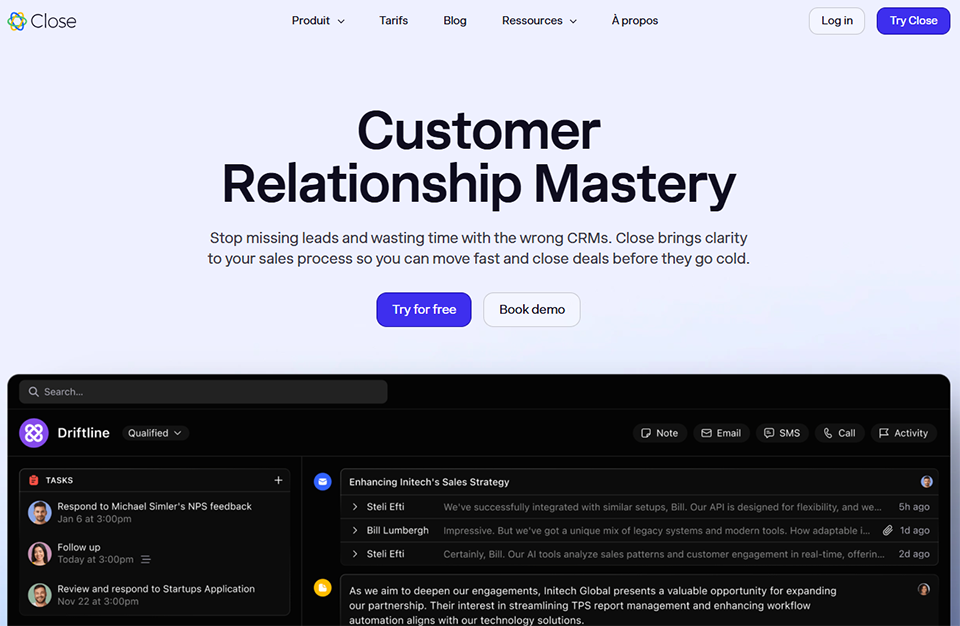
Close is a CRM (Customer Relationship Management) platform founded in 2013 by Steli Efti and his team, based on a clear initial conviction: existing sales tools were causing sales teams to waste too much time. Too many clicks, too many open tabs, and too little time spent actually selling.
The software is based on a simple yet effective principle: centralizing calls, emails, and text messages in a single interface, without having to switch between multiple apps. Whereas a traditional CRM requires you to integrate a separate phone app, email client, and tracking tool, Close offers all of this natively.
Who is it for? Startups, small and medium-sized businesses, and growing sales teams that handle a high volume of leads and want to move quickly. If you manage a sales team of 1 to 50 people and your day-to-day routine revolves around cold calls, follow-ups, and email campaigns, Close is clearly designed with you in mind.
In this guide, you'll find everything you need to know to decide if Close is the right tool for you, how to get started and make the most of it, as well as a few tips that advanced users apply every day.
On average, a salesperson spends between 20% and 30% of their time switching between different tools: their CRM, email client, phone system, and notes. This friction adds up over a week, over a month.
Close tackles this problem head-on. Rather than offering you yet another dashboard filled with contacts and opportunities, the software puts communication at the heart of the experience. When you call a prospect from the lead record, the call is automatically logged in the history, and the transcript appears moments later. When you send an email from the interface, it syncs in real time.
| Criterion | Close | HubSpot | Pipedrive | Salesforce |
|---|---|---|---|---|
| Free map | ✗ | ✓ (limited) | ✗ | ✗ |
| Built-in native calling | ✓ | ✗ (add-on) | ✗ | ✗ |
| Native SMS | ✓ | ✗ | ✗ | ✗ |
| Email sequences | ✓ | ✓ | ✓ | ✓ |
| Ideal for | SMEs / Inside sales | Marketing + sales | Mid-market sales | Enterprise |
| Starting price | 9 $/user/month | Free, then $20 | 12 $/user/month | 25 $/user/month |
HubSpot, Pipedrive, and Salesforce are listed on Freelance Stack if you'd like to compare the available options.
What really sets Close apart is that it doesn't try to be a one-size-fits-all tool. That's its strength. If your business relies on short sales cycles with a lot of direct interactions, it's hard to find a better option on the market in this price range.
A freelance sales professional who manages their own leads will find the Solo plan to be a solid foundation without overpaying. A startup with 5 to 15 employees and an active sales team will appreciate the automation features and Power Dialer starting with the Growth plan. An SME with 20 to 50 employees that wants to oversee its teams and analyze their performance can upgrade to the Scale plan.
Close offers four subscription tiers, billable annually (with a discount of about 35%) or monthly.
| Plan | Monthly price | Annual Award | For whom |
|---|---|---|---|
| Solo | 19 $/user/month | 9 $/user/month | Freelancers, solo founders |
| Essentials | 49 $/user/month | 35 $/user/month | Small teams (2–10 people) |
| Growth | 109 $/user/month | 99 $/user/month | Growing Teams |
| Scale | 149 $/user/month | 139 $/user/month | More Structured Organizations |
A free 14-day trial is available on all plans; no credit card is required.
Please note: Certain advanced phone features (premium numbers with call routing, AI assistant for call transcriptions and analysis) are available as paid add-ons, regardless of the plan you have subscribed to.
Close's onboarding process is one of the fastest in the CRM market. From the moment you log in for the first time, a wizard guides you through:
The email connection works both ways: any email sent from your regular inbox will automatically appear in the corresponding lead's record. The history import feature also retrieves past correspondence without requiring manual intervention.
The main screen is organized around three elements:
The unified inbox: brings together all your emails, missed calls, text messages, and voicemails. It's your starting point every morning.
The Leads view is the heart of the CRM: each lead is a company or contact with a complete history of interactions, notes, tasks, and associated opportunities.
The Pipeline: Provides a classic Kanban view to track the progress of your deals and drag them from one stage to the next.
Beyond the marketing hype, here's what you actually use every day when you work with Close.
This is the feature that most sets Close apart from its direct competitors. You can call any lead directly from their profile without leaving the interface. The call is automatically recorded, a transcript is generated (for eligible plans), and an AI-generated summary can be created in just a few seconds.
Teams also have access to advanced features: automated voicemail (to leave a pre-recorded message with a single click when calls go unanswered), power dialing, and—on higher-tier plans—predictive dialing for high-volume teams.
Starting with the Essentials plan, you can create multi-step email sequences that trigger automatically based on rules you define. For example: if a prospect hasn't responded to your first email within 3 days, a follow-up email is sent automatically, with a different subject line.
The sequences stop as soon as a response is detected, preventing unwanted follow-ups. You can customize each message with dynamic variables (first name, company, industry).
Close lets you create multiple pipelines (depending on your plan) with custom stages that match your actual sales process. Each opportunity within a lead has its own tracking for amount, probability, and stage.
Dynamic lists are particularly useful: you can create filtered views that update in real time. For example, “All leads contacted more than 7 days ago with no response” or “Leads in my pipeline with a value greater than €5,000.”
Close's dashboards provide a real-time view of the team's sales activity: number of calls made, emails sent, response rates, average call duration, and opportunity progress.
In the Growth and Scale plans, reports become more granular, with the ability to segment by user, pipeline, time period, or lead source.
Close has integrated several AI features over the past two years. The AI Email Assistant helps you draft or rephrase emails directly from the lead record. The AI lead summary automatically generates an overview of the latest interactions, so you can get back up to speed on a prospect’s context in a few seconds.
Here are a few real-life scenarios to help you understand the context in which Close really comes into its own.
With the Solo plan, a freelancer can centralize all their business communications in one place. No more emails scattered across Gmail, notes in Notion, and lead tracking in Google Sheets. Close becomes the one-stop dashboard for their business.
Typical workflow: Create a lead for each prospect, store all email correspondence there (automatic synchronization), log calls with a brief summary, and schedule follow-up tasks with reminders.
This is the use case Close was literally built for. The team shares a common pipeline, each sales rep has their assigned leads, and the manager can track activity in real time from the dashboard.
Automated email sequences make it possible to scale outbound prospecting without sacrificing personalization. A sales representative can manage 3 to 5 parallel sequences without losing track of them.
For a company with 15 to 50 employees that doesn't need the full Salesforce ecosystem, Close is often cited as a viable alternative. It's easier to get started with, the interface is less intimidating, and the cost is significantly lower.
Close isn't just a lead generation tool. Its pipeline and automated task features also help structure post-sale follow-ups: customer onboarding, 30/60/90-day follow-ups, and planned upsells.
During this critical phase, Close offers unbeatable value for money on the Solo plan. The entire prospecting history is already in place when the time comes to hire a first salesperson.
Instead of manually reviewing your pipeline, create dynamic lists organized by topic:
These lists become your morning sales agenda.
If you have high-volume prospecting lists, set up a Power Dialer session with a list of pre-filtered leads. Close automatically places calls one after another, lets you leave pre-recorded voicemails with a single click, and significantly increases your contact rate.
Build a library of templates for each step in your sequence. Dynamic variables {{lead.name}}, {{contact.first_name}} or {{opportunity.value}} allow for quick and effortless customization.
Integrate Close with Google Calendar or Microsoft 365 natively: each meeting appears directly on the relevant lead's profile. If you use Calendly, synchronization is also possible via Zapier to automatically create a lead in Close when an appointment is scheduled.
Close offers a comprehensive and well-documented REST API. If you manage custom workflows, you can automate lead generation from your website, trigger sequences based on external events, or synchronize your data with your data warehouse.
Close integrates natively with several popular tools.
Automation and No-Code: Through Zapier, Close connects to more than 8,000 apps.
AI and advanced automation: Close now offers native integrations with ChatGPT and Claude (Anthropic) to automate tasks and enrich leads directly from the interface.
Whether you use Brevo for your marketing emails, Apollo.io for data enrichment, or Lemlist for your outbound sequences, all of these tools can connect to Close via Zapier or Make to create a comprehensive sales workflow.
⚠️ No free plan. Unlike HubSpot or some alternatives, Close does not offer a freemium version. The entry-level plan at $9/month is still affordable, but it’s a barrier for those on very tight budgets.
⚠️ Not well-suited for marketing teams. Close is a sales tool, not a marketing tool. If you're looking to manage large-scale email marketing campaigns, landing pages, or automated lead nurturing, you'll need a complementary tool like Brevo.
⚠️ Limited customization compared to Salesforce. Teams that need highly customized CRM objects, complex validation rules, or a bespoke data architecture will quickly reach Close's limits.
⚠️ Call recording retention. On lower-tier plans, call recordings are retained for only 30 days. For teams that need long-term archives for training or compliance purposes, this can be a problem.
⚠️ Customer support. Several users have mentioned the lack of direct phone support. Support is provided via email and chat, with response times that can be frustrating when there’s an urgent issue.
You’re just starting out on a tight budget: HubSpot CRM (free version) is a good place to start.
You need a more flexible CRM for a mid-market team: Pipedrive offers more customization on pipelines and reports.
You’re a large organization with complex needs: Salesforce remains the benchmark for organizations that need a comprehensive, customizable CRM architecture.
You’re mainly looking for a sales emailing tool: Lemlist is a powerful alternative for outbound sequences.
Here are the questions people ask most often before adopting Close. The answers are here.
Yes, the Solo plan was designed for that purpose. At $9/month when billed annually, it offers all the basic tools: contact management, synchronized email, integrated calls and text messages, and a sales pipeline. It’s a solid foundation for organizing your lead generation efforts without a significant investment.
Yes, 14 days without a credit card, with full access to all the features of the Startup plan. That's enough time to test email sequences, integrated calls, and pipeline management under real-world conditions.
The interface is primarily in English. There is no native French version of the app, which may be a drawback for some users.
Yes, Close offers free migration from other CRMs, as well as CSV import. Your email history can also be imported automatically if your email account is connected.
Close offers GDPR compliance features, including data encryption, role and permission management, and options for exporting and deleting data.
The Power Dialer (Growth plan) chains calls manually: you launch the next call when you’re ready. Predictive dialing (Scale plan) anticipates your availability and automatically dials the next number before you’ve even hung up, maximizing your time on the line.
For direct outreach campaigns, yes. For mass marketing campaigns or large-scale automated lead nurturing, Close isn't designed for that. The two types of tools are often complementary.
Phone calls are billed by the minute, depending on the country. Premium numbers (with call routing and IVR menus) are a paid add-on. The AI call assistant is also available as an optional feature.
Yes, through the API and webhooks, which are available on all plans. You can create Make scenarios that trigger actions in Close or send data to other tools in your stack.
Support is available via email and chat through the interface. Scale plans include priority access with a dedicated account manager.
Close isn’t a general-purpose CRM. It’s a sales tool built for teams that live in their inbox and on the phone. Its main strength, the complete centralization of communication channels, makes it an essential benchmark for inside sales teams and startups in their commercial growth phase.
If your day-to-day looks like this—lots of prospects to contact, follow-ups you can’t afford to miss, sequences to run, and a team to coordinate—then Close is definitely worth a serious try.
In summary:
✅ Ideal for outbound-focused sales teams
✅ Quick onboarding, intuitive interface
✅ Fully integrated calls, text messages, and emails (not add-ons)
⚠️ No free plan—be mindful of your budget with the higher-tier plans
⚠️ Less suitable if you need a highly customizable CRM
