






AutoCAD or AutoCAD LT: Which version should you choose to get started?
AutoCAD and AutoCAD LT look almost identical, but they’re not intended for the same users. In this guide, we…
Read more

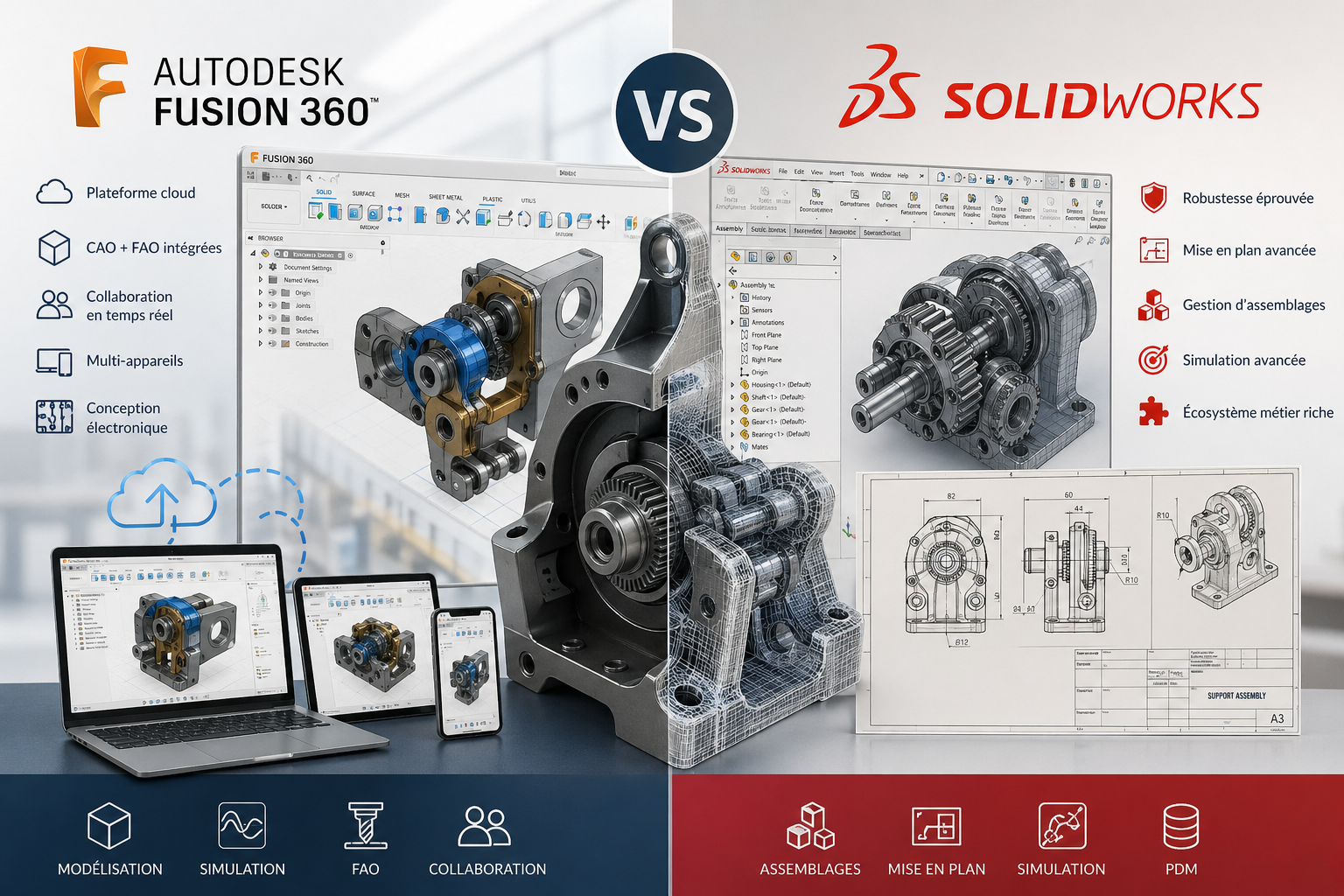
In the world of computer-aided design, two names consistently come up: Autodesk and SolidWorks. These two software suites have dominated the CAD (computer-aided design) market for decades, and yet choosing one over the other is no trivial matter.
If you’re an engineer, industrial designer, architect, or the manager of an SME that designs mechanical parts, you’ve surely come across these two solutions. And you’ve probably wondered which one best suits your needs, your team, and your budget.
The short answer? It really depends on your business. The long answer is in this article.
We're going to break down what really sets Autodesk (and its ecosystem) apart from SolidWorks, beyond the marketing hype. Features, learning curve, pricing, integrations, real-world use cases: here's an honest comparison to help you make a decision.
Autodesk isn't just software—it's a whole world. Founded in 1982, the American company now offers about 20 distinct solutions, each designed for a specific industry: architecture, mechanical engineering, 3D animation, manufacturing, infrastructure, and more.
Some of the flagship products in the Autodesk ecosystem include:
This breadth of offerings is both Autodesk’s greatest strength and its main challenge. When comparing it to SolidWorks, it is primarily Autodesk Fusion that enters the fray, since it covers the same functional scope of parametric mechanical CAD.
Fusion is a cloud-native platform that integrates 3D modeling, simulation, computer-aided manufacturing (CAM), and team collaboration into a single environment. This is one of its most significant differentiating features: everything happens online, files are accessible from any device, and multiple people can work on the same project at the same time.
Key features of the solution:
Autodesk also offers student and startup plans, available at significantly discounted rates—or even for free in some cases.

SolidWorks, developed by Dassault Systèmes since its acquisition in 1997, holds a unique position in the world of mechanical CAD. Unlike Autodesk, which has expanded into many sectors, SolidWorks has focused on mechanical and industrial engineering, and it is this focus that makes it the tool of choice for engineering design offices.
Available only on Windows (unlike Fusion, which also runs on macOS), SolidWorks is a locally installed solution. This is a deliberate choice: the computing power remains on the machine, allowing users to handle highly complex assemblies without relying on an internet connection.
At the heart of the software lies a highly sophisticated parametric solid and surface modeling system. Engineers working on complex parts, articulated mechanisms, or assemblies consisting of hundreds of components recognize its technical robustness as virtually unmatched.
Among its key features:
Drawing creation is often cited as one of the areas where SolidWorks outperforms its competitors. The creation of annotated technical drawings—including views, sections, and dimensions—is more intuitive and comprehensive than what most alternatives offer.
SolidWorks uses a perpetual license model with annual maintenance, which sets it apart from Autodesk Fusion's cloud subscriptions:
Annual subscription plans have also been available for several years, starting at $1,295 per year for the Standard version, which makes access more affordable for small organizations.
The key selling point of Autodesk Fusion is its integrated view of the design cycle. Whereas other solutions require importing and exporting files between several software programs (CAD, simulation, CAM), Fusion brings everything together in a single environment. For a small team or a freelancer who handles everything from A to Z, this consistency saves a considerable amount of time.
Working remotely, collaborating with vendors or clients from a distance, accessing your projects from your laptop while on the go: Fusion is designed for all of that. Version history is automatically managed, files are shared via links, and comments can be left directly on 3D models.
For makers, prototype builders, and digital fabrication shops, Fusion’s CAM modules are particularly well-designed. Users can generate machining paths for 3-, 4-, and 5-axis CNC milling machines without having to rely on third-party software. This is a major differentiator compared to SolidWorks Standard or Professional, which require add-on modules for CAM.
Who designs objects for additive manufacturing or digital cutting: Fusion is their natural environment, accessible, affordable, and directly connected to the machines.
The free (or very inexpensive) Starter plan lets you get started with a professional tool without a large upfront investment.
Combining CAD and CAM in a single software package eliminates the complexity of managing multiple licenses.
Who need to integrate electronic and mechanical design into the same project.
SolidWorks really shines when projects become more complex: hundreds of parts, articulated mechanisms with dynamic constraints, and assemblies that must meet very tight tolerances. Its configuration management (variants of the same product), feature tree, and constraint manager are refined to a degree that Fusion doesn’t really match for the most demanding uses.
Creating technical drawings that comply with ISO standards, featuring custom title blocks, automatic parts lists, exploded views, and precise dimensions: this has long been one of SolidWorks’ strengths. Engineering firms that regularly send drawings to subcontractors or institutional clients particularly appreciate the quality and standardization of the output.
SolidWorks Electrical for wiring, SolidWorks Flow Simulation for fluid dynamics, SolidWorks Plastics for injection-molded parts: the breadth of the ecosystem of specialized modules is unmatched for engineers with highly specific needs.
Who works on complex industrial products and regularly needs to produce drawings that meet standards: SolidWorks is its natural tool.
accustomed to a powerful Windows environment, working on assemblies with hundreds of components.
That needs stable, locally installed software with reliable technical support and integrated document management (PDM).
where version traceability, compliance with standards, and the robustness of simulation calculations are non-negotiable requirements.
✅ Very affordable entry price: the free version (Starter plan) is functionally generous for personal use or a very small organization.
✅ Cloud-native platform: collaboration, automatic backup, and cross-device access.
✅ Integrated CAM: rare for a tool in this price range, it’s a decisive advantage for makers and digital workshops.
✅ Multi-disciplinary: mechanical design, electronics, and visual rendering in a single environment.
✅ Compatible with macOS and Windows: an important feature for creatives and designers who work on Macs.
⚠️ Dependence on an internet connection: Even though there is an offline mode, Fusion really only works well with a good connection.
⚠️ Managing large assemblies: On highly complex projects (involving several hundred parts), Fusion shows its limitations compared to SolidWorks.
⚠️ Learning curve for former AutoCAD users: Fusion's interface and workflow are quite different from AutoCAD's, which may come as a surprise.
⚠️ Frequent interface changes: Regular updates can be disorienting for users who are used to finding their way around.
✅ Robustness on complex assemblies: hard to beat in this area.
✅ Professional drafting: the quality of its technical output is an industry benchmark.
✅ Extensive module ecosystem: advanced simulation, fluid management, electrical wiring, plastic injection molding.
✅ 100% local operation: stable performance, regardless of network quality.
✅ Widespread adoption in the industry: A large number of subcontractors and industry partners use SolidWorks, which facilitates file sharing.
⚠️ High cost: perpetual licenses represent a significant investment, especially for freelancers or very small organizations.
⚠️ Windows only: a drawback for macOS users.
⚠️ Less seamless collaboration: Sharing files and collaborating with others requires using SolidWorks PDM or third-party solutions.
⚠️ No built-in CAM as standard: you must add modules or use additional software for CNC machining.
⚠️ Outdated interface: Although it works, the user experience reflects a design that is several decades old.
Here is an overview of the main differences between the two solutions:
| Criterion | Autodesk Fusion | SolidWorks |
|---|---|---|
| Parametric Modeling | ✅ Solid | ✅ Excellent |
| Large assemblies | ⚠️ Limited on very large projects | ✅ Recognized strength |
| Technical drafting | ✅ Decent | ✅ Industry benchmark |
| Integrated CAM | ✅ Yes (starting with the Pro plan) | ❌ Separate module required |
| Simulation | ✅ Yes | ✅ Yes (advanced with modules) |
| Cloud collaboration | ✅ Native | ⚠️ Via PDM or third-party solutions |
| Compatible with macOS | ✅ Yes | ❌ Windows only |
| Admission fee | ✅ Free (Starter plan) | ⚠️ High |
| Industry-specific ecosystem | ✅ Wide-ranging (BIM, animation, etc.) | ✅ Mechanical depth |
| Industrial Adoption | ✅ Wide | ✅ Very strong in the industry |
| Learning curve | Moderate | Moderate to high |
The pricing information above is for reference only. Prices vary by retailer, country, and selected configurations. We recommend that you check directly with the publishers before making a purchase decision.
Freelancers and makers who need a comprehensive tool at an affordable price. The Starter plan offers a level of functionality rarely found at this price point, and the integrated CAM saves you from stacking subscriptions.
Hardware startups in the product development phase that do not yet have the resources to invest in expensive licenses, but need a professional tool to convince investors or work with manufacturers.
Multidisciplinary teams that bring together mechanical and electronic experts: the PCB design capabilities integrated into Fusion are a real asset in this context.
Instructors and teachers: Autodesk offers very affordable educational licenses, and Fusion is increasingly being taught at engineering schools and in technical training programs.
macOS users who don't want to be limited to a Windows machine for their design work.
Design firms and experienced mechanical engineers who work on complex assemblies every day and need to produce technical drawings that comply with industry standards. This has been SolidWorks’ natural domain for 30 years.
Industrial SMEs that need stable, well-maintained software with integrated document management and high-quality technical support.
Regulated industries (aeronautics, medical devices, automotive) where traceability, certification, and the robustness of simulations are critical requirements.
Organizations that work with a network of industrial subcontractors: Since SolidWorks is widely adopted in the industry, file sharing and compatibility with partners are made easier.
Specialized engineers who need highly specialized industry-specific modules (fluid simulation, electrical wiring, plastic injection molding): the SolidWorks module ecosystem is hard to beat when it comes to these specific needs.
Here’s a simple guideline: if drafting and robustness on large assemblies are central to your day-to-day work, SolidWorks will remain hard to replace. If you’re looking for a more agile, accessible tool focused on the cloud and digital manufacturing, Autodesk Fusion will often be the most relevant and cost-effective choice.
For those new to mechanical CAD who haven't yet developed established habits, Fusion also offers a more affordable entry point with the potential for gradual skill development.
Here are a few frequently asked questions on this topic to round out this comparison.
Yes, Autodesk Fusion supports importing files in the .SLDPRT and .SLDASM formats (SolidWorks' native formats), but the conversion is not always accurate, particularly when it comes to assembly constraints and sketch parameters. For projects where interoperability is critical, it is best to use neutral formats such as STEP or IGES.
No. AutoCAD and Fusion have different scopes. AutoCAD remains the standard for 2D technical drafting and the documentation of architectural or infrastructure plans. Fusion is more focused on parametric 3D modeling and digital fabrication. Both tools can be used together as needed.
SolidWorks has been offering annual subscription plans for several years now, in addition to its traditional perpetual license model with maintenance. Monthly plans are very rare and generally much more expensive on a pro-rata basis. The annual subscription is now the most affordable option for small businesses.
Both software programs require an investment in training. SolidWorks is known for being relatively intuitive to learn at first, but mastering its advanced features (simulation, managing large assemblies, PDM) takes time. Fusion has an interface logic that differs from traditional Autodesk software, which may come as a surprise to users coming from AutoCAD, but its documentation and online community are very comprehensive.
Yes, SolidWorks offers a free version called SolidWorks for Makers, which is available to enthusiasts and creators for non-commercial use. It provides access to a substantial range of features but is limited compared to the commercial versions.
Fusion has an offline mode, but its use is limited. Full access to files, version history, and collaboration requires an active internet connection. For work environments without a stable internet connection, SolidWorks (installed locally) will be a better fit.
Both can be learned from scratch, but Autodesk Fusion has a practical advantage: its free Starter plan allows users to learn without any financial commitment, with a large number of tutorials available online. SolidWorks is often taught in engineering programs and technical high schools, with discounted educational licenses.
Yes, SolidWorks allows you to export models in STL, OBJ, or 3MF formats, which are compatible with most 3D slicers and printers. Autodesk Fusion offers the same capabilities, plus geometry optimization tools for printing (overhang analysis, support structure analysis, etc.) built directly into the platform.
