Managing passwords manually is a promise we make to ourselves and rarely keep. We often end up with the same passwords reused everywhere, sticky notes under our desks, or scribbled in a notebook. 1Password is a password manager and digital vault specifically designed to put an end to these bad habits. This guide is for everyone: whether you're a freelancer juggling ten client platforms, an entrepreneur running a small business or startup, or a technical manager in an SME looking to structure your team's access management, 1Password has something to offer you.
Managing passwords manually is a promise we make to ourselves and rarely keep. We often end up with the same passwords reused everywhere, on sticky notes under the desk, or jotted down in a notebook. 1Password is a password manager and digital vault specifically designed to put an end to these bad habits.
Launched in 2006 by AgileBits, the software has established itself as one of the world's leading solutions in its category, with several million active users today. It allows users to automatically store, generate, and fill in secure passwords, as well as credit card information, confidential notes, documents, and SSH keys.
This guide is for all profiles: if you are a freelancer juggling ten client platforms, an entrepreneur at the head of a small business or a startup, or a technical manager in an SME looking to structure the access management of your team, 1Password has something to offer you.
By the end of this guide, you will have a clear understanding of what the software really does, what it costs, how to get started quickly, and most importantly, whether it is the right tool for you.
Why choose 1Password over another password manager? 💡
Benefit from our free deal on 1Password.
19% off on annual plan
Find over 300 free deals as well as over 850 Premium deals right now with 1Password and save on your software subscriptions. Whether you're an entrepreneur, a startup or a solo freelancer, save hundreds of euros thanks to our discounts and promo codes.
The question is legitimate: web browsers now offer their own built-in password managers, and free alternatives like Bitwarden exist. So why pay for 1Password?
The answer lies in several concrete points.
The problem that 1Password solves:
Most corporate security breaches don't stem from sophisticated hacking. They originate from weak passwords, reused or shared in an Excel file among colleagues. A freelancer or entrepreneur typically manages dozens of accounts: hosting provider, clients, SaaS tools, banks, e-commerce platforms, and more. If even one of these accounts is compromised, the damage can be significant.
1Password centralizes all of this in an encrypted vault, generates unique passwords for each service, and fills them in automatically. No need to remember anything.
Comparison with alternatives:
Some useful points of reference if you are comparing:
Bitwarden is a well-regarded open-source alternative. Its price is unbeatable (free for solo use, very affordable for teams), but the interface and ergonomics are less polished, and advanced features like Travel Mode are not included.
Keeper Password is a serious competitor, with interesting encrypted file storage features. It is positioned more in the enterprise segment with prices close to those of 1Password Business.
Browser managers (Chrome, Safari, etc.) do not allow secure sharing of access between colleagues, offer no leak monitoring, and are linked to a single browser and a single Google or Apple account.
Typical use cases:
The freelancer who manages multiple clients with different access to each workspace. The 5-person startup that wants to share access to common tools without circulating passwords via email. The very small business that must comply with GDPR best practices and audit who has access to what.
Prices and packages 💰
1Password offers several pricing tiers. Here's a summary of the available plans, all billed annually (monthly billing is also available with a surcharge of approximately 25%):
Plan
Price
For whom
Individual
~2,99 $/month
Solo, freelance
Families
~4,99 $/month
Up to 5 users
Teams Starter Pack
~19,95 $/month
Up to 10 users (fixed plan)
Business
~$7.99/user/month
Teams of all sizes
Enterprise
Upon request
100+ users
Some useful details:
The Individual plan covers an unlimited number of devices, document storage, Travel Mode, and Watchtower. It's the basic plan, but it's already very comprehensive for solo use.
The Teams Starter Pack is often the best value for money for small teams: up to 10 users for a fixed price, with access to SSO features and shared vaults. Beyond 10 people, upgrading to the Business plan is necessary, with a per-user price.
The Business plan adds activity logs (audit logs), integrations with identity providers (Okta, Azure AD, Google Workspace...), customizable security policies, and also offers a Families plan for each team member.
There is no free lifetime version, but a 14-day trial is available on all plans, with no credit card required.
Getting started: using 1Password 🚀
Setting up 1Password takes less than 10 minutes. Here's how it works in practice.
Create your account and install the applications:
Go to 1password.com, choose your plan, and create your account with your email address. After registration, 1Password automatically generates your Emergency Kit: a PDF document containing your Secret Key. This is a critical aspect of the service's security; we'll discuss it in more detail in the next section.
Next, install the application on your devices: macOS, Windows, iOS, Android, and Linux are all supported. Also add the browser extension available for Chrome, Firefox, Edge, Safari, and Brave.
Understanding the interface:
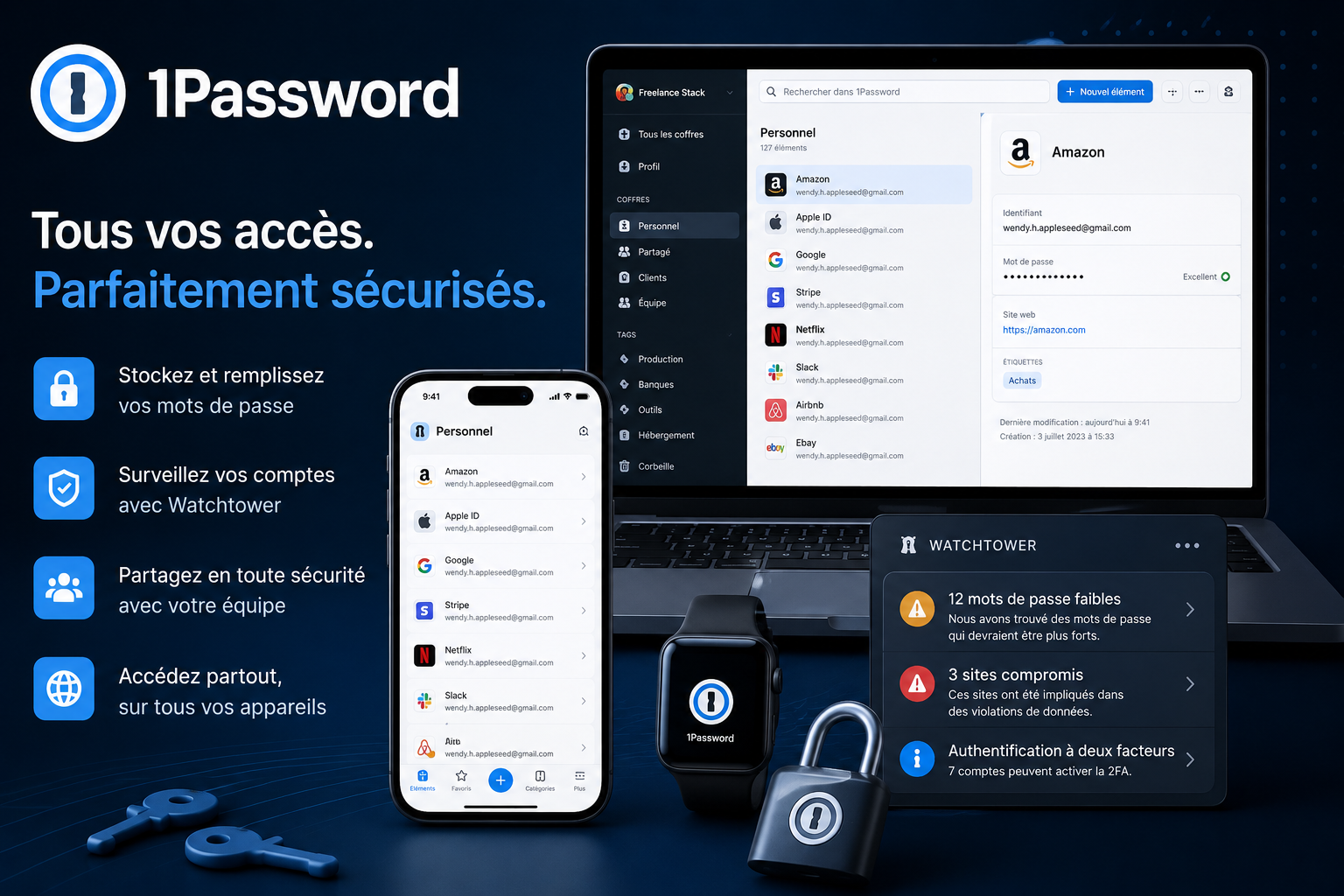
The 1Password interface is structured around a few main areas:
On the left are your vaults. By default, a "Personal" vault and a "Shared" vault are created. You can create as many as you like and organize them freely.
In the center is the list of items in the selected vault. Entries can include login credentials, bank cards, secure notes, documents, SSH keys, software licenses, and more.
In the top right corner, the Watchtower dashboard provides an overview of the health of your passwords.
First password saved in 5 minutes:
The easiest way to get started is to import your existing passwords. 1Password accepts imports from Chrome, Safari, Firefox, LastPass, Dashlane, and many other password managers via a CSV file. Once the import is complete, Watchtower automatically analyzes all your passwords and flags the most vulnerable ones.
Alternatively, you can simply browse normally: the next time you log in to a site, the extension will offer to save your credentials automatically.
Key features 🔐
1/ Encryption and the Secret Key:
1Password uses AES-256 bit encryption, the same standard used by banks and governments. But what really sets the service apart from most competitors is its dual key system.
In addition to your master password, 1Password generates a 34-character secret key the first time you log in. This key is stored locally on your devices and is never transmitted to 1Password's servers. In practical terms, even if 1Password's servers were compromised, no one could decrypt your data without both your master password and this secret key.
The architecture is described as zero-knowledge: 1Password cannot technically access your data. This isn't just a marketing claim; it's a direct consequence of the product's cryptographic operation.
The downside: if you lose both your master password and your secret key without having backed up your Emergency Kit, there is no way to recover your data.
2/ Watchtower:
Watchtower is one of 1Password's strong points. It constantly monitors your passwords and alerts you to several types of problems:
Weak or reused passwords are immediately identified. Compromised sites (via an integration with Have I Been Pwned) generate alerts if your credentials have been exposed in a data breach. Watchtower also flags sites where you could enable two-factor authentication but haven't yet done so.
All these checks are done directly on your device, without sending your list of sites to 1Password.
3/Travel Mode:
Travel Mode is a unique feature, especially useful for business travelers. It allows you to temporarily hide certain vaults on your devices. If you cross a border and a customs officer asks you to unlock your phone, only the vaults you’ve marked as "travel safe" will be visible.
Hidden vaults are not deleted; they are simply inaccessible locally until you disable Travel Mode from the web.
4/ Password sharing and shared vaults:
You can share access to entire vaults with colleagues or family members. Each person accesses the vault with their own account, without ever seeing the password in plain text.
To share a login with someone who doesn't use 1Password, the time-limited link feature is very handy: you generate a secure link valid for a few hours or days, which you share via email or messaging. After that time, the link expires automatically.
5/ Autofill and form filling:
The browser extension manages the autofill of login credentials on websites. 1Password does not offer autofill without your explicit consent: it waits for you to click in the field or confirm the action. This prevents phishing attacks where a fake website would try to steal your login credentials by triggering autofill without your knowledge.
On mobile, fill also works in native applications via Face ID, Touch ID or fingerprint.
6/ Integrated 2FA code management:
1Password can store and generate your two-factor authentication (TOTP) codes. You no longer need a separate app like Google Authenticator or Authy. When you log in to a service, the 6-digit code is directly available in the extension, and sometimes even filled in automatically.
Concrete use cases for freelancers, startups and very small businesses/small and medium-sized enterprises.
💼For the freelancer with multiple clients:
A freelance consultant or developer often manages access to many different environments: FTP servers, hosting providers, project management tools, client interfaces, billing accounts, etc. Organizing these into separate vaults for each client is a very efficient approach. Each client has their own vault, with their own login credentials. At the end of the project, you simply remove the shared access without having to change the passwords one by one.
SSH key and API token management is also integrated, making it a useful tool for technical profiles.
💼For the growth-stage startup:
A startup with 5 to 20 people often needs to share common access points (hosting, marketing tools, advertising accounts, etc.) while maintaining traceability of who accesses what. With the Teams or Business plan, administrators can see in real time who is logging into which vaults and can revoke access with a single click when a team member leaves.
It is also an argument for due diligence or certifications: showing that access is managed centrally and audited is reassuring for demanding investors and clients.
💼For very small businesses/small and medium-sized enterprises (SMEs) with an external IT provider:
Many small businesses grant access to their infrastructure to an external provider. With 1Password, you can invite this provider as a guest to a dedicated vault, restrict their access to what is strictly necessary, and revoke access at any time without having to change the passwords for all your tools.
💼For the compliance-conscious team leader:
The Business and Enterprise plans allow you to define security policies: minimum length of master passwords, obligation to enable two-factor authentication, geographical restrictions... Activity logs (audit logs) record all connections and modifications, which can be useful in case of an incident or to meet GDPR requirements.
Tips and tricks to go further 🎯
Use tags to organize your items:
Beyond vaults, 1Password allows you to add tags to each entry. This enables more precise searches and cross-functional organization: for example, tagging all production-related access, or all tools in a specific category.
Enable automatic locking:
By default, 1Password can remain unlocked for several hours. For users who are very security-conscious, reducing this time to a few minutes limits the risk in case of unauthorized access to your device.
The clipboard and security:
When you copy a password, 1Password automatically clears the contents of your clipboard after 90 seconds. It's a small detail, but one that matters if you work in shared spaces.
Take advantage of the passphrase generator:
The 1Password generator offers not only classic random passwords, but also passphrases composed of several random words separated by hyphens. These phrases are both more memorable and very difficult to guess.
Monitor passkeys:
1Password now supports passkeys, the increasingly common passwordless authentication standard. Watchtower notifies you when a site where you have an account starts supporting passkeys, allowing you to migrate proactively.
Integrations and Ecosystem. 🔗
1Password integrates natively with many tools, making it a solid link in a larger stack.
Regarding identity and access:
The Business and Enterprise plans allow you to connect 1Password to identity providers such as Okta, Microsoft Azure AD, Google Workspace, JumpCloud, Duo, and Rippling. SCIM provisioning automates the addition and removal of users: when a collaborator joins or leaves your organization in your corporate directory, their 1Password access is automatically updated.
From the developers' perspective:
1Password offers a CLI (command-line interface) and integrations with tools like GitHub Actions, GitLab CI, HashiCorp Vault, and plugins for popular IDEs. Secrets (tokens, API keys, certificates) can be injected directly into CI/CD pipelines without ever exposing them in plain text within the code.
Regarding SIEM and monitoring:
The Business plan allows you to export events to Datadog or Splunk to integrate access monitoring into your overall security dashboard.
Beyond native integrations, 1Password connects seamlessly to all common SaaS tools via its browser extension. If you use tools like Notion, Slack, Jira, Asana, Figma, or invoicing platforms, your login credentials are stored and automatically filled in.
The limitations of 1Password ⚠️
A serious tool deserves an honest presentation of its drawbacks. Here are a few to be aware of before committing.
No free version:
This is the main obstacle for users who want to test the tool without constraints. The 14-day trial is sufficient to evaluate the features, but too short to truly integrate the tool into a daily routine. Competitors like Bitwarden offer a free version with no time limit for individual use.
A higher than average price:
For individual use, 1Password is more expensive than Bitwarden or NordPass. If your only need is to store personal passwords without advanced features, these alternatives may suffice.
The Secret Key: Don’t lose it:
The dual key system is a security advantage, but it has a drawback: if you lose both your master password and your Secret Key, 1Password cannot help you recover your data. It is essential to back up your Emergency Kit in a secure physical location.
Mobile autofill can be unreliable:
On Android in particular, autofill behavior can vary between applications. This isn't a major problem, but it may occasionally require manually copying and pasting a password from within the application.
Customer support is only available via email:
No live chat or phone support is available on standard plans. Response times may take several days during periods of high demand.
For whom 1Password may not be suitable:
If you have a very limited budget and basic needs, Bitwarden (free) or Keeper Password may be sufficient. If you are looking for a 100% self-hosted (on-premise) solution, 1Password does not offer this option in its standard plans.
Benefit from our free deal on .
Find over 300 free deals as well as over 850 Premium deals right now with and save on your software subscriptions. Whether you're an entrepreneur, a startup or a solo freelancer, save hundreds of euros thanks to our discounts and promo codes.
Do you still have questions about 1Password? Here are the most frequently asked questions.
1️⃣ Is 1Password really secure?
Yes. The service uses AES-256 bit encryption and a zero-knowledge architecture. 1Password has never experienced a data breach since its creation in 2006. Independent security audits are carried out regularly and published on the publisher's website.
2️⃣ What is the difference between a master password and a secret key?
Your master password is the one you choose and remember. Your secret key is automatically generated by 1Password when you sign up; it's stored locally on your devices and is never transmitted to the servers. Both are required to log in from a new device. This is what makes 1Password particularly resistant to remote attacks.
3️⃣ Can 1Password be used without an internet connection?
Partially. Once the application is installed and synchronized, the data is available locally even offline. However, new entries or changes will only be synchronized between your devices once the connection is restored.
4️⃣ What happens if 1Password shuts down or stops its service?
Your data remains accessible even if you cancel your subscription: your account goes into "frozen" mode, but you can log in and export your data at any time, as long as you do not delete the account.
5️⃣ How to migrate from another password manager?
1Password offers an import tool that supports exports from Chrome, Firefox, Safari, LastPass, Dashlane, Bitwarden, and many other tools in CSV format. The migration typically takes a few minutes.
6️⃣ Can 1Password replace a 2FA authentication application?
Yes. 1Password stores and generates TOTP codes (the 6-digit one-time codes), allowing you to consolidate password management and authentication into a single tool.
7️⃣ Is 1Password GDPR compliant?
Yes. 1Password lets you choose where your data is hosted (United States, Canada, or European Union). Its zero-knowledge architecture means that even if legally required, 1Password cannot provide your data in plain text.
8️⃣ Is Travel Mode available on all plans?
Travel Mode is available on Individual, Families, Teams, and Business plans. It is not limited to business plans.
Conclusion.
Benefit from a on 1Password.
An additional 30% off on annual plan
Find our best discount right now with 1Password and save on your software subscriptions. We offer over 850 promo codes and discounts on the best software and SaaS on the market.
1Password is one of the most comprehensive and reliable password managers on the market. Its robust security architecture, unique features like Travel Mode and Watchtower, and user-friendly design make it a solid choice for users who refuse to compromise on security.
It is particularly well suited to freelancers who manage multiple clients, startups and very small businesses that want to structure their team's access, and to all those who take the protection of their digital data seriously.
The price is slightly higher than free alternatives, but it is largely justified by the quality of the experience and the level of protection offered.