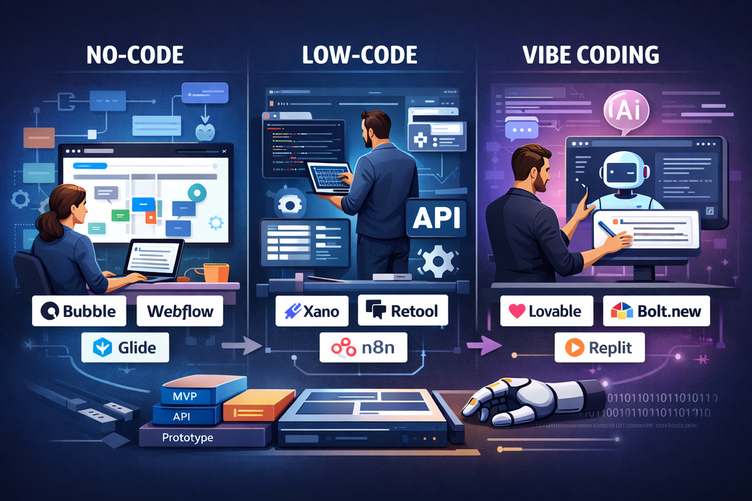






Why has creating a mobile app in 2026 become 10 times easier?
In this article, we take a look at five tools that embody this revolution: FlutterFlow, Adalo, Glide, GoodBarber, and Draftbit.…
Read more


WeWeb is a no-code/low-code platform that lets you create professional web applications, dashboards, customer portals, or internal tools without writing a single line of front-end code. The core idea: you connect your data (from an API, a database, Airtable, Supabase, Xano, etc.) and visually build the interface on top of it.
Founded in France in 2019, the platform has evolved significantly. What began as a simple page builder has, by 2026, become a full-stack solution with its own native backend (WeWeb Tables), a redesigned visual editor, and built-in AI capable of generating complete applications in just a few minutes.
This guide is intended for three types of people who often face the same challenge: how to build a digital tool without an unlimited development budget.
Freelancers and consultants who want to deliver client projects quickly. Startups and founders who need a functional MVP without hiring a technical team. Microbusinesses and small and medium-sized businesses looking to automate or digitize their internal processes.
If any of these descriptions sound like you, you've come to the right place.

It’s worth asking this question frankly. The no-code market is crowded, with tools like Bubble, Webflow, and Framer each occupying their own segment. WeWeb has carved out a unique niche for itself by solving a problem that others often overlook: vendor lock-in.
With most no-code tools, your app belongs to the platform. If prices go up, or if the company shuts down or changes its policies, you’re back to square one. WeWeb has taken a radically different approach: the platform generates standard Vue.js code, which you can export in its entirety and host wherever you want. Your data remains independent. Your work belongs to you.
You have an existing database (Supabase, Xano, PostgreSQL) and want to build a user interface on top of it without hiring a front-end developer. You deliver recurring client projects and need to quickly replicate templates. You want to prototype a SaaS or an internal tool in a few weeks rather than several months.
| Tool | Key strength | Main limitation | Ideal for |
|---|---|---|---|
| WeWeb | Code export, backend flexibility, full-stack since 2026 | Longer learning curve than Webflow | Data-driven apps, dashboards, portals |
| Bubble | All-in-one, integrated backend, mature ecosystem | No code export; risk of lock-in | Comprehensive SaaS solutions, all-in-one MVPs |
| Webflow | Pixel-perfect design, ideal for marketing websites | Limited for apps with complex logic | Showcase websites, landing pages, CMS |
| Retool | Internal tools, fast database connection | Very high per-seat pricing | Internal Tools for Tech Teams |
WeWeb revamped its pricing model in February 2025, switching to a seat-based system. Each seat corresponds to an active developer or editor on the platform. There is no limit on the number of published projects on any paid plan.
| Plan | Price (monthly) | What it unlocks |
|---|---|---|
| Free | 0 € | Full-featured visual editor, API integrations, publishing to a WeWeb subdomain, 1 million AI tokens included |
| Essential | $16/month (annual) or $20/month | Code export, self-hosting, GitHub sync, automatic daily backups, custom domain |
| Pro | ~$42–50/month per seat | Team collaboration, hourly backups, unlimited manual backups, multiple seats |
| Partner | Starting at $67/month per user | Staging environment, project handoff to clients, WeWeb partner visibility |
The Free plan is truly usable in production, not just for prototyping. Published applications aren't functionally limited, but they remain on a WeWeb subdomain. Code export is only available starting with the Essential plan, which is a major difference if you want to host the application on your own servers. AI tokens are included with each seat; you can purchase additional ones if needed (about $4 for 10,000 tokens).
WeWeb also offers regional discounts for several countries, with prices listed in local currency directly on the pricing page.
WeWeb's onboarding process is guided and relatively user-friendly, although the platform does take some getting used to compared to simpler tools like Softr or Glide. As soon as you log in, you'll be taken to a workspace that brings together all your projects.
You can start a new project either from a template or a blank page. The templates cover common use cases: analytics dashboard, customer portal, CRUD application, and simplified CRM. This is a good starting point for understanding how WeWeb structures its projects.
Since the editor was redesigned in the spring of 2026, WeWeb has organized the workspace into three main areas:
Interface: This is where the visual design takes place. You build your pages using drag-and-drop, and you define styles, animations, and responsive layouts. The editor is very similar to Figma in terms of usability, which makes it easy for those who have already worked with design tools to get started.
Data & API: This is the heart of the application logic. You declare your data sources (REST, GraphQL, Supabase, Airtable, WeWeb Tables...), configure your collections, and define workflows. This is where WeWeb truly sets itself apart from traditional website builders.
Settings: management of domains, users, environment variables, and third-party integrations.
Here's a realistic scenario to get you started: You want to display a list of contacts from a REST API. You declare your data source in the Data & API tab, create a collection that points to your endpoint, and then, in the Interface tab, add a list component and bind it to the collection. The data appears instantly. No code required.
The strength of WeWeb: this workflow remains the same whether you have 10 or 10,000 entries, regardless of the backend.
The WeWeb editor offers a level of control that few no-code platforms provide. You can work down to the pixel, define custom CSS variables, create reusable components, and even inject custom JavaScript or CSS for specific needs. It is this “low-code” approach that makes it possible to build interfaces that are visually indistinguishable from an application developed using traditional methods.
WeWeb's AI, launched in February 2025 and updated regularly, goes far beyond autocomplete. It can generate entire pages, create components based on a description, suggest formulas, and test workflows. User tests have shown that a complete CRM can be generated in less than 5 minutes using the AI prompt.
The AI is trained on the platform's existing components and generates elements that can be edited directly in the code. It uses several models depending on the plan (Claude Sonnet, GPT-4o, Gemini 2.5 Pro). AI tokens are not deducted in the event of an error, which helps avoid unpleasant surprises.
This is probably WeWeb's strongest feature. The platform natively connects to:
Databases and BaaS: Supabase, Xano, Airtable, SmartSuite, any REST or GraphQL backend
Third-party tools: Stripe for payments, dozens of integrations via community plugins, NPM packages via the official plugin
WeWeb Tables (since April 2026): Native PostgreSQL database with a spreadsheet interface, auto-generated CRUD APIs, backend logic, and integrated authentication and storage
This flexibility is what sets WeWeb apart from Bubble: you're never locked into a single ecosystem. If you decide to migrate your backend from Supabase to Xano in 18 months, you can reconfigure the data source without changing the user interface.
WeWeb generates a Progressive Web App (PWA) using standard Vue.js. The code export feature, available starting with the Essential plan, gives you access to the full source code. You can then deploy it to any infrastructure (Vercel, Netlify, your own server), manage versions with GitHub, and have traditional developers work on it as the project grows.
WeWeb also offers its own hosting infrastructure (a paid add-on) with deployment on a global CDN for those who don't want to manage the infrastructure themselves.
An independent consultant needs to create a sales tracking tool for an SME that uses Airtable as its database. Using WeWeb, the consultant connects Airtable as the data source, generates the page structure using AI, customizes the views with the client’s brand colors, configures access rights by role, and transfers the project to the client via the Partner plan. Result: delivery in 3 weeks, compared to 2 to 3 months for custom development.
A team of two founders wants to validate a concept for a management portal for real estate agencies. They’re using Supabase for the backend and WeWeb for the frontend. In four weeks, they have an MVP ready to present to investors, complete with authentication, dashboards, and file management. The cost: a few dozen euros per month, compared to tens of thousands in traditional development.
A company with 30 employees wants to replace its Excel spreadsheets for tracking vacation time and expense reports with a dedicated in-house tool. It uses WeWeb Tables as its database, builds forms and views in the editor, configures approval workflows, and grants each employee access through a portal protected by individual login credentials. Everything is up and running in two weeks, without any external developers.
An agency specializing in internal tools builds reusable templates for its repeat clients. It uses the Partner plan to manage multiple workspaces, deploys its deliverables on dedicated subdomains, and bills projects based on value rather than time. Billing for the tool becomes predictable (per seat), and profit margins increase significantly.
WeWeb has an NPM plugin that allows you to import most of the JavaScript packages available on unpkg, provided they are packaged in UMD format and attach to the `window` object. This opens the door to libraries for charts, data manipulation, and PDF export without the need for custom development.
Environment variables allow you to properly manage the differences between your development and production environments. This is essential if you use WeWeb for client projects with separate databases.
GitHub synchronization (Essential plan and above) allows you to version the entire project. If a problem arises, you can restore any previous version. This is a rare feature in the no-code world.
Importable code components allow you to integrate Vue.js components developed by traditional developers directly into your WeWeb editor. This allows WeWeb to integrate seamlessly into hybrid no-code/development teams.
The regional pricing option automatically applies discounts based on your billing country. If you are in an eligible country, the price displayed on the pricing page already reflects this adjustment.
WeWeb integrates natively or via plugins with a particularly rich ecosystem. Here are the most useful integrations for entrepreneurs and freelancers:
Backends and databases: Supabase, Xano, Airtable, any REST or GraphQL API
Authentication: Auth0, Xano Auth, Supabase Auth, native WeWeb Auth
Payments: Stripe (via a community plugin or direct API integration)
Automation: Make, Zapier (via webhooks or connected APIs)
Design: Figma files can serve as visual references; WeWeb does not offer direct Figma import, but the editor allows you to faithfully reproduce an existing design
A common workflow in the WeWeb community: Supabase (backend) + WeWeb (frontend) + Make (automations). Supabase handles the database and authentication, WeWeb builds the user interface, and Make triggers automated actions (emails, notifications, updates) based on database events. It’s a comprehensive, flexible, and low-cost stack suitable for most internal tools or early-stage SaaS projects.
WeWeb isn't a one-size-fits-all solution, and recognizing its limitations is key to using it wisely.
WeWeb generates Single-Page Applications (SPAs) that are rendered on the client side. Search engines have improved their ability to index SPAs, but if your project relies heavily on organic search rankings for public pages (blogs, e-commerce sites, SEO landing pages), WeWeb is not the right choice. The platform acknowledges this: server-side rendering (SSR) is not on the 2026 roadmap. For these types of needs, Webflow or Framer are better suited.
WeWeb isn't the easiest tool on the market. If you have no idea how APIs work or what a relational database is, getting started can be frustrating. Tools like Softr or Glide have much gentler learning curves for simple use cases.
WeWeb is built for the web. If you need a native iOS or Android app, FlutterFlow or Adalo are better suited. A PWA is still possible with WeWeb for certain lightweight mobile use cases.
(nested business rules, computationally intensive real-time calculations, sophisticated multi-step workflows) may reach their limits in WeWeb's visual editor. In these cases, an architecture where the heavy-duty backend remains in Xano or Supabase and WeWeb handles only the front end is often the best approach.
Here are the answers to the questions you may have about WeWeb.
WeWeb falls somewhere between no-code and low-code. You can build full-fledged applications without coding, but the platform is more powerful if you understand the basics of how APIs and databases work. Knowing how to read JSON and understanding the difference between a GET and a POST request helps. The ability to write JavaScript isn't required but can be useful for advanced use cases.
Yes, that's one of the platform's key selling points. Starting with the Essential plan, you can export all of the generated Vue.js code and deploy it wherever you like. Your data, however, remains in your backend (Supabase, Xano, etc.) and does not pass through WeWeb.
It depends on the project. Bubble is still simpler for beginners who want an all-in-one solution with a built-in backend and minimal configuration. WeWeb is a better fit if you already have a backend, if you want to retain full ownership of your code, or if you need a level of UI customization that Bubble doesn’t offer. Since April 2026, WeWeb has offered its own native backend, which narrows the gap, but Bubble remains a more closed ecosystem and is more accessible to non-technical users.
Yes, it’s actually one of the flagship use cases. Many early-stage SaaS companies use WeWeb for their front end, with Supabase or Xano on the back end. The platform handles role and access rights management, multi-user portals, and client-specific dashboards very well.
WeWeb generates optimized Vue.js code with lazy image loading and a clean DOM. The Core Web Vitals of a well-built WeWeb application are generally good. However, performance also depends on the backend and the volume of data being loaded: an application that fetches thousands of lines with every load will be slow regardless of the frontend.
The community is real and particularly active. WeWeb has an official forum, a community Slack channel, a library of open-source plugins, and a video academy (WeWeb Academy) with structured courses. For a platform of this size, the level of documentation and resources is remarkable.
Yes. WeWeb exposes APIs for your data collections, and you can trigger webhooks from your workflows. The combination of WeWeb and Make is particularly popular for automating actions in response to in-app events.
WeWeb Tables, launched in April 2026, is a PostgreSQL database integrated directly into WeWeb, with a spreadsheet-style interface. It’s useful for projects that are just getting started without an existing backend. Supabase is a more comprehensive backend service, offering more options for role management, serverless functions, and security policies. Both are compatible with WeWeb: you can use WeWeb Tables for some projects and Supabase for others.
Don't use this as your first no-code tool if you have no experience. It's recommended that you start with Notion or tools like Glide to understand the basics of databases and user interfaces before moving on to WeWeb. If you've already used Airtable and understand how views work, you're ready for WeWeb.
WeWeb is a robust tool designed for people who build serious projects. It isn't the simplest tool on the market, nor is that its goal. It's a platform for those who want to build quickly without sacrificing quality—and without getting locked into a proprietary ecosystem.
Three reasons to choose it: complete freedom over your code and data, a level of UI customization that rivals traditional development, and exceptional value for freelancers and startups.
One reason not to choose it: if your project relies heavily on SEO for public pages, or if you're looking for a tool with no learning curve.