Lovable: The Ultimate Guide to Building Your Web App Without Writing a Single Line of Code
In this article, you'll find everything you need to know about Lovable: what the tool actually does, who it's really best suited for, how to get started with it, how much it costs, and what its limitations are.
Lovable is an AI-powered web application development platform. The principle is simple: you describe your project in natural language, and the AI generates a complete, working web application, code included. No drag-and-drop, no limited visual blocks. Real code that is readable, exportable and yours.
Launched in 2024 under the name GPT Engineer, the tool quickly changed course and rebranded as Lovable, one of the most iconic representatives of the “vibe coding” movement: a way to create applications by chatting with an AI, without ever opening a code editor.
The promise? To go from an idea to a deployed prototype in just a few hours. And in many cases, that's exactly what happens.
Lovable is primarily aimed at entrepreneurs, freelancers, product managers and startups who have a digital product idea to validate but do not (yet) have a development team. It also appeals to developers who want to speed up their prototyping and to designers who want to see their mockups come to life without relying on an engineer.
Find over 300 free deals as well as over 850 Premium deals right now with Lovable and save on your software subscriptions. Whether you're an entrepreneur, a startup or a solo freelancer, save hundreds of euros thanks to our discounts and promo codes.
Most no-code tools on the market let you create showcase websites or databases. Lovable goes further: it generates full-stack web applications, with frontend, backend, authentication and database, all connected and deployed automatically.
The specific problems it solves:
Having a web app developed is expensive: between €5,000 and €50,000 for a simple MVP, depending on the profiles hired. Timelines stretch out, iterations pile up, and the final product sometimes strays from the initial vision. Lovable compresses this cycle: you test an idea in a few hours, adjust it, and come back to it. The cost of experimentation drops dramatically.
For a freelancer or solo entrepreneur, this is often the difference between an idea that stays in a notebook and a product that actually goes live.
What really sets Lovable apart is the absence of technical lock-in. The generated code is synced with a GitHub repository that you own. You can hand it over to a developer at any time or refine it in an editor like Cursor. Bubble, for example, doesn’t give you that freedom: you remain stuck in their ecosystem.
Typical use cases:
A freelance consultant who wants a client portal to share deliverables and track invoices. A founder looking to validate a SaaS idea before raising funds. A product manager who wants to show a clickable prototype to investors without waiting three months for development. A small business that needs a simple internal tool to centralize its customer data, but doesn’t have the budget for an IT services company.
Lovable Pricing and Plans 💰
Lovable runs on a credit system. Each interaction with the AI agent uses one or more credits, depending on the complexity of the request. It’s important to understand this before choosing your plan, as costs can quickly add up if you iterate a lot.
Plan
Price
Credits / month
What it unlocks
Free
0 $
5 messages/day (30/month)
Unlimited public projects, GitHub sync, 1-click deployment
Maximum speed, unlimited projects, advanced analytics
Business
~50 $/month
100 credits + SSO
Opt-out data training, for teams with security requirements
The free plan gives you a good sense of the tool, but it’s too limited to build a real project. The Starter plan at $25/month is suitable for most users who want to seriously test an idea or deliver prototypes to clients. For more ambitious projects with frequent iterations, the Launch plan quickly becomes a worthwhile investment.
You can buy additional credits if you exceed your monthly quota: about $15 for 50 credits on the Starter plan. These credits are valid for one year from purchase. Note that priority email support is only available from the Business plan upwards.
Getting Started: The Basics.
Getting started on Lovable doesn't take long. The interface is designed to be easy to use right from the start, even for someone who has never written a line of code in their life.
Sign-up and first project:
Go to lovable.dev and create an account using your email address or via Google. You'll be taken directly to a clean, uncluttered dashboard with a central text field. That's where it all begins: you describe your app in natural language, just as if you were explaining your idea to a developer.
Lovable analyzes your prompt and, if your description is detailed enough, asks you a few clarifying questions before it starts generating code: which backend do you want (Lovable Cloud or an external Supabase), what visual style, and which features are a priority. If your prompt is vague, the AI makes default choices and starts coding without consulting you much.
The interface at a glance:
The screen is divided into two main sections: a chat panel on the left, where you type your prompts and monitor the generation logs, and a preview panel on the right, where your application is displayed in real time. You can navigate the preview just like in a real browser, click on buttons, and fill out forms.
A simple first project, such as a landing page with a contact form or a basic dashboard, is usually created in less than five minutes.
Key features ⚙️
Here’s what makes Lovable strong day to day, beyond the marketing promise.
1/ Agent Mode: the core engine.
This is Lovable’s most impressive feature. In Agent Mode, the AI works autonomously: it explores your codebase, reads existing files, performs web searches as needed to find documentation, debugs errors, and validates its own changes before presenting them to you. You describe a complex feature, and you watch the agent reason and build it, step by step, in real time.
Since February 2026, Agent Mode has displayed a detailed plan of what it’s about to code before writing a single line. You review it, make adjustments, and then run it. It’s a useful safeguard that prevents ill-conceived changes, especially on projects that are already well underway.
2/ Chat Mode: think before you act.
Chat Mode doesn’t touch the code. It’s used to plan, ask the AI questions about your project’s architecture, analyze an error or anticipate the consequences of a change. You can ask “if I add this feature, what is likely to break?” and get an analysis without a single line being changed. It doesn’t use any generation credits, which makes it a valuable tool before every major change.
3/ Visual Edits: changes without a prompt.
Instead of typing a prompt to change a button color or adjust spacing, Lovable offers a visual editor similar to Figma. You click directly on an element in the preview and edit its properties: color, size, font, and margins. These changes don’t cost any credits and take effect instantly. For fine-tuning details, this is the feature you should always use.
4/ Lovable Cloud: the configuration-free backend.
Launched in late 2025, Lovable Cloud is an all-in-one solution that natively integrates authentication, a PostgreSQL database, file storage and serverless functions. One-click activation, everything is configured through prompts, and hosting is included. Each workspace gets $25 in free Cloud credit per month (offer valid until the end of May 2026 at the time of writing). It’s the fastest way to get started. The alternative is to connect your own Supabase account, which gives you finer control over your infrastructure.
5/ GitHub synchronization.
Your project is constantly synchronized with a GitHub repository. Synchronization is bidirectional: you can edit the code directly in GitHub or in your local editor, and the changes are reflected in Lovable. This also means there is no exclusive dependency on the platform. If Lovable doesn't evolve in the direction you want, you can take your code elsewhere.
6/ Native integrations.
Lovable natively integrates with several essential services: Stripe for payments, Resend for transactional email, Clerk for advanced authentication, and, of course, Supabase for the backend. It also supports image generation directly within the builder (with transparent backgrounds since March 2026), as well as a Voice Mode that lets you dictate your instructions by voice.
7/ Prompt Queue.
This feature lets you stack up to 50 prompts and have Lovable run them in sequence. It's ideal when you have a list of changes to make and don't want to oversee each step one by one.
Real-world use cases for freelancers and entrepreneurs.
To better understand what Lovable can help you build in practice, here are five real-world scenarios in which the tool provides real added value.
💼 Creating a client portal for a consulting firm:
An independent consultant can use Lovable to build a secure client portal: each client gets personalized access to view their deliverables, approve documents, track the progress of an assignment or download invoices. All with authentication, a database and storage, without hiring a developer.
💼 Validating a B2B SaaS before raising funds:
A founder who wants to show their idea to investors no longer needs to wait six months of development to have a credible prototype. With Lovable, a working V1 can go live in a day. This makes it possible to test market interest, collect email addresses and even take the first payments via Stripe, before hiring a CTO.
💼 Developing an internal tool for a small business:
A small team that manages its projects using spreadsheets can transition to a custom-built tool. Order tracking, supplier management, sales performance dashboards: Lovable lets you build these components without a large software budget or reliance on a third-party provider. For automating upstream or downstream data flows, integrating with Make is often a good idea.
💼 Prototyping a feature for an existing product:
A product manager who wants to test a new feature without holding up the development team can build a prototype on Lovable, test it with real users, gauge their feedback, and then send the exported code to the technical team for integration. This saves a considerable amount of time.
💼 Building a marketplace or a booking platform:
The platform handles workflows that are more complex than a simple static website: account creation, user profiles, service catalogs, payment systems, and messaging. Lovable can provide a solid foundation for these types of projects, although highly specific features will often require manual code tweaks after export.
Tips and tricks to take it to the next level 🔥
Write a detailed initial prompt:
The quality of your initial prompt largely determines the quality of the generated application. Describe the pages you want, the types of users, the expected features, and the visual style (colors, atmosphere). A well-structured 200-word prompt will save you ten unnecessary iterations.
Use Chat Mode before every major change:
Before adding a feature that affects your project’s architecture, ask Lovable in Chat Mode to analyze the risks. It costs no credits and can save you an hour spent fixing a regression.
Save the Visual Editor for cosmetic adjustments:
Changing a color or spacing with a prompt is a wasted credit. That’s what the Visual Editor is for: it’s free and instant.
Start with a template rather than a blank page:
Lovable offers production-ready templates for portfolios, blogs, e-commerce platforms, and event platforms. Customizing an existing template is often faster and results in fewer errors than building everything from scratch.
Combine Lovable and Cursor:
A very popular workflow is to prototype with Lovable until the project is 70-80% complete, then export the code via GitHub and import it into Cursor to refine it before going into production. It’s the most efficient way to get the best out of both tools.
Integrations and Ecosystem.
Lovable is part of an ecosystem of complementary tools. Here are the most useful integrations for an entrepreneur or freelancer:
Supabase is the go-to backend if you choose not to use Lovable Cloud. PostgreSQL database, authentication, file storage, custom edge functions: integration is native and well-documented.
GitHub is the backbone of code portability. Two-way synchronization is continuous and automatic.
Make and n8n let you connect your Lovable app to hundreds of other services via automated workflows: sending emails, updating CRMs, and syncing data between tools.
Figma can serve as a starting point: you upload a screenshot or an export of your mockup, and Lovable uses it as a visual reference to generate the components.
Airtable or Notion can serve as lightweight data sources, connected via API to your Lovable app for simple use cases.
Limitations and alternatives based on your profile.
Lovable isn't a miracle tool, and it's best to know that before embarking on a critical project.
Complex projects create friction:
The limitation most often cited by users is what’s known as the “debugging loop”: when a difficult bug arises, the AI can get stuck in a loop, trying different fixes without success, while consuming credits with each attempt. The more complex your project becomes, the more time-consuming and costly this phenomenon can be.
The generated code can be hard to take over manually:
If you don't have a technical background, you're entirely dependent on AI to fix or improve your project. For a product in production with real users, this can lead to tricky situations.
Security requires special attention:
In March 2026, a vulnerability was identified in Lovable’s API, allowing a user to access data from projects that did not belong to them. The vulnerability was quickly fixed, but this illustrates a structural challenge facing AI app builders. For any project that handles sensitive data (personal information, payments, health data), a security review by a professional remains essential.
Support is limited on entry-level plans:
No direct email support on the Starter plan at $25/month. Users rely on the community Discord, which is active and generally responsive, but not infallible.
Which alternative fits your situation?
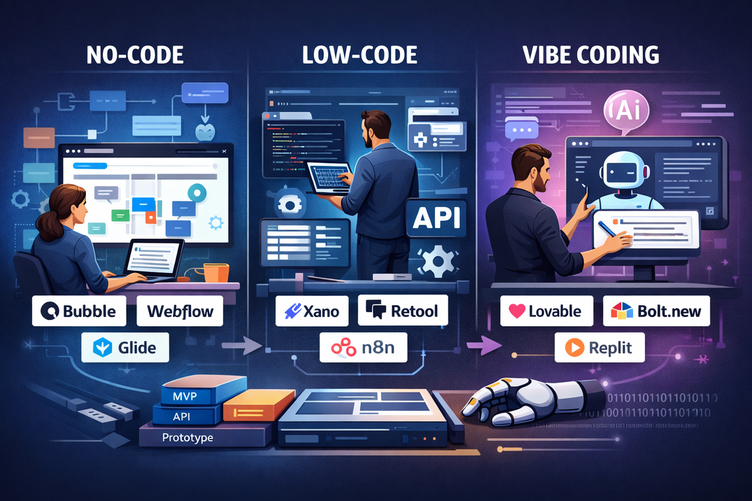
If you have a technical background and want more control over the generated code, Bolt.new is a solid alternative, with a development environment that runs entirely in the browser. For visual applications without a complex backend, Webflow or Framer offer greater design control. For no-code applications with advanced business logic and a native database, Bubble remains a top choice, even though the lack of code export remains a real drawback. If you need to develop no-code mobile apps, Glide or FlutterFlow are options worth considering.
Benefit from our free deal on .
Find over 300 free deals as well as over 850 Premium deals right now with and save on your software subscriptions. Whether you're an entrepreneur, a startup or a solo freelancer, save hundreds of euros thanks to our discounts and promo codes.
Here are a few frequently asked questions to help you get a clearer picture before you get started.
1️⃣ Is Lovable really free to start with?
Yes, the free plan gives you access to 5 messages per day (30 per month), with GitHub sync and one-click deployment included. That's enough to explore the tool and test a simple idea, but not enough to build a serious, long-term project.
2️⃣ Do you need to know how to code to use Lovable?
No. That's exactly what sets Lovable apart from traditional development environments. You don't need any programming knowledge to create and deploy an application. That said, some technical knowledge will help you write better prompts and interpret errors more effectively.
3️⃣ Do I own the code generated by Lovable?
Yes. The code is synced with your own GitHub repository, and you are the owner. You can download it, work on it with a developer, or migrate it to any other environment without any restrictions.
4️⃣ Can I use my own domain name with Lovable?
Yes. Each project is automatically assigned a public URL in the format yourproject.lovable.app. You can then connect a custom domain.
5️⃣ Can Lovable handle online payments?
Yes, through a native integration with Stripe. You can add a payment system to your app in just a few prompts, with support for subscriptions, one-time payments and webhooks.
6️⃣ What is the difference between Lovable Cloud and Supabase in Lovable?
Lovable Cloud is a turnkey solution that can be activated with a single click and is fully managed by Lovable. Supabase in external mode gives you more control over your infrastructure (security policies, edge functions, database schema export) but requires more extensive initial configuration. If you migrate to Lovable Cloud, you will not be able to switch back to external Supabase for the same project.
7️⃣ Is Lovable suitable for a production app with real users?
For an MVP or a beta version, absolutely. For a mature product with high volumes and strict security requirements, Lovable is best used as a starting point. The exported code will need to be audited and optimized by developers before a critical production release.
8️⃣ Can Lovable generate mobile apps?
Not directly. Lovable generates web applications that can be adapted for mobile devices via a browser (responsive design). For native mobile apps, you'll need to use tools like FlutterFlow or Glide.
9️⃣ How does Lovable compare to the competition in 2025-2026?
The AI app builder market has exploded in recent months. Lovable has established itself as one of the most mature and well-documented platforms, with a strong community and a transparent roadmap. According to Gartner, low-code and no-code tools will account for 75% of new application development by the end of 2026. Lovable is well-positioned to capture a significant share of this trend.
🔟 Can Lovable be used by a team?
Yes, the Business and Enterprise plans are designed for teams, with SSO, the option to opt out of data training, and priority support. The Starter and Launch plans also allow for collaboration via GitHub.
Conclusion.
Benefit from a on Lovable.
Additional 10% off on annual plan
Find our best discount right now with Lovable and save on your software subscriptions. We offer over 850 promo codes and discounts on the best software and SaaS on the market.
Lovable is today one of the most accessible and powerful tools for turning an idea into a working web application, without a technical team, without a large development budget, and without waiting.
For a freelancer who wants to offer a tool to their clients, an entrepreneur looking to validate a concept, or a small team that needs a custom in-house solution, this is often the best starting point available on the market today.
The credit system deserves special attention so you don’t run out of budget on a project that is still being iterated, and very complex or sensitive projects will always need a developer’s eye before going into production. But within its scope, Lovable does what it promises: it gets you moving.