







The 5 Best Collaboration Tools for Businesses
This article introduces you to 5 collaboration tools that really make a difference, each with its own unique features, strengths, and…
Read more


A few years ago, having a collection of tools was almost a point of pride. One tool for tasks, another for notes, a third for communication, a fourth for files... The result? A fragmented system where we spend more time searching for information than creating it.
According to a study by RingCentral, employees juggle an average of four different communication apps on a daily basis, and that number rises among distributed teams. The hidden cost of this fragmentation is massive: context lost between tools, decisions made without the right information, and unnecessary meetings to catch up on what the system should have made visible.
The underlying trend is consolidation. Teams, whether they consist of two or thirty people, are looking for unified work environments: a space where tasks, discussions, documents, and resources coexist seamlessly.
That is precisely what the tools discussed in this article aim to address, each with its own approach. Some prioritize total flexibility, others focus on a strong vision, and still others rely on the power of databases. Here is an honest and detailed analysis to help you make your choice.

Notion is undoubtedly the tool that has most transformed the way teams think about their organization over the past five years. It is neither a simple task manager nor a note-taking tool: it is a modular workspace where each page can become a database, a Kanban board, a calendar, a collaborative document, or a combination of all of these.
The core concept of Notion is based on blocks: each piece of content is an element that can be moved, nested, or transformed. A to-do list can become a table, and a page can embed a database linked to another. This extreme flexibility is both its strength and its limitation for users who are less comfortable with configuration.
Some of the most frequently used features include:
Link projects to clients, tasks to sprints, and resources to teams, while switching between views.
Build a document hierarchy as deep as needed, with granular access rights.
Switch between list, Kanban board, calendar, gallery, or timeline views within the same database.
Built right in, it lets you summarize, rephrase, generate content, and answer questions about your documents.
Multiple people can edit at the same time, with comment and mention management.
In terms of integrations, Notion connects to Slack, GitHub, Google Drive, and Figma, as well as hundreds of other services via Zapier or Make.
🧠 The freelancer or consultant who handles everything on their own: Notion is probably the best personal workspace available. Client management, project tracking, knowledge base, logbook-everything is all in one place.
🚀 The fast-growing startup: Notion’s flexibility adapts to a company’s evolving structure. You start with a simple wiki and end up with a full-fledged product management system.
📚 The team that produces a lot of content and documentation: Notion's document management system is one of the most sophisticated on the market.
✅ Extreme flexibility: you can build just about any system.
✅ Versatile: often replaces three or four separate tools.
✅ A sleek and user-friendly interface for everyday use.
✅ AI capabilities natively integrated at no significant additional cost.
✅ Free for individual use or use in small groups.
⚠️ Steep learning curve: without a clear initial structure, Notion can quickly turn into a state of organized chaos.
⚠️ Performance slows down with very large databases.
⚠️ Project management remains less structured than specialized tools like Asana or Linear.
⚠️ No built-in time tracking.

While Notion focuses on flexibility, ClickUp takes a different approach: integrating everything natively into a single interface. Tasks, documents, goals, dashboards, messaging, spreadsheets... ClickUp literally aims to replace all your tools. It’s a bold ambition, yet the platform largely delivers on its promises.
ClickUp is organized into Workspaces > Spaces > Folders > Lists > Tasks. This hierarchy may seem complex at first glance, but it allows for detailed segmentation by team, department, or project type.
Key features:
A comprehensive, built-in document editor that allows you to link documents to tasks.
List, Kanban, Gantt, calendar, mind map, workload... more than fifteen views available.
Conditions, actions, and triggers without the need for a third-party tool.
Built-in time tracking with detailed reports.
An in-house AI that can answer questions about your tasks, write reports, and suggest subtasks.
Widgets for aggregating metrics from multiple projects.
🏗️ Teams that want everything in one tool: ClickUp is designed for those who want to avoid juggling multiple subscriptions and projects.
⚙️ Tech and product teams: the combination of tasks, documentation, Gantt charts, and sprints covers most of the product development cycle.
📊 Managers and team leaders: dashboards and workload views enable precise management of human resources.
✅ One of the most comprehensive platforms on the market.
✅ Powerful built-in automations with no need for an external subscription.
✅ Built-in time tracking.
✅ Very competitive pricing given the range of features.
✅ Frequent updates and an active product roadmap.
⚠️ The interface may seem a bit overwhelming at first, and it can take some time to get used to.
⚠️ Feature-rich software can become a pitfall if the team doesn't agree on a common approach to using it.
⚠️ Some advanced features are still unstable between updates.
⚠️ Performance may be affected on heavily loaded pages.


Monday.com has established itself as one of the most widely adopted work management platforms among mid-sized companies. Its positioning is clear: a visual, intuitive interface that allows users of all skill levels to get organized without any prior training.
Monday’s philosophy is built around boards: highly customizable collaborative boards where each row represents an item (task, project, client, campaign, etc.) and each column represents an attribute (status, assignee, deadline, priority, budget, etc.). The layout is immediately clear.
Key features:
The core of the product, focused on project and task management.
Integrated client module, for teams that want to manage leads and projects in one place.
An environment designed for product and development teams (sprints, backlogs, roadmaps).
Hundreds of preconfigured recipes to trigger actions based on specific events.
Multi-board dashboards with key metrics.
Automatic column generation, task summaries, writing assistance.
Monday integrates natively with Slack, Google Workspace, Microsoft Teams, Zoom, Salesforce, HubSpot, and many others.
🏢 Teams of 5 to 50 people across various departments: Monday is designed for use by non-technical users, such as those in marketing, HR, finance, and operations.
📣 Marketing and communications teams: managing campaigns, editorial calendars, and creative briefs comes naturally here.
🤝 Organizations that work with external clients: guest areas and client portals provide partial visibility into projects.
✅ Easy to learn, ideal for teams that aren't very tech-savvy.
✅ A visually clear and user-friendly interface.
✅ Versatile: suitable for a wide range of applications.
✅ Automations that require no technical skills.
✅ Seamlessly integrated specialized modules (CRM, Dev).
⚠️ Higher price than the competition for advanced use.
⚠️ Per-user billing can become expensive for growing teams.
⚠️ Less powerful than Notion when it comes to document management.
⚠️ Some advanced automations require the Pro plan.
Asana is one of the oldest and most established project management tools on the market. Founded by former engineers from Facebook and Google, it has always prioritized clear processes and organizational discipline over unbridled flexibility.
Where Notion offers a blank canvas and ClickUp a Swiss Army knife, Asana structures your workflow around projects, tasks, and portfolios. The tool excels at managing task dependencies, tracking milestones, and providing an overview of multiple projects at once.
Key features:
Overview of multiple projects, including metrics on status, progress, and resources.
Visual planning with dependencies and milestones.
Conditional triggers for automating workflows without code.
AI to generate project summaries, automatically prioritize tasks, and identify risks.
To centralize incoming requests (design, IT, HR, etc.) directly in Asana.
View of the workload per employee to balance resources.
Integration with Slack, Microsoft Teams, Google Workspace, Zoom, Salesforce, and hundreds of other tools is built-in.
🎯 Process-oriented and detail-driven teams: Asana is designed for organizations that need detailed tracking and structured workflow management.
📋 Operations, HR, and marketing teams: Asana is the perfect tool for managing campaigns, onboarding, and product launches.
🌍 Distributed or remote teams: knowing who’s doing what and when is one of Asana’s key strengths.
✅ Product maturity: reliable, stable, well-documented.
✅ One of the best Gantt charts and dependency management tools on the market.
✅ Excellent tracking of workload and resources.
✅ Convenient request forms for centralizing internal requests.
✅ Robust integrations.
⚠️ High cost to access advanced features (portfolios, goals).
⚠️ No native document management: you need to rely on integrations.
⚠️ The interface is sometimes perceived as rigid by teams accustomed to more flexible tools.
⚠️ The free version has significant limitations.
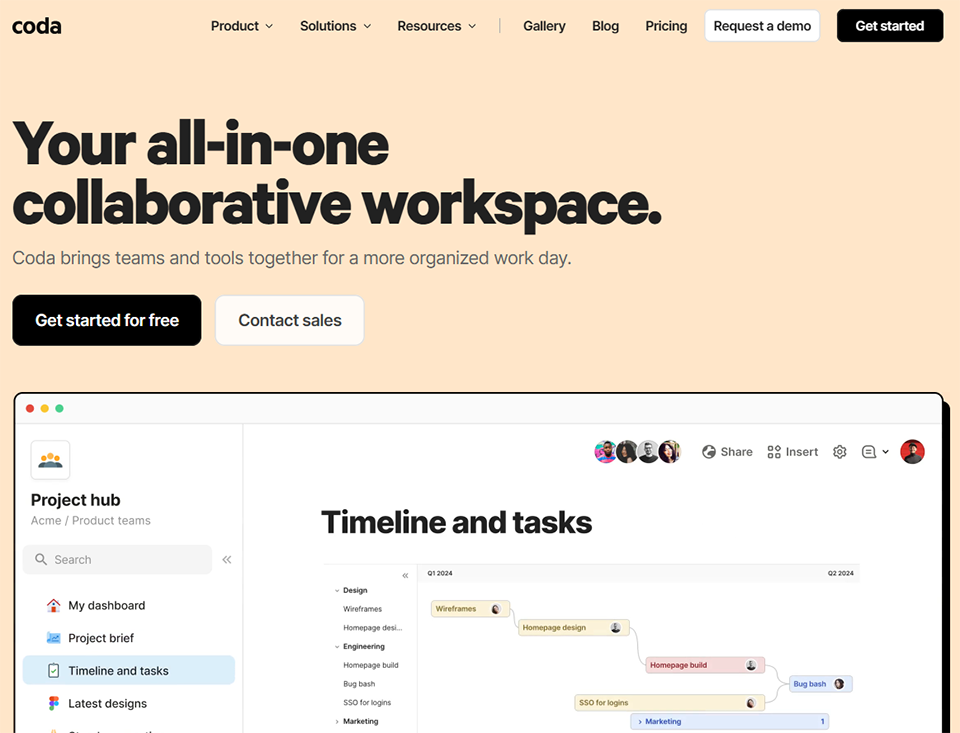
Coda is often described as "Notion for builders." While Notion offers a great deal of flexibility in terms of structure, Coda goes a step further by allowing users to create fully-fledged applications directly from a document. With tables, buttons, formulas, and automations, Coda transforms a document into a functional tool.
Coda is an exciting option for users with specific needs that are difficult to meet with standard tools. While Notion provides you with a database, Coda lets you add action buttons, complex Excel-style calculations, and automations that can be triggered directly from the interface.
Key features:
Syntax similar to Excel or Airtable, but in a document-based environment.
Trigger actions (send an email, create a task, update a field) directly from the document.
Native integrations with Gmail, Slack, GitHub, Jira, Salesforce, and many others.
Content generation, data analysis, automatic summaries.
A comprehensive library of templates for specific use cases.
🔧 Teams with very specific business needs: if no off-the-shelf tool perfectly fits your workflow, Coda lets you build it yourself.
📊 Operations teams and "Ops" in general: Coda is particularly popular among RevOps, Sales Ops, and Marketing Ops teams that need to cross-reference data and automate processes.
💡 People who loved Excel but are looking for a collaborative experience: Coda’s formula logic will feel familiar to advanced spreadsheet users.
✅ Ability to create functional mini-apps without writing code.
✅ Very powerful formula logic.
✅ Action buttons: a unique feature that Notion and ClickUp lack.
✅ Numerous, well-designed native integrations.
✅ Coda AI is seamlessly integrated into the document experience.
⚠️ Steep learning curve, especially when it comes to formulas.
⚠️ Billing "by Maker" (document creator) can be confusing.
⚠️ Less suitable for visual project management (no built-in Gantt chart).
⚠️ The community and resources are not as extensive as Notion's.


Taskade is perhaps the most ambitious tool in this selection in one specific regard: integrating AI into the very core of the organization. While other platforms have added AI as an extra layer, Taskade designed it as a central component of its product from the very beginning.
Taskade combines classic features (tasks, documents, mind maps, calendar, video conferencing) with a layer of AI agents that can handle research, writing, summarizing, and organizational tasks on your behalf.
Highlights:
Create agents dedicated to specific projects (research, writing, analysis) that run in the background.
Lists, Kanban boards, mind maps, Gantt charts, tables, and calendars-all accessible within the same project.
Team messaging right within the interface.
Hold meetings directly from Taskade, without leaving the tool.
Hundreds of preconfigured templates to get you started quickly.
🤖 Early adopters and "AI-first" teams: Taskade is ideal for teams looking to explore a way of working that is deeply enhanced by AI.
🧩 Solo workers and small, versatile teams: combining tasks, documents, chat, and video calls in a single tool is the perfect way to avoid having to sign up for multiple subscriptions.
🎓 Consultants and entrepreneurs produce a lot of content: AI agents can significantly speed up the research and writing phases.
✅ The most advanced AI integration in this selection.
✅ Built-in video conferencing and messaging-a rare feature.
✅ A wide variety of views within a single project.
✅ Affordable pricing for the range of features.
✅ Clear and modern interface.
⚠️ Less mature than Notion or Asana: some features are still under development.
⚠️ AI agents require some setup time to be truly useful.
⚠️ Fewer native integrations than its competitors.
⚠️ Less suitable for large teams with advanced governance needs.

Slite stands out from the other tools in this selection: it’s not a task manager; it’s first and foremost a team documentation tool. Its value proposition is simple: to make your organization’s knowledge base accessible, up-to-date, and useful-without turning it into a chore.
While Notion can become an impenetrable jungle if left unmaintained, Slite takes a different approach with a lighter, more focused tool that uses AI to actively help maintain the quality of the documentation.
Key features:
Ask a question in natural language, and Slite will search your entire document database for the answer, even if it’s scattered across multiple documents.
Slite alerts you to documents that haven't been updated in a long time and suggests that you review them.
Organization by channels (team, project, process) with a structure similar to Slack's.
Comments, tags, version history.
Slack, Notion, GitHub, Linear, and others.
📖 Teams looking for a true knowledge base, not just another workspace: Slite excels where other tools often fall short-keeping documentation up-to-date and easy to find.
🔄 Fast-growing teams with a lot of onboarding: centralizing processes, guides, and company policies makes it easier to onboard new employees.
🤝 Distributed or remote teams: Reducing reliance on real-time communication requires solid written documentation. Slite is designed for just that.
✅ Focused on what it does best: structured documentation.
✅ The "Ask" AI is one of the most useful in this category.
✅ Clean interface, free of unnecessary features.
✅ Alerts for outdated documents: a rare and valuable feature.
✅ Very easy to get started.
⚠️ This is not a replacement for a task manager: use it in conjunction with another tool.
⚠️ Less powerful than Notion when it comes to database structuring.
⚠️ Smaller community, so fewer resources and templates are available.
⚠️ The free plan has a very limited number of users.

Basecamp is in a league of its own. Created by Basecamp (formerly 37signals), the company behind the book *Rework* and the Remote Manifesto, it embodies a radically different work philosophy: less, but better. No endless views, no endless customization, no stacked features. An intentionally simple approach.
Basecamp brings together six essential elements for each project: messages (instead of email), to-dos, file storage, discussions, a calendar, and a bulletin board. Nothing more. Nothing less.
What sets Basecamp apart:
Built-in real-time team messaging-no need for Slack.
A unique way to visualize task progress, designed to reflect uncertainty and actual progress rather than artificial percentages.
Questions asked regularly of the team ("What are you working on?", "Are there any obstacles?") to maintain visibility without holding meetings.
Centralized storage of all documentation and project resources.
One of the few platforms that doesn't charge users.
🧘 Teams struggling with information overload: if your employees spend more time managing their tools than actually working, Basecamp can be a game-changer.
🌐 Agencies and project teams working with external clients: Basecamp’s project model is designed with client relationships in mind: guest access, dedicated workspaces, and centralized communication.
💰 Medium to large teams looking for predictable pricing: the fixed-price Pro Unlimited plan offers great value for money for teams of 20 or more users.
✅ Radical simplicity: no other tool on this list is as easy to adopt.
✅ A single, very affordable pricing plan (Pro Unlimited) for large teams.
✅ Hill Charts: a conceptual innovation for tracking actual progress.
✅ Built-in messaging and check-ins reduce reliance on Slack.
✅ A product philosophy consistent with a healthy approach to work.
⚠️ Intentionally limited: If you need Gantt charts, advanced Kanban features, or databases, this isn't the right tool for you.
⚠️ Few native automations and integrations.
⚠️ No native desktop app (web and mobile only).
⚠️ No AI is currently integrated.

It’s hard to choose just one tool when each has its own strengths. This table provides an overview that lets you compare the key features of each solution at a glance, based on your actual priorities: task management, documentation, AI, integrated communication, or budget.
| Tool | Tasks | Docs | Built-in AI | Communication | Monthly rate per user | Best for |
|---|---|---|---|---|---|---|
| Notion | ✅ | ✅✅ | ✅ | ⚠️ | ~10 $ | Freelancers, startups, knowledge workers |
| ClickUp | ✅✅ | ✅ | ✅ | ⚠️ | ~7-12 $ | Tech & Product Teams, SMEs |
| Monday.com | ✅✅ | ⚠️ | ✅ | ⚠️ | ~12-24 $ | Marketing and Operations Teams |
| Asana | ✅✅ | ⚠️ | ✅ | ⚠️ | ~13-30 $ | Process-driven teams, HR, operations |
| Coda | ✅ | ✅✅ | ✅ | ⚠️ | ~12-36 $ | Ops, RevOps, in-house developers |
| Taskade | ✅ | ✅ | ✅✅ | ✅ | ~8-19 $ | AI-first teams, solo developers |
| Slite | ❌ | ✅✅ | ✅ | ⚠️ | ~8-12 $ | Team documentation, onboarding |
| Basecamp | ✅ | ✅ | ❌ | ✅ | $15 or $299/month (unlimited) | Agencies and teams looking for simplicity |
Here are the questions that come up most often when choosing a centralization tool. Straightforward, no-nonsense answers.
Not necessarily. The goal is to reduce friction, not to achieve a theoretical ideal of a single tool. Many teams work very well with two complementary tools (for example, Notion for documentation and Asana for tasks). What matters is that every team member knows where to find the information they need, and that that information is up to date.
The answer depends on your needs. If you need maximum flexibility and are comfortable with customization, Notion is often the best choice. If you want a ready-to-use tool with advanced project management and built-in time tracking, ClickUp is a strong contender. If your priority is quick adoption by non-technical teams, Monday.com is the obvious choice.
Personal productivity tools (to-do lists, notes, idea capture) are focused on the individual. Project management tools introduce concepts such as collaboration, dependencies, deadlines, and shared visibility. Most of the tools on this list bridge the gap between the two, but with different emphases.
Yes, that’s actually one of their core purposes. Asana, ClickUp, Notion, and Basecamp were designed (or widely adopted) for distributed teams. Asynchronous communication is particularly well supported by Basecamp and Slite, which emphasize written and structured communication.
All the tools on this list integrate with Slack. Some go a step further: ClickUp and Taskade offer internal messaging, and Basecamp includes its own messaging platform (Campfire). For teams looking to reduce their reliance on Slack, Taskade and Basecamp are the most self-contained options.
Notion remains the most popular and versatile choice for solo use. The free version offers a wealth of features, and the tool’s flexibility allows you to manage clients, projects, invoicing, and notes all in one place. Taskade is also an excellent option if you want to leverage AI to boost your productivity.
Monday.com and Basecamp are clearly the most user-friendly. Asana comes in a close second. Notion, ClickUp, and Coda require a greater initial investment to be used effectively. Slite, with its focus on documentation, is also very user-friendly for non-technical users.


