
Plezi One
30% off on "One" plan

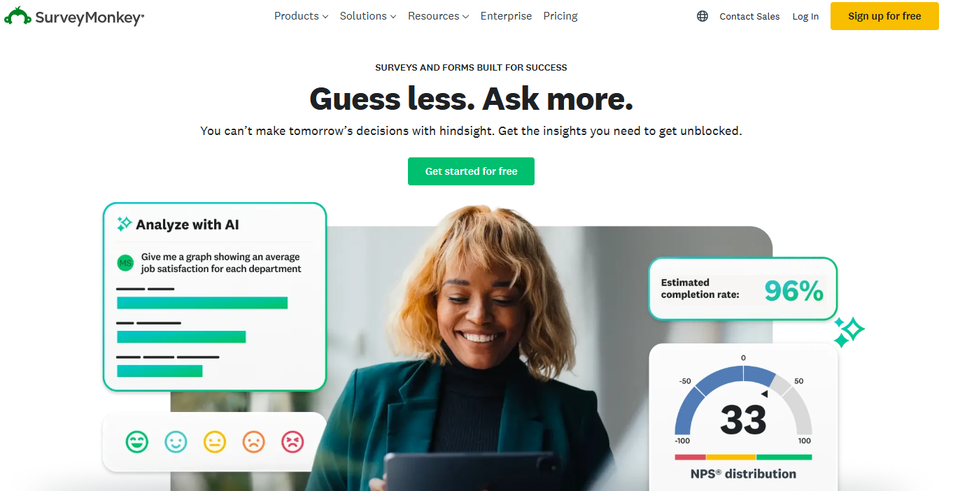







SurveyMonkey is a powerful online survey and questionnaire creation platform that enables businesses, teams, and researchers to collect, analyze, and leverage feedback quickly and efficiently. With an intuitive editor, ready-to-use templates, and advanced customization options, you can create questionnaires tailored to all your needs, whether for customer studies, internal surveys, product feedback, or satisfaction assessments. Responses are centralized in a clear dashboard with visual analysis tools to interpret the data and draw actionable insights.
SurveyMonkey also offers advanced features such as conditional logic, panel management, integration with CRM/marketing tools, and multi-channel distribution options (email, web link, social media). The platform helps organizations improve engagement, optimize strategic decisions, and measure the real impact of their actions, while ensuring the confidentiality and security of respondents' data. It is an essential solution for any organization wishing to structure its surveys and obtain reliable data.
A solution to meet every challenge:
SurveyMonkey is an online platform for creating surveys and questionnaires, offering a comprehensive solution for designing, distributing, and analyzing online surveys. This cloud-based platform enables businesses, researchers, marketers, and individuals to collect valuable data from their target audience.
SurveyMonkey's strength lies in its ability to make survey research accessible to everyone by allowing even users without technical expertise to create professional surveys. The platform offers a modular approach that adapts just as well to the simple needs of a sole proprietor as it does to the complex requirements of a multinational corporation seeking to conduct in-depth market research.
With over 20 million active users worldwide, SurveyMonkey has developed a comprehensive ecosystem that goes far beyond simply creating surveys. The solution includes tools for statistical analysis, response segmentation, team collaboration, and integration with the leading productivity tools used in businesses.
This wealth of features makes SurveyMonkey a versatile tool that effectively supports your data collection projects, whether you're looking to gauge customer satisfaction, assess employee engagement, or conduct in-depth market research.
Aggressive pricing for useful features: The tool isn’t really accessible to everyone since the basic features are locked behind expensive subscriptions. The free version of SurveyMonkey is almost token, with its limit of 10 questions. As soon as you need essential features like exporting data to Excel or conditional logic (if the user answers A, display question B), the prices quickly rise. For a freelancer or a small nonprofit, the annual budget can quickly become a major obstacle compared to more generous alternatives.
An interface that can feel cluttered: It’s hard to call the interface streamlined, and it’s certainly overloaded and outdated. After years of adding features, SurveyMonkey’s admin panel can feel like an airplane cockpit. While creating a simple survey is quick, navigating the advanced options and account settings requires patience. The design is starting to look a bit dated and lacks the visual fluidity found in more modern competitors like Typeform.
Limited visual customization: Despite the wide variety of templates, creative freedom is quite limited. If you’re looking to create a unique user experience or strictly adhere to a very specific brand style guide, you may find yourself frustrated. The options for layout, fonts, and colors remain fairly rigid. Your surveys will always look a bit like SurveyMonkey surveys, which can be a problem for brands that place a high priority on visual identity.
Statistical analyses that only scratch the surface: The text presented the analyses as advanced while also stating that they were superficial. SurveyMonkey is excellent for generating automatic charts and clear visual summaries. However, for researchers who need to perform multivariate analyses or complex cross-tabulations directly within the tool, the options remain basic. For truly in-depth market research, exporting data to specialized software like SPSS or Excel is often a necessary step.
The lack of a native offline mode: The tool relies entirely on a stable internet connection. For field surveys in remote areas or trade shows where Wi-Fi is unreliable, this can be a real drawback. Unlike some solutions designed for field data collection, SurveyMonkey does not offer the flexibility of a robust offline mode for capturing responses without a network connection.
SurveyMonkey offers a full range of pricing plans to meet the diverse needs of users, from individuals to large enterprises. The platform provides a fully functional free plan as well as several premium subscriptions with advanced features.
The rates are particularly competitive given the features offered, with monthly or annual billing options that allow for substantial savings.
| Plan | Rates | Included |
|---|---|---|
| Basic (Free) | 0€/month | 10 questions per survey, 100 responses per survey, 3 surveys per month |
| Standard | 39€/month | Unlimited questions, 1,000 answers per month, skip logic, custom templates |
| Advantage | 99€/month | 5,000 responses per month, text analysis, advanced export options, API |
| First | 129€/month | 7,500 responses per month, real-time dashboard, advanced integrations |
| Enterprise | Upon request | Unlimited responses, SSO, priority support, HIPAA compliance |
1️⃣ If you are a freelancer or consultant:
For one-time needs and a tight budget, Google Forms is often the ideal solution. It’s free and seamlessly integrated into the Google Workspace ecosystem, allowing you to quickly create simple customer satisfaction surveys or market research questionnaires. The intuitive interface requires no learning curve, and responses are automatically organized in Google Sheets for your analysis. Typeform is also an excellent choice if you want to impress your clients with visually appealing and interactive forms. Its conversational approach significantly improves response rates, which is particularly useful for satisfaction surveys or client discovery questionnaires. The free version more than meets the needs of a freelancer with 100 responses per month and professional, ready-to-use templates.
2️⃣ If you are a startup:
Typeform is the natural choice for startups looking to validate their product concept or understand their target market. Its advanced features, such as conditional logic and integrations with growth tools (Slack, HubSpot, Zapier), make it easy to automate your feedback workflows. Jotform offers a robust alternative with over 10,000 templates and advanced customization capabilities, ideal for creating beta sign-up forms or sophisticated product surveys. Its integrated payment system can even turn your forms into presale tools. For technical teams, Airtable Forms is worth considering because it combines form creation with a relational database, allowing you to centralize all your user feedback in an organized, scalable system that grows with your startup.
3️⃣ If you are a small business or an SME:
Microsoft Forms is a strategic choice if your company already uses the Microsoft 365 ecosystem. Native integration with Excel, SharePoint, and Teams facilitates internal collaboration and the analysis of collected data. Its quiz and assessment features are ideal for employee training or employee satisfaction surveys. JotForm stands out for its versatility and competitive pricing for SMBs, offering advanced features such as electronic signatures, online payments, and approval workflows. It is particularly well-suited for service-based businesses that collect complex customer requests. Formstack is an attractive mid-range solution with its advanced automation capabilities and native GDPR compliance, which is essential for European companies handling sensitive customer or employee data.
Otherwise, these other software programs may also be a good alternative to SurveyMonkey.