

Akiflow
Additional $50 off on your subscription








✅ Deal details:
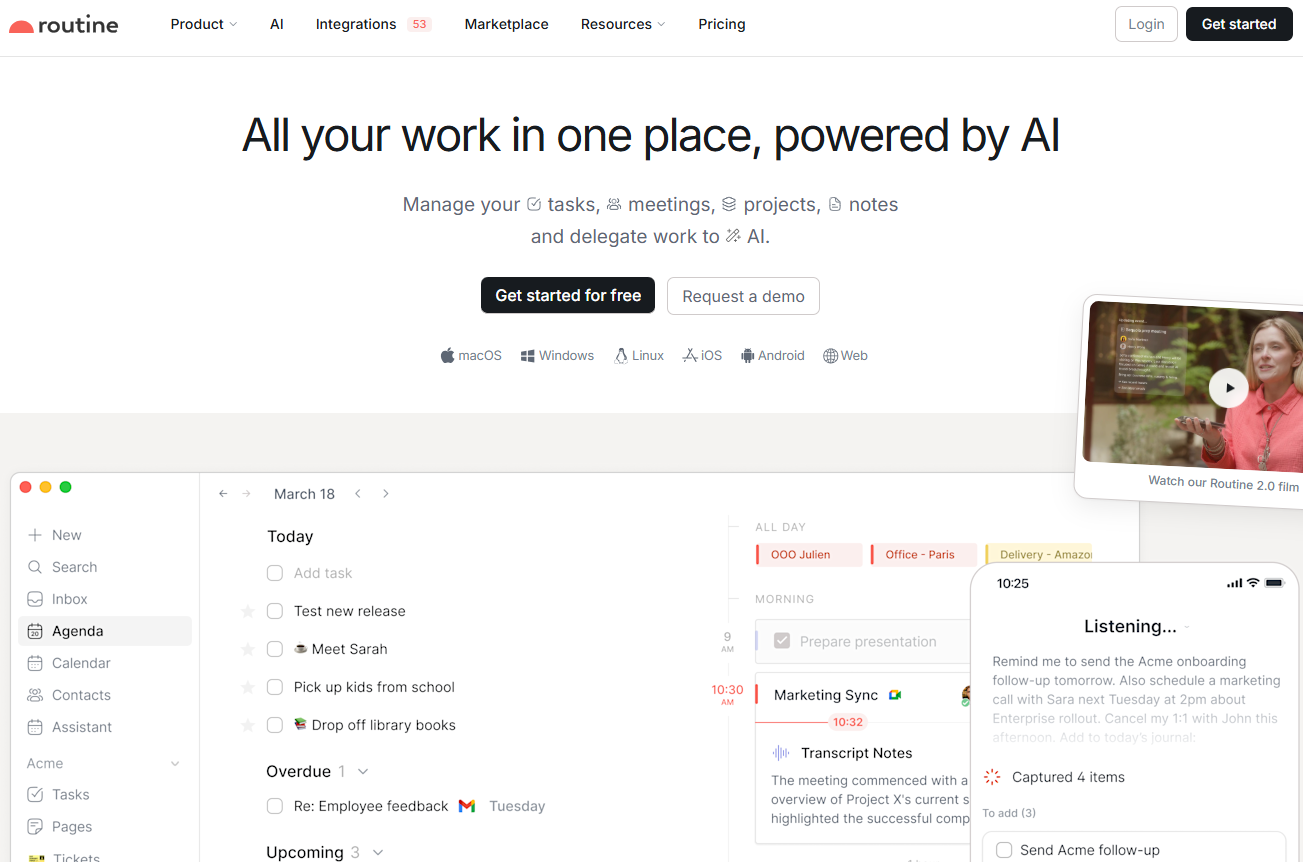
Routine brings your tasks, calendar and notes together in a single interface, built for people who spend their days switching between a calendar, a to-do list and a note-taking app. Its universal inbox pulls together tasks, messages and notifications from your other services, while time blocking lets you drag tasks straight into your calendar to reserve real working slots. Capture happens through a desktop hotkey, or by voice from mobile when you are away from your desk.
For independent professionals, the built-in time tracking makes client billing easier, since each task can be timed without reaching for a separate tool. The app connects to more than 50 integrations (Google Calendar, Slack, Outlook, Linear, Asana, Notion and others) with two-way syncing, and the AI meeting notes work across Meet, Zoom and Teams without inviting a bot into the call. Routine runs on macOS, Windows, Linux, iOS, Android and the browser, with an offline mode.
Capture everything:
Automate and delegate: Add specialized AI agents to your workforce, automate complex processes, and re Focus on s on making key decisions.
Organize and plan:
Data model:
Customize Routine by defining the entities you work with every day: customers, projects, candidates, bug reports, marketing initiatives, etc.
Expand as you grow:
Built for every team:
Routine brings together three things that most professionals juggle across separate apps: your tasks, your calendar, and your notes. Instead of switching back and forth between a to-do list, a calendar, and a note-taking tool, you work from a single workspace where everything is connected and, increasingly, powered by AI.
The heart of the product is a universal inbox that centralizes your tasks, messages and notifications so you stop losing time switching between services. Around it sits a quick capture system: a desktop hotkey lets you jot down a task in a second, attach the context it came from, and get back to what you were doing. That capture layer also works through voice, which is handy when you're away from your desk and simply want to offload something before it slips your mind.
On the AI side, Routine leans into features that go beyond a chatbot. Its meeting notes feature transcribes and summarizes calls, then turns action items into tasks automatically. Worth noting for anyone wary of intrusive tools: it works across platforms without any meeting bot joining the call, and it plugs into Google Meet, Zoom, Teams, Discord, and Slack. Beyond that, you can build AI agents and automations to handle repetitive processes, delegating the busywork and keeping your attention on decisions that actually matter.
Planning is where the calendar and task sides meet. You lay out tasks and events on a single planner, then drag tasks directly onto your calendar to block time for the work that counts. Recurrences, labels, priorities, and projects keep everything organized without much ceremony, and recurring tasks stay on autopilot once set up.
For teams and power users, Routine gets deeper. A customizable data model lets you define the objects you deal with every day, whether that's clients, projects, candidates, or bug reports, and turn the app into something closer to an operating system for how you work. Custom databases, flexible views for dashboards and reports, and separate workspaces for access control round out the picture. It connects to 53 integrations with two-way sync, runs on macOS, Windows, Linux, iOS, Android, and the web, and keeps working offline.
Routine keeps its pricing simple with four paid tiers and a free plan; the main difference between them is the amount of AI you use and whether you're working alone or with a team. The prices below are shown in U.S. dollars per month, as listed on Routine's official pricing page, so it's worth confirming the exact currency and billing cycle at checkout before publication.
| Plan | Price | Best for |
|---|---|---|
| Free | $0 forever | Tasks, calendars, notes, AI assistant, 3 integrations, 250 AI credits |
| Personal | $5 per month | Time blocking, exporting, 10 integrations, 500 AI credits |
| Professional | $10/month | AI meeting notes, agents, automations, time tracking, 7,000 AI credits |
| Business | $15 per seat per month | Workspaces, access control, priority support, 10,000 AI credits per seat |
| Enterprise | Custom quote | Compliance, audit logs, SSO, analytics, dedicated success manager |
The free plan is generous enough to let you truly test the workflow, and most individual users will find what they need with the Personal or Professional plans. The upgrade to Business is really about team features rather than individual productivity.
1️⃣ If you're a freelancer or consultant:
Your priority is usually a single, low-friction place to run your day and keep track of client work. Todoist is the natural pick if you want something lighter and faster to adopt, with excellent task capture and no learning curve. Sunsama takes the opposite approach, building a calm daily planning ritual that pulls your tasks and calendar into one intentional agenda, which suits anyone who wants to plan deliberately rather than react. If your friction is mostly around scheduling, Akiflow consolidates tasks and calendar events into one command-driven view, while Motion leans on AI to auto-schedule your work into open slots so you spend less time arranging your own calendar.
2️⃣ If you're a startup:
Here the goal is often to consolidate tools and move fast without paying for five overlapping subscriptions. Notion is the reference for an all-in-one workspace, combining docs, notes, and databases with enormous flexibility, though it asks for more setup. Coda sits in similar territory, blending documents and structured data into interactive tools your team can actually operate. For product and engineering teams that value speed and focus, Linear offers a fast, opinionated issue and project tracker, and Taskade brings AI-assisted task management and collaboration into a lighter package well suited to small, fast-moving teams.
3️⃣ If you're a small or medium-sized business:
At this stage, the focus shifts to structured project management and keeping everyone on the same page as operations scale. ClickUp is the most feature-rich option, covering tasks, documents, goals, and dashboards all in one platform. Asana and Monday.com are solid choices when you want clear workflows, visual project views, and reporting that non-technical team members will actually use. Basecamp takes a deliberately simpler, more relaxed approach to team coordination, and Zoho Projects is worth considering if you’re already using the broader Zoho suite and want a project management solution that integrates seamlessly with your other business tools.
Otherwise, these other software programs may also be a good alternative to Routine.No resources currently available.