

logo anime freelance stack white
Logo de l'outil Routine sur Freelance Stack

All deals (850+)

Logo de l'outil Routine sur Freelance Stack

Routine

Free Deal
2 deals available
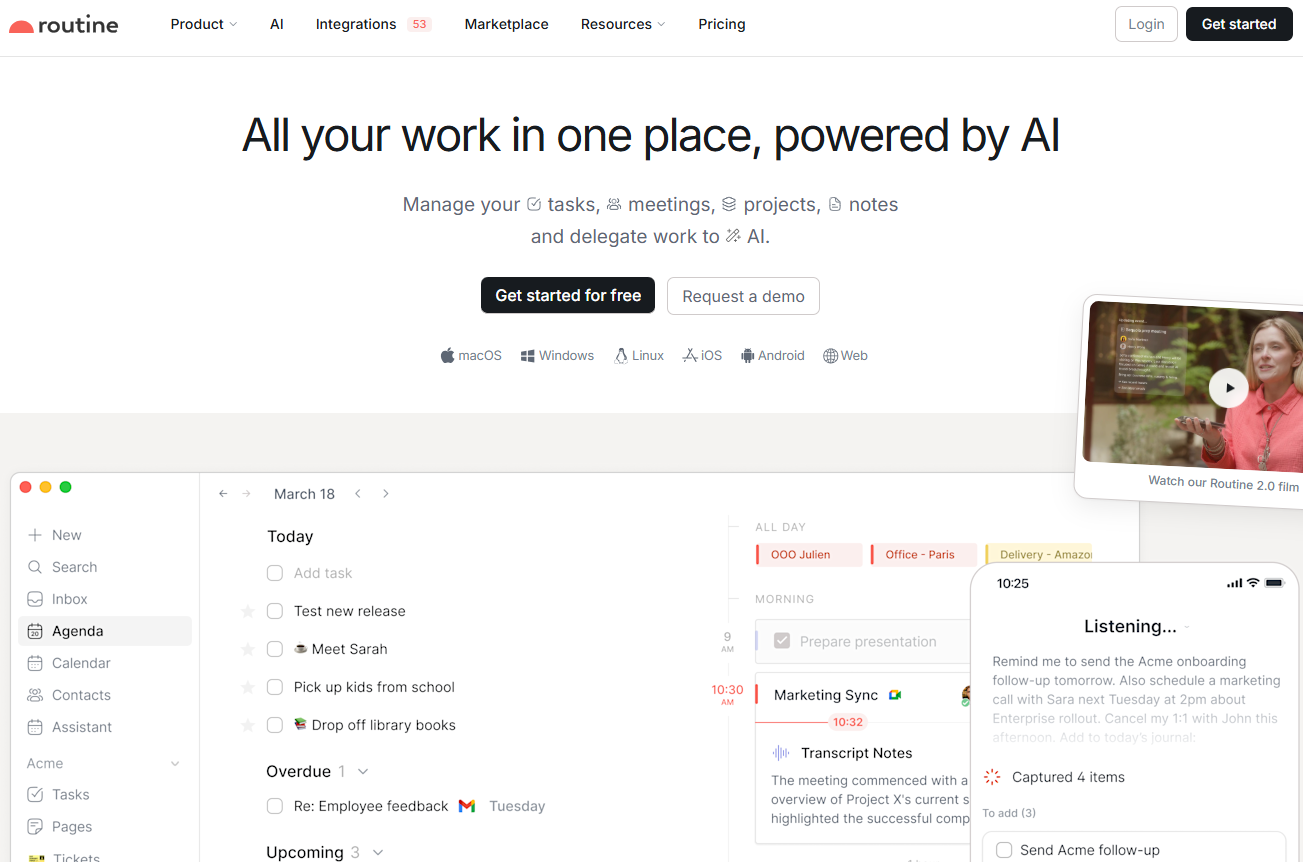
All your work in one place, powered by AI.
Manage your tasks, meetings, projects, and notes, and delegate work to AI.
Logo NotionLogo MakeLogo AirtableLogo BoltLogo StripeLogo Brevo
Save big with 850+ deals 💶
Explore all deals
Illustration of Routine on Freelance Stack's deal page
2 deals available
Free Deal
Premium Deal #1

15% off on annual plan

All our deals are negotiated by our team to give you the best discount and are updated regularly.
This deal requires you to create a new account to benefit from the discount. It is reserved for new customers

4 months free

All our deals are negotiated by our team to give you the best discount and are updated regularly.
This deal is available to new customers or customers on a free plan of the tool.
Save Money !
Logo Freelance Stack blanc
Freelance Stack 
Premium
Access our 850+ exclusive promo code for $55/year.
Logo NotionLogo MakeLogo AirtableLogo BoltLogo StripeLogo Brevo
and over 850 other deals.
and +850...
general information
ALTERNATIVES
YOU MAY ALSO LIKE...

📅 August 2026 -

 Our promo code verified with the software 

Routine

Benefit from 4 months for free on Routine.

Save4 months on a Routine subscription thanks to our exclusive partnership.

Freelance Stack is the first deals platform to access best discounts, coupon codes and credits on 850+ software, SaaS and online services for entrepreneurs and startups. We offer exclusive and validated discounts that we negotiate directly with partners to help you to grow and save money. Our coupon codes enable thousands of entrepreneurs, startups, freelancers and consultants to save thousands of euros on the best softwares.

Don’t wait any longer and save 4 months on Routine.

📄 Information about 

Routine

Routine brings your tasks, calendar and notes together in a single interface, built for people who spend their days switching between a calendar, a to-do list and a note-taking app. Its universal inbox pulls together tasks, messages and notifications from your other services, while time blocking lets you drag tasks straight into your calendar to reserve real working slots. Capture happens through a desktop hotkey, or by voice from mobile when you are away from your desk.

For independent professionals, the built-in time tracking makes client billing easier, since each task can be timed without reaching for a separate tool. The app connects to more than 50 integrations (Google Calendar, Slack, Outlook, Linear, Asana, Notion and others) with two-way syncing, and the AI meeting notes work across Meet, Zoom and Teams without inviting a bot into the call. Routine runs on macOS, Windows, Linux, iOS, Android and the browser, with an offline mode.

Capture everything:

  • Universal Inbox: Centralize all your tasks, messages, and notifications, and stop wasting time switching between apps and services.
  • Quick capture: Create tasks at lightning speed using a desktop hotkey, add context to them, and stop switching between apps and services.
  • AI voice assistant: Use your voice to delegate tasks such as remembering or organizing, especially when you're on the go.
  • AI meeting notes: Summarize meetings and automatically turn action items into tasks to ensure nothing falls through the cracks. Works on all platforms, without any meeting bot!

Automate and delegate: Add specialized AI agents to your workforce, automate complex processes, and re Focus on s on making key decisions.

Organize and plan:

  • Planner: Plan your tasks and events on a single screen.
  • Time blocking: Set aside time for your most important tasks to ensure they get done.
  • Labels, priorities, and projects: Categorize your work with labels, assign priorities, and organize everything into projects.
  • Recurrences: Schedule recurring tasks with ease, and never miss a beat again.

Data model:
Customize Routine by defining the entities you work with every day: customers, projects, candidates, bug reports, marketing initiatives, etc.

Expand as you grow:

  • Databases: Integrate your third-party services to aggregate data into Routine databases and create additional databases to suit your workflows.
  • Views: Visualize data the way you need to build powerful dashboards, reports, and workflows.
  • Workspaces: Divide your organization into logical workspaces to keep data separate and manage access control.

Built for every team:

  • Founders: Never lose s Focus on s of what matters, and make a difference every day.
  • Startups: Consolidate multiple apps into a single workspace to reduce costs and move faster.
  • Freelancers: Manage your entire workflow, from meetings and notes to tasks, so you never lose track of projects and clients
  • SMBs: Adapt your work processes and scale your operations thanks to Routine's extensibility.

📋 Routine features:

In this section, you will find our opinion the main features of Routine. All of these features are subject to regular updates. We recommend that you check that they are available before purchasing any software.

Routine brings together three things that most professionals juggle across separate apps: your tasks, your calendar, and your notes. Instead of switching back and forth between a to-do list, a calendar, and a note-taking tool, you work from a single workspace where everything is connected and, increasingly, powered by AI.

The heart of the product is a universal inbox that centralizes your tasks, messages and notifications so you stop losing time switching between services. Around it sits a quick capture system: a desktop hotkey lets you jot down a task in a second, attach the context it came from, and get back to what you were doing. That capture layer also works through voice, which is handy when you're away from your desk and simply want to offload something before it slips your mind.

On the AI side, Routine leans into features that go beyond a chatbot. Its meeting notes feature transcribes and summarizes calls, then turns action items into tasks automatically. Worth noting for anyone wary of intrusive tools: it works across platforms without any meeting bot joining the call, and it plugs into Google Meet, Zoom, Teams, Discord, and Slack. Beyond that, you can build AI agents and automations to handle repetitive processes, delegating the busywork and keeping your attention on decisions that actually matter.

Planning is where the calendar and task sides meet. You lay out tasks and events on a single planner, then drag tasks directly onto your calendar to block time for the work that counts. Recurrences, labels, priorities, and projects keep everything organized without much ceremony, and recurring tasks stay on autopilot once set up.

For teams and power users, Routine gets deeper. A customizable data model lets you define the objects you deal with every day, whether that's clients, projects, candidates, or bug reports, and turn the app into something closer to an operating system for how you work. Custom databases, flexible views for dashboards and reports, and separate workspaces for access control round out the picture. It connects to 53 integrations with two-way sync, runs on macOS, Windows, Linux, iOS, Android, and the web, and keeps working offline.

📊 Routine Pros and Cons:

This section provides a summary of the advantages and limitations of using Routine on a daily basis. We are not paid or influenced by brands, and this content is solely our own. These features, their advantages and disadvantages are likely to change regularly, both positively and negatively. If you have complex needs, we invite you to contact the software publisher directly for more information about your requirements. 

👍 Pros with Routine:

  • One workspace instead of five: The strongest argument for Routine is consolidation. Having tasks, a calendar, and notes all in one place eliminates the constant context switching that fragments a workday, and for many users, that single source of truth is reason enough to switch.
  • True time-blocking: Since tasks and the calendar share the same interface, dragging a task into a time slot feels natural rather than like an afterthought. If you plan your days by assigning work to specific hours, this is one of the cleanest implementations available.
  • AI that does real work: The meeting notes feature stands out precisely because it doesn’t require a bot to be present during your call, and the agents and automations allow you to offload recurring processes rather than just asking questions. This is closer to delegation than to a simple assistant.
  • Works everywhere, including offline: Native apps on every major platform, plus a fully functional offline mode, mean your setup stays with you and doesn't crash when the connection drops.
  • Extensible when you need it: The custom data model and databases let the tool grow with you, from a personal task list to a lightweight operating system for a small team, without forcing you into a rigid structure from day one.

👎 Cons with Routine:

  • AI usage is capped by plan: Each tier comes with a fixed pool of AI credits (250 on Free, 500 on Personal, 7,000 on Professional). Heavy users of meeting notes, agents, and automations will feel those ceilings and may need to move up a plan to stay comfortable.
  • Several features are still on the roadmap: A number of features are listed as “coming soon” rather than “released,” including the public API, webhooks, templates, comments, public sharing, and two-factor authentication. If any of these are essential to your workflow right now, it’s worth checking their status before committing.
  • A younger ecosystem: Compared to long-established tools, Routine has a smaller library of community templates and third-party resources. You'll likely build your own setup rather than using someone else's ready-made system.
  • Member limit on the lower tiers: Collaboration is limited to five members on the Free, Personal, and Professional plans, while Business and Enterprise plans offer unlimited members. Growing teams hit that limit fairly quickly.
  • The real challenge of adoption: The flip side of breadth is that consolidating your work into Routine requires deliberate effort. Migrating from existing tools and getting a team to adopt a single system is an investment, even if the app itself is easy to learn.

💰 Routine pricing:

All prices listed are taken from the Routine software website. However, these prices are subject to change regularly. We recommend that you check them directly on each software's website to be sure. 

Routine keeps its pricing simple with four paid tiers and a free plan; the main difference between them is the amount of AI you use and whether you're working alone or with a team. The prices below are shown in U.S. dollars per month, as listed on Routine's official pricing page, so it's worth confirming the exact currency and billing cycle at checkout before publication.


Plan Price Best for
Free $0 forever Tasks, calendars, notes, AI assistant, 3 integrations, 250 AI credits
Personal $5 per month Time blocking, exporting, 10 integrations, 500 AI credits
Professional $10/month AI meeting notes, agents, automations, time tracking, 7,000 AI credits
Business $15 per seat per month Workspaces, access control, priority support, 10,000 AI credits per seat
Enterprise Custom quote Compliance, audit logs, SSO, analytics, dedicated success manager


The free plan is generous enough to let you truly test the workflow, and most individual users will find what they need with the Personal or Professional plans. The upgrade to Business is really about team features rather than individual productivity.

💬 Frequently asked questions about Routine's promo:

In this section, you will find all the main questions you may have about accessing this discount. We wanted to provide you with as much information as possible to help you save as much as possible on your software subscriptions. 

1️⃣ How to access to the deal with Routine?

This promo code allows you to save money and enjoy premium features on Routine paid plans and subscriptions. Check the eligibility criteria on this page to see if you can benefit from this discount. Don't miss out on the opportunity to pay less for your subscription to one of the best tools on the market.

2️⃣ Why Freelance Stack can help you to access to Routine discount?

As a partner of Routine, you can easily save on your subscription to this software. Without us or another affiliate partner, you will have difficulties to activate the discount. We are the largest discount promo code platform for software and SaaS in the world.

3️⃣ How to use Routine deal?

To use the discount with Routine, you need to click on the various buttons that may be available on the right side of the deal page and follow the instructions to unlock this promotion.

4️⃣ What are Routine's promo requirements?

We specify all the terms and conditions on each deal page. You must click on the various buttons on the deal page to view all the terms and conditions. This deal is available to new customers or customers on a free plan with Routine.

🔄 Alternatives to Routine software:

Find the right software with our suggestions for alternative solutions.

When growing a business, comparing the right tools is essential. With thousands of options available, these solutions are strong alternatives to Routine 
Indeed, Routine is a solution that can adapt according to your needs:

1️⃣ If you're a freelancer or consultant:

Your priority is usually a single, low-friction place to run your day and keep track of client work. Todoist is the natural pick if you want something lighter and faster to adopt, with excellent task capture and no learning curve. Sunsama takes the opposite approach, building a calm daily planning ritual that pulls your tasks and calendar into one intentional agenda, which suits anyone who wants to plan deliberately rather than react. If your friction is mostly around scheduling, Akiflow consolidates tasks and calendar events into one command-driven view, while Motion leans on AI to auto-schedule your work into open slots so you spend less time arranging your own calendar.

2️⃣ If you're a startup:

Here the goal is often to consolidate tools and move fast without paying for five overlapping subscriptions. Notion is the reference for an all-in-one workspace, combining docs, notes, and databases with enormous flexibility, though it asks for more setup. Coda sits in similar territory, blending documents and structured data into interactive tools your team can actually operate. For product and engineering teams that value speed and focus, Linear offers a fast, opinionated issue and project tracker, and Taskade brings AI-assisted task management and collaboration into a lighter package well suited to small, fast-moving teams.

3️⃣ If you're a small or medium-sized business:

At this stage, the focus shifts to structured project management and keeping everyone on the same page as operations scale. ClickUp is the most feature-rich option, covering tasks, documents, goals, and dashboards all in one platform. Asana and Monday.com are solid choices when you want clear workflows, visual project views, and reporting that non-technical team members will actually use. Basecamp takes a deliberately simpler, more relaxed approach to team coordination, and Zoho Projects is worth considering if you’re already using the broader Zoho suite and want a project management solution that integrates seamlessly with your other business tools.

Otherwise, these other software programs may also be a good alternative to Routine

🆕 Our new Premium deals:

We offer discounts on 650+ different software. We regularly add new discounts on the best software for freelancers, consultants and entrepreneurs.

Discover these new software in addition to the deal we offer with Routine.

👤 Our members have just used these other deals:

We offer on 850+ different software. That's both a lot and a little compared to all the software that exists and that could help you in your business as entrepreneur or business owner.

Discover new software and discounts to complement the deal we offer on Routine

🔗 Related resources and articles:

We've gathered a selection of resources that might interest you. You'll discover exclusive content related to Routine.

Our blog allows you to find guides, comparisons, tutorials to help you grow your business with the best software and SaaS available on the market. Don't wait any longer, the best tips are here!

No resources currently available.