Asana
50% off on Starter" and "Advanced" annual plan

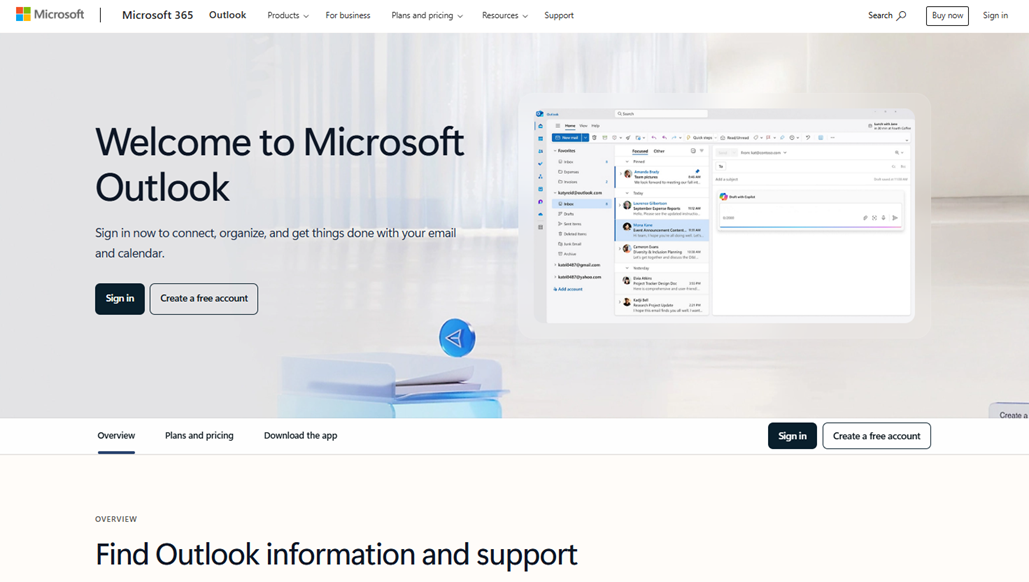







Outlook offers a unified solution for managing your e-mail, calendar and contacts on the web, desktop and mobile. It centralizes your accounts (Outlook.com, Gmail, Yahoo, iCloud) and provides extensive storage space, accessible wherever you are. Advanced security features protect your data with threat detection, encryption and ransomware prevention.
Featuring a fluid interface, Outlook integrates Copilot to automatically prioritize your messages and suggest personalized responses. The intelligent calendar schedules meetings according to availability and sends contextual reminders to optimize your time. Powerful search tools and dynamic filters let you find important content instantly.
Here are the main features of Outlook :
Outlook uses its professional-level security features to analyze attachments and links for threats. Encryption prevents the transfer of sensitive information.
Organize your schedule, track your parcels and flights, and set reminders so you don't forget a thing.
Eliminate jumbled mail with the priority inbox and tidying features. Set e-mails to Repeat mode and bookmark important messages.
Manage Outlook.com, Gmail, Yahoo and iCloud simultaneously in a single interface.
Draft, summarize and prioritize your e-mails automatically thanks to built-in AI.
Create rules and workflows to sort, reply and resend your messages without manual effort.
Interact with your inbox via an intuitive chat interface.
Connect Outlook natively to Teams, OneDrive, Zoom and other services for greater efficiency.
Microsoft Outlook is one of the most comprehensive email and personal information management solutions available in the business market. Much more than just an email client, this application is an integral part ofthe Microsoft 365 ecosystem and serves as a true communication hub for businesses of all sizes. Its ability to centralize emails, calendars, contacts, and tasks within a unified interface makes it an must-have tool must-have optimizing daily productivity.
Outlook’s approach is distinguished by its philosophy of native integration with other Microsoft services, creating a cohesive work environment where data flows seamlessly between applications. This natural synergy allows users to switch seamlessly between composing emails, scheduling meetings, and collaborating on documents, all while maintaining a comprehensive view of their professional activities.
Another key strength of this platform lies in its flexibility, as it can adapt to the needs of a entrepreneur business entrepreneur easily entrepreneur the complex requirements of a multinational corporation. This adaptability is reflected in its modular features, which can be activated according to the specific needs of each organization.
This wealth of features positions Microsoft Outlook as a central communication solution capable of organizing and optimizing information flows within organizations, while offering the flexibility needed to adapt to changes in modern work practices.
Microsoft Outlook offers several pricing plans to meet the diverse needs of users, ranging from individuals to large enterprises. Microsoft's strategy is to offer Outlook primarily through its Microsoft 365 subscriptions, which include the entire Office suite.
Here is a detailed overview of the various plans available, along with their current pricing:
| Plan | Rates | Included |
|---|---|---|
| Outlook.com (Free) | €0/month | 15 GB of storage, web version, mobile apps |
| Microsoft 365 Personal | €7/month | Outlook for desktop, 1 TB of OneDrive storage, full Office suite for 1 user |
| Microsoft 365 Home | €10/month | Outlook for desktop, 1 TB of OneDrive storage per user, Office suite for 6 users |
| Microsoft 365 Business Basic | €5.60 per user per month | Outlook Web and Mobile, Exchange Online, 1 TB of OneDrive storage, Teams |
| Microsoft 365 Business Standard | €12.20 per user per month | Full desktop version of Outlook, Office suite, Exchange Online, Teams, SharePoint |
| Microsoft 365 Business Premium | €20.60 per user per month | All Business Standard features + advanced security, device management, and threat protection |
| Exchange Online Plan 1 | €3.80 per user per month | Outlook Web Only, 50 GB mailbox, calendar, contacts |
| Exchange Online Plan 2 | €7.50 per user per month | Outlook Web, 100 GB mailbox, unlimited archiving, advanced protection |
Microsoft Outlook's pricing is based on a subscription model designed to maximize perceived value by bundling multiple services. The free Outlook.com offeringis an excellent starting point for casual users or those who want to test the basic features. This version offers 15 GB of storage-which is still generous compared to many competitors-and provides access to essential email, calendar, and contact management features via the web interface and mobile apps.
For individuals who want access to the full desktop version of Outlook, Microsoft 365 Personal at €7 per monthis the most affordable option. This subscription includes not only the most advanced version of Outlook, but also the entire Office suite (Word, Excel, PowerPoint), as well as 1 TB of OneDrive storage. This bundled approach allows Microsoft to offer an attractive price for Outlook while encouraging users to adopt its full ecosystem.
The Microsoft 365 Familyplan , priced at €10 per month, extends these benefits to up to six users, making it a particularly cost-effective solution for households. Each family member gets their own 1 TB of OneDrive storage and can install the apps on their personal devices. This family plan exemplifies Microsoft’s strategy to build user loyalty from an early age and foster long-term usage habits.
In the business segment, the Microsoft 365 Business suite offers three subscription tiers. Business Basic, priced at €5.60 per user per month,includes only the web and mobile versions of Outlook, but also features Exchange Online with business-grade capabilities such as secure email, shared calendars, and integration with Teams. This plan is ideal for companies that prefer cloud-based solutions and do not require desktop applications.
Business Standard, priced at €12.20 per user per month, marks a significant milestone by including full-featured desktop applications. This plan offers the most comprehensive Outlook experience, complete with all advanced features: sophisticated sorting rules, deep integration with other Office applications, full offline mode, and extensive interface customization. The addition of SharePoint and premium versions of Teams makes it a complete collaborative solution.
Business Premium, priced at €20.60 per user per month, is designed for security-conscious businesses. In addition to all the features of Business Standard, this plan includes Microsoft Defender for Office 365, which protects against advanced threats such as phishing and malware. Mobile device management features allow IT administrators to control access to corporate email from personal smartphones and tablets.
For organizations that want to focus solely on email, Exchange Online Plan 1, priced at €3.80 per user per month,offers Outlook on the web with 50 GB of storage per mailbox. This option is suitable for businesses that already use other office suites but want to take advantage of Microsoft’s robust email infrastructure. However, the limitation to web-based versions may be a drawback for users accustomed to the advanced features of the desktop version.
Exchange Online Plan 2, priced at €7.50 per user per month,doubles storage space to 100 GB and includes unlimited archiving capabilities. This plan also includes compliance and e-discovery tools that are particularly valuable in regulated industries. Advanced threat protection rounds out this package for businesses with strict email security requirements.
Microsoft's pricing structure reflects a sophisticated approach to market segmentation. Annual plans, which typically offer a discount to 20% discount compared to monthly subscriptions, encourage long-term commitment. Microsoft also offers special rates for educational institutions, with discount for students and academic staff.
It should be noted that these rates are subject to changedepending on Microsoft’s business strategy and market conditions. The company regularly adjusts its prices-usually upward-justifying these increases by citing the addition of new features or improvements to existing services. Business customers are generally given several months’ notice before any price changes take effect.
1️⃣ If you are a freelancer or consultant:
For your freelance work, Thunderbird is a particularly appealing free and open-source alternative. This Mozilla email client offers a customizable interface and advanced filtering features, perfect for organizing your client communications at no extra cost. Spark is also a smart choice, thanks to its modern approach to email management. Its smart sorting system helps you automatically prioritize important messages from your prospects and clients. The streamlined interface makes it easy to manage your daily professional communications. If you’re looking for an all-in-one solution, Notion can partially replace Outlook by centralizing your emails through integrations, while managing your client projects, notes, and schedule in a single workspace. This unified approach is particularly well-suited for consultants who juggle multiple projects and need a comprehensive overview of their work.
2️⃣ If you are a startup:
Startups often benefit from Google Workspace, which integrates Gmail with a comprehensive collaboration suite including Drive, Meet, and Calendar. This solution eliminates Outlook licensing costs while offering native synchronization across all your team’s tools. Zoho Mail stands out as a cost-effective alternative with tiered pricing that scales with your growth. The Zoho ecosystem allows you to gradually add CRM, accounting, and project management tools as needed. For tech teams, Slack combined with a simple email client can revolutionize your internal communication. This approach separates team discussions from external client communications, improves productivity, and reduces information overload. Slack integrations with your development and management tools create a modern and efficient work environment, particularly suited for agile startups that prioritize speed of execution.
3️⃣ If you are a small business or an SME:
Established businesses often value Zimbra for its stability and enterprise-grade features at a manageable cost. This solution offers professional webmail, a shared calendar, and collaboration tools without relying on Microsoft. Hosting can be managed in-house or outsourced, depending on your preferences. eM Client faithfully replicates the Outlook experience with an interface that’s familiar to your teams, while offering more attractive pricing. It seamlessly manages Exchange, Gmail, and other email services within a unified interface. For data-conscious SMBs, Protonmail Business combines enhanced security with professional features. This Swiss solution automatically encrypts your communications and includes a secure calendar. It is particularly well-suited for sensitive sectors such as healthcare, legal, or finance, where the confidentiality of communications is a major concern for your company’s reputation and regulatory compliance.
Otherwise, these other software programs may also be a good alternative to Microsoft Outlook.No resources currently available.