logo anime freelance stack white
Logo de l'outil Forms.app sur Freelance Stack
All deals (850+)
Freelance Stack > Legal > Form & Online Survey >

Forms.app Promo Code

Logo de l'outil Forms.app sur Freelance Stack

Forms.app

Premium Deal
1 deal available
Effortlessly create online forms that make an impact.
Forms.app helps businesses craft the best forms & turn their data into impactful results.
Save big with 850+ deals 💶
Explore all deals
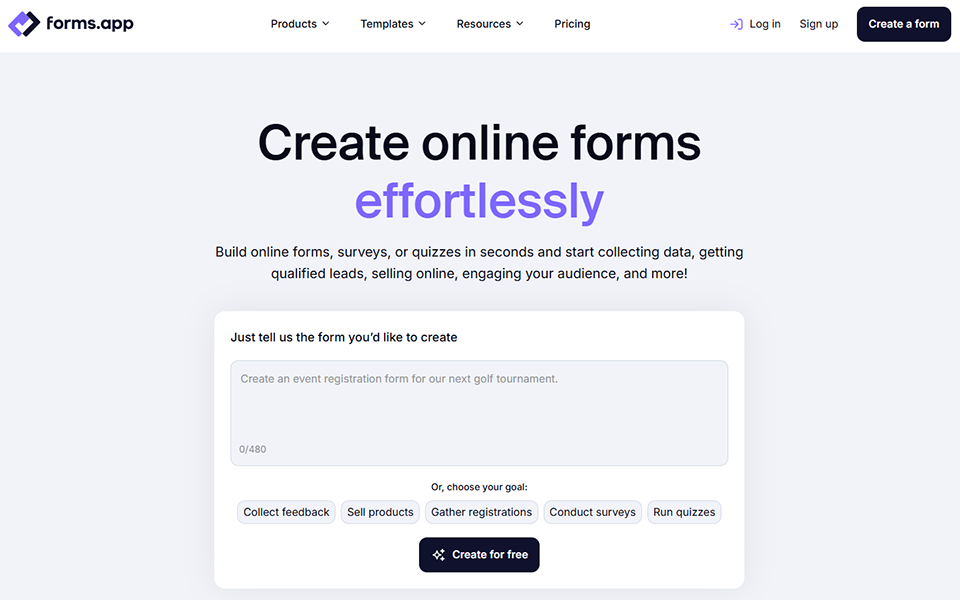
Illustration of Forms.app on Freelance Stack's deal page
1 deal available
Premium Deal #1

50% off on any plan during 12 months

All our deals are negotiated by our team to give you the best discount and are updated regularly.
This deal is available to new customers or customers on a free plan of the tool.
Save Money !
Logo Freelance Stack blanc
Freelance Stack 
Premium
Access our 850+ exclusive promo code for $55/year.
and over 850 other deals.
and +850...
general information
ALTERNATIVES
YOU MAY ALSO LIKE...

📅 April 2026 -

 Our promo code verified with the software 

Forms.app

Benefit from 50% off on any plan during 12 months on Forms.app.

Save 50% off on any plan during 12 months on Forms.app thanks to our exclusive partnership.

Freelance Stack is the first deal platform to offer discountss, coupon codes and credits on 650+ software, SaaS and online services for entrepreneurs and startups. We offer exclusive, validated discounts that we negotiate directly with vendors to save you money. Our coupon codes enable thousands of entrepreneurs, startups, freelancers and consultants to save thousands of euros on software subscriptions.

Don't wait any longer and save 50% off on any plan during 12 months on Forms.app.

📄 Information about 

Forms.app

Forms.app is an intuitive platform for creating customizable online forms, surveys, quizzes, and polls. It offers a user-friendly interface with drag-and-drop functionality, enabling users to build forms without coding.

The tool integrates with third-party applications, allowing seamless data collection and automation. It's ideal for gathering feedback, event registration, customer surveys, and more.

Here are the key features of Forms.app:

  • Multi-language Support:

Forms can be created in various languages, enabling businesses to reach a wider, international audience by offering forms tailored to specific language preferences.

  • Embed Forms:

Easily embed forms into any website, blog, or landing page, making them accessible to your audience directly where they interact with your brand.

  • File Uploads:

Allow users to submit files, images, or documents along with their form responses, facilitating efficient data collection and sharing.

  • Security Features:

Protect user data by adding CAPTCHA verification and SSL encryption, ensuring that your forms are safe and secure for both users and businesses.

  • Analytics & Reporting:

View detailed reports on form submissions and performance, helping you track trends and make data-driven decisions.

  • Customizable Notifications:

Set up automatic email notifications to receive alerts whenever a form is submitted, keeping you informed and responsive in real time.

📋 Forms.app features:

In this section, you will find our opinion the main features of Forms.app. All of these features are subject to regular updates. We recommend that you check that they are available before purchasing any software.

Forms.app is aform builder that bridges the gap between simplicity and advanced functionality. Unlike many competitors that force you to choose between ease of use and powerful features, this platform delivers both through an intuitive drag-and-drop interface combined with sophisticated automation capabilities. The tool caters to businesses of all sizes, from solopreneurs creating simple contact forms to enterprises managing complex multi-step workflows and data collection processes.

What sets Forms.app apart is its extensive template library, featuring over 5,000 pre-built forms for virtually every industry and use case imaginable. Whether you need registration forms, surveys, order forms, or feedback collection tools, the platform provides ready-made solutions that can be customized to match your brand and specific requirements. The platform also excels in payment integration, supporting multiple payment gateways and currencies, making it particularly valuable for businesses that need to collect payments directly through their forms.

The platform's conditional logic capabilities enable dynamic form experiences where questions and fields appear or disappear based on user responses, creating more engaging and personalized interactions. This smart functionality reduces form abandonment rates and ensures that users see only relevant questions, significantly streamlining the data collection process.

  • Advanced Form Builder: The core editor combines drag-and-drop simplicity with powerful customization options, allowing you to create everything from basic contact forms to complex multi-page surveys. You can add various field types, including file uploads, date pickers, signature fields, and rating scales, while maintaining complete control over styling and layout.
  • Conditional Logic and Smart Branching: Create dynamic forms that adapt to user responses in real time, showing or hiding fields, sections, or entire pages based on previous answers. This feature enables sophisticated survey logic and personalized user experiences that guide respondents through relevant pathways.
  • Payment Processing Integration: Seamlessly collect payments through integrated gateways such as PayPal, Stripe, and Square, supporting multiple currencies and payment methods. The platform handles secure transactions while providing detailed payment analytics and automated receipt generation.
  • Automated Workflows and Email Notifications: Set up sophisticated automation sequences that trigger based on form submissions, sending customized emails to respondents, team members, or external systems. You can create multi-step email campaigns and conditional notifications based on specific response criteria.
  • Team Collaboration Tools: Share forms and results with team members through customizable permission levels, enabling collaborative editing, response management, and data analysis. The platform supports role-based access control and real-time collaboration features.
  • Advanced Analytics and Reporting: Access comprehensive submission analytics-including completion rates, drop-off points, and response patterns-through interactive dashboards. Export data in multiple formats and integrate with third-party analytics tools for deeper insights.
  • Mobile Optimization and Responsive Design: All forms automatically adapt to different screen sizes and devices, ensuring an optimal user experience across desktop, tablet, and mobile platforms. The responsive design maintains functionality and aesthetics regardless of device type.
  • Integration Ecosystem: Connect with over 30 popular business tools, including CRM systems, email marketing platforms, cloud storage services, and project management tools, through native integrations and Zapier connections.
  • Custom Branding and White-Label Options: Remove Forms.app branding and apply your own company colors, logos, and custom domains to create a seamless brand experience. Advanced users can implement custom CSS for complete design control.
  • Data Security and Compliance Features: Protect sensitive information with SSL encryption, GDPR compliance tools, and data retention controls. The platform provides audit trails and meets various international data protection standards.

Forms.app successfully combines user-friendly design with enterprise-level functionality, making it suitable for users ranging from small business owners to large organizations. The platform's strength lies in its ability to scale with your needs, offering simple solutions for basic requirements while providing the depth and flexibility necessary for complex data collection scenarios.

📊 Forms.app Pros and Cons:

This section provides a summary of the advantages and limitations of using Forms.app on a daily basis. We are not paid or influenced by brands, and this content is solely our own. These features, their advantages and disadvantages are likely to change regularly, both positively and negatively. If you have complex needs, we invite you to contact the software publisher directly for more information about your requirements. 

👍 Pros with Forms.app:

  • Extensive Library of Ready-to-Use Templates: With thousands of templates available, you almost never have to start with a blank page. They cover everything from simple contact forms to industry-specific surveys. You can search by category, choose a structure that works, and then customize it. It’s a huge time-saver for freelancers who need to deploy a professional-looking form in minutes rather than hours.
  • Practical Logic and Smart Automations: The tool makes it easy to build forms that respond to user input. You can set up rules to show or hide fields based on previous answers, which keeps surveys relevant and concise. It also handles automatic calculations and dynamic pricing for basic order forms. While it might not replace a complex database engine, it covers nearly all standard business needs by making forms feel more like a conversation than a static list of questions.
  • Essential Third-Party Integrations: You can quickly link your forms to core business tools like Google Sheets, Slack, Mailchimp, or Stripe. Setup is fast and doesn’t require technical skills to get data flowing automatically. While the native library focuses on the most popular apps, the built-in Zapier and Make integrations allow you to bridge the gap with thousands of other specialized platforms if your workflow requires more niche connections.
  • Clear Performance Tracking: Once you start receiving responses, the platform provides a clear overview of your data through charts and filters. You can view completion rates and identify where people might be dropping off. It’s perfect for getting a quick sense of your audience without getting bogged down in overly technical data, and you can easily export everything to Excel or CSV for more detailed internal reporting.
  • Mobile-first design with offline capabilities: All forms created on Forms.app are automatically optimized for mobile devices, ensuring consistent functionality across smartphones, tablets, and desktop computers. The responsive design adapts seamlessly to different screen sizes while maintaining usability and visual appeal. Additionally, the platform supports offline data collection, allowing users to complete forms even when internet connectivity is poor or unavailable. Responses are stored locally and automatically synchronized once a connection is reestablished, making it particularly valuable for field work, events, or areas with unreliable internet access.
  • Enterprise-grade security and compliance features: Forms.app implements bank-level security measures, including SSL encryption, secure data transmission, and compliance with major privacy regulations such as GDPR and CCPA. The platform offers detailed privacy controls, allowing you to specify data retention periods, configure consent management, and implement access restrictions based on user roles. For organizations handling sensitive information, these security features provide peace of mind while ensuring compliance with industry standards and regulatory requirements without requiring technical expertise to implement them properly.

👎 Cons with Forms.app:

  • Limited Advanced Logic and Conditional Branching: While Forms.app offers basic conditional logic features, it falls short when you need complex branching scenarios or sophisticated skip patterns. Users requiring multi-layered conditional workflows or intricate form paths may find themselves limited by the platform's relatively straightforward logic system. This limitation becomes particularly apparent when creating complex surveys, multi-step applications, or forms that need to adapt dynamically based on multiple user responses.
  • Limited Integration Ecosystem: Compared to industry leaders like Typeform or Google Forms, Forms.app’s integration library is significantly smaller and less comprehensive. You may find it difficult to connect your forms with specialized CRM systems, advanced marketing automation tools, or niche business applications that your workflow relies on. While basic integrations with popular platforms like Zapier are available, the depth and variety of native integrations remain limited, potentially forcing you to rely on third-party middleware solutions.
  • Basic Analytics and Reporting Capabilities: The platform's reporting features, while functional, lack the depth and sophistication that data-driven organizations typically require. You won't find advanced analytics such as conversion funnel analysis, detailed response time tracking, or comprehensive demographic breakdowns. For businesses that need to extract meaningful insights from form data or create detailed performance reports, these analytical limitations can be a significant drawback.
  • Strict Design Limits: If you have a very specific brand identity to follow, you might find the editor a bit rigid. You can easily change colors and fonts, but deep layout modifications or custom CSS injection are limited. It’s great for clean, standard designs, but agencies looking for total pixel-perfect control might feel restricted by the fixed structures.
  • Performance Issues with Complex Forms: Users have reported occasional slowdowns and loading issues when working with forms that contain numerous fields, multiple pages, or extensive conditional logic. The platform may become less responsive during peak usage times, and form loading speeds may be affected when dealing with image-heavy or media-rich forms. This inconsistent performance can impact the user experience, particularly for public-facing forms where loading speed directly affects completion rates.

💰 Forms.app pricing:

All prices listed are taken from the Forms.app software website. However, these prices are subject to change regularly. We recommend that you check them directly on each software's website to be sure. 

Forms.app offers a flexible pricing structure that caters to the needs of every user, from individuals to large corporations. The platform provides a generous free plan to get started, along with several paid options for accessing advanced features.

Rates are calculated on a monthly basis, but customers receive significant discounts when they commit to an annual plan. Each plan includes specific quotas for forms, submissions, and features to accommodate different usage levels.


Plan Pricing Includes
Basic Free 10 forms, 100 submissions per month, 100 MB of storage
Pro $25/month 100 forms, 1,000 submissions per month, 1 GB of storage, conditional logic
Premium $45/month Unlimited forms, 10,000 submissions per month, 10 GB of storage, advanced integrations
Enterprise By quote Unlimited submissions, unlimited storage, priority support, custom SLA

💬 Frequently asked questions about Forms.app's promo:

In this section, you will find all the main questions you may have about accessing this discount. We wanted to provide you with as much information as possible to help you save as much as possible on your software subscriptions. 

1️⃣ How to access to the deal with Forms.app?

This promo code allows you to save money and enjoy premium features on Forms.app paid plans and subscriptions. Check the eligibility criteria on this page to see if you can benefit from this discount. Don't miss out on the opportunity to pay less for your subscription to one of the best tools on the market.

2️⃣ Why Freelance Stack can help you to access to Forms.app discount?

As a partner of Forms.app, you can easily save on your subscription to this software. Without us or another affiliate partner, you will have difficulties to activate the discount. We are the largest discount promo code platform for software and SaaS in the world.

3️⃣ How to use Forms.app deal?

To use the discount with Forms.app, you need to click on the various buttons that may be available on the right side of the deal page and follow the instructions to unlock this promotion.

4️⃣ What are Forms.app's promo requirements?

We specify all the terms and conditions on each deal page. You must click on the various buttons on the deal page to view all the terms and conditions. This deal is available to new customers or customers on a free plan with Forms.app.

🔄 Alternatives to Forms.app software:

Find the right software with our suggestions for alternative solutions.

When growing a business, comparing the right tools is essential. With thousands of options available, these solutions are strong alternatives to Forms.app 
Indeed, Forms.app is a solution that can adapt according to your needs:

1️⃣ If you are a freelancer or consultant:

For independent professionals looking for alternatives to Forms.app, Typeform remains a top choice thanks to its conversational interface that turns data collection into an engaging experience. Its elegant templates and advanced conditional logic allow you to create sophisticated client questionnaires without any technical expertise. JotForm is also an excellent option, offering thousands of ready-to-use templates and native integrations with client management tools like HubSpot or Salesforce. Its generous free version is perfect for freelancers just starting out. For those who prioritize simplicity and speed, Google Forms offers a reliable and free solution that’s seamlessly integrated into the Google Workspace ecosystem, making it ideal for quick client surveys and basic lead generation.

2️⃣ If you are a startup:

Fast-growing startups will find Airtable Forms to be a powerful alternative that combines form creation with a structured database. This solution allows you to centralize all collected data in a collaborative environment where your team can analyze and leverage information in real time. Notion Forms is a strategic choice for startups already using Notion, offering native integration with your workspace and enabling you to create automated workflows between data collection and your internal processes. Tally stands out for its flexibility and ability to create complex forms with advanced conditional logic, while providing essential collaboration features for growing teams. Its modern approach and integrations with productivity tools make it a natural fit for tech startups.

3️⃣ If you are a small or medium-sized business (SMB):

Established companies looking for a robust alternative to Forms.app may turn to Microsoft Forms, especially if they already use the Office 365 ecosystem. This solution offers enterprise-grade security and integrates seamlessly with SharePoint, Teams, and Power Automate to create sophisticated business workflows. SurveyMonkey remains a benchmark for companies that need advanced analytical tools and detailed reporting, with segmentation and industry benchmarking features particularly useful for market research. For SMBs that prioritize total control over their data, LimeSurvey offers an open-source, self-hosted solution that guarantees maximum privacy while providing professional features such as advanced questionnaire customization and data export in all standard formats.

Otherwise, these other software programs may also be a good alternative to Forms.app

🆕 Our new Premium deals:

We offer discounts on 650+ different software. We regularly add new discounts on the best software for freelancers, consultants and entrepreneurs.

Discover these new software in addition to the deal we offer with Forms.app.

👤 Our members have just used these other deals:

We offer on 850+ different software. That's both a lot and a little compared to all the software that exists and that could help you in your business as entrepreneur or business owner.

Discover new software and discounts to complement the deal we offer on Forms.app