logo anime freelance stack white
Logo Streamlabs sur Freelance Stack
All deals (850+)
Logo Streamlabs sur Freelance Stack

Streamlabs

Premium Deal
1 deal available
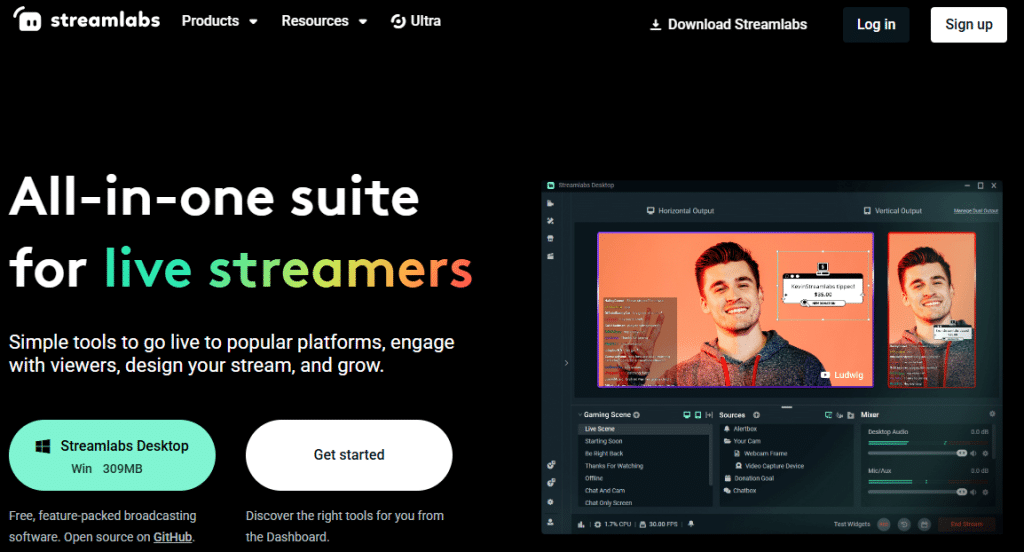
All-in-one suite for live streamers.
Simple tools to stream live on popular platforms, interact with your viewers, design your stream and develop yourself.
Save big with 850+ deals 💶
Explore all deals
Illustration of Streamlabs on Freelance Stack's deal page
1 deal available
Premium Deal #1

$20 off on annual plan + 7 days free

All our deals are negotiated by our team to give you the best discount and are updated regularly.
This deal is available to new customers or customers on a free plan of the tool.
Save Money !
Logo Freelance Stack blanc
Freelance Stack 
Premium
Access our 850+ exclusive promo code for $55/year.
and over 850 other deals.
and +850...
general information
ALTERNATIVES
YOU MAY ALSO LIKE...

📅 May 2026 -

 Our promo code verified with the software 

Streamlabs

Benefit from $20 off on annual plan + 7 days free on Streamlabs.

Save $20 off on annual plan + 7 days free on Streamlabs thanks to our exclusive partnership.

Freelance Stack is the first deal platform to offer discountss, coupon codes and credits on 650+ software, SaaS and online services for entrepreneurs and startups. We offer exclusive, validated discounts that we negotiate directly with vendors to save you money. Our coupon codes enable thousands of entrepreneurs, startups, freelancers and consultants to save thousands of euros on software subscriptions.

Don't wait any longer and save $20 off on annual plan + 7 days free on Streamlabs.

📄 Information about 

Streamlabs

Streamlabs is a comprehensive live streaming platform designed to help content creators manage, personalize and monetize their live streams. Whether you're a novice streamer or an experienced professional, Streamlabs offers powerful tools to enhance the interactivity, engagement and quality of your broadcasts.

Streamlabs integrates easily with popular streaming platforms such as Twitch, YouTube and Facebook Live, enabling streamers to personalize their live broadcasts and create unique experiences for their viewers. In addition, the platform offers a premium version, Streamlabs Prime, which provides advanced features such as custom themes, access to a library of exclusive alerts and additional personalization tools.

Streamlabs' main features:

  • Customizable alerts:

Create personalized visual and audio alerts for each important event (new subscribers, donations, follow-ups, etc.) to maintain engagement with your viewers during streaming.

  • Interactive widgets:

Add interactive widgets like donation bars, subscriber rankings, follower counters and live chats to encourage interaction and make your broadcasts more dynamic.

  • Video overlays:

Customize the look of your live broadcast with attractive video overlays, animations and graphics to enhance the visual appearance of your streams.

  • Live chat tools:

Integrate interactive chat on your screen to interact in real time with your viewers, allowing them to actively participate in the broadcast.

  • Monetization through donations:

Make it easy for your viewers to donate with an integrated money collection system, enabling creators to receive financial support in real time.

  • Performance analysis and monitoring:

Access detailed reports on your broadcasts, including view, engagement and growth statistics, to optimize your content and enhance your viewers' experience.

  • Integration with popular streaming platforms:

Streamlabs integrates seamlessly with platforms such as Twitch, YouTube, and Facebook Live, making it easy to customize and manage your broadcasts across multiple channels.

  • Streamlabs Prime (premium version):

Access exclusive features with Streamlabs Prime, including custom themes, premium alerts, additional overlays and advanced customization tools.

  • High-quality recording and broadcasting:

High-quality live broadcasts with recording options to create archives of your streams and share them on other platforms.

  • Customer support and community:

Benefit from dedicated technical support and access to an active community of content creators to share tips and tricks.

📋 Streamlabs features:

In this section, you will find our opinion the main features of Streamlabs. All of these features are subject to regular updates. We recommend that you check that they are available before purchasing any software.

Streamlabs is a leading platform for content creators looking to take their live streams to the next level. This all-in-one solution combines streaming, monetization, and community engagement tools into a single, user-friendly interface. Whether you’re a beginner streamer on Twitch, a YouTube Gaming creator, or a multi-platform broadcaster, Streamlabs helps you build a professional streaming ecosystem without requiring advanced technical skills.

The Streamlabs ecosystem stands out for its all-in-one approach, which eliminates the need to switch between multiple apps. The platform natively integrates streaming features, graphic design tools, notification systems, donation management, and even merchandising solutions. This centralized approach allows creators to focus on their content rather than the technical aspects of their streams.

Unlike more technical solutions such as OBS Studio, Streamlabs focuses on automation and ease of use. The platform offers pre-configured templates, drag-and-drop widgets, and native integrations with major streaming platforms, making the setup process accessible even to users with little technical experience.

  • Streamlabs Desktop: serves as the heart of the system with its OBS-based streaming software, which has been significantly simplified. The interface lets you configure scenes, manage audio and video sources, and start streaming with just a few clicks. Preconfigured templates offer professional layouts that are ready to use right away, while the built-in scene editor allows for advanced customization without technical complexity.
  • Alert System and Widgets: Turn every interaction from your audience into a spectacular moment with customizable animations for follows, donations, subscriptions, and raids. These visual and audio elements boost your community’s engagement while creating a distinctive visual identity. The widgets integrate seamlessly into your overlays and can be fully customized to match your brand guidelines.
  • Streamlabs Cloudbot: automates your chat moderation and enhances your viewers’ experience with custom commands, a loyalty points system, and interactive mini-games. The chatbot also handles music requests and real-time polls, and can automatically distribute rewards to your active audience.
  • Built-in monetization tools: include donation management with customizable tip pages, merch integration, and even premium subscription features. The platform makes it easy to diversify your revenue streams by centralizing all these channels in a unified dashboard with detailed tracking of your financial performance.
  • Streamlabs Video Editor: lets you quickly create highlights from your streams to share on social media. The tool automatically detects the highlights of your broadcasts and offers pre-configured clips optimized for YouTube, TikTok, or Twitter. This feature is particularly valuable for maintaining an active presence across all your platforms.
  • Companion mobile app: lets you control your stream remotely, monitor your chat, manage your alerts, and even stream directly from your smartphone. This flexibility is especially useful for IRL (In Real Life) streamers or for staying connected with your community even when you’re not at your main setup.
  • Analytics and detailed statistics: provide a clear overview of your performance with viewer tracking, revenue analysis, engagement statistics, and reports on your community’s growth. This data helps you optimize your broadcast schedules, identify your top-performing content, and make informed decisions to grow your audience.

The Streamlabs ecosystem truly excels in its ability to save creators time by automating repetitive tasks and simplifying complex processes. This approach allows streamers to focus on what really matters: creating engaging content and growing their community.

📊 Streamlabs Pros and Cons:

This section provides a summary of the advantages and limitations of using Streamlabs on a daily basis. We are not paid or influenced by brands, and this content is solely our own. These features, their advantages and disadvantages are likely to change regularly, both positively and negatively. If you have complex needs, we invite you to contact the software publisher directly for more information about your requirements. 

👍 Pros with Streamlabs:

  • Ultra-fast all-in-one setup: Streamlabs Desktop drastically simplifies getting started with streaming. Unlike OBS Studio, which requires you to configure every element manually, everything here is centralized. With just a few clicks, you can import your scenes, alerts, and broadcast settings. It’s the ideal solution for those who want to launch their first live stream in under ten minutes without having to follow complex technical tutorials on encoding.
  • A comprehensive ecosystem of integrated tools: Streamlabs’ main strength lies in its ability to centralize all a creator’s needs within a single platform. You get streaming software, a donation and subscription management system, chat moderation tools, detailed analytics, and even content creation options like basic video editing. This integration eliminates the need for multiple subscriptions and significantly simplifies the day-to-day management of your channel, while ensuring seamless compatibility between all components.
  • An exceptional library of visual resources: Streamlabs offers an impressive collection of themes, overlays, animated alerts, and customizable widgets, which is constantly being expanded by the community and the development team. These professional-quality visual elements allow you to create a consistent visual identity without any design skills. The templates are tailored to different content genres (gaming, IRL, educational) and evolve with current trends, helping you maintain a visually appealing and modern stream.
  • Automatic hardware configuration: The software scans your components and internet speed to suggest appropriate default settings. This prevents beginners from making critical mistakes, such as choosing a bitrate that’s too high, which would cause their stream to lag. It’s a valuable tool for getting started with a smooth stream without any technical knowledge, even though manual adjustments are often preferable for truly optimizing resources.
  • Native integration with popular platforms: Streamlabs excels at seamlessly connecting with Twitch, YouTube, Facebook Gaming, and TikTok Live, making simultaneous multi-platform streaming a breeze. Platform-specific features are automatically supported, including retrieving follower information, managing Twitch Bits, and integrating YouTube Super Chats. This multi-platform approach allows you to expand your audience without complicating your technical workflow.
  • Comprehensive and diversified monetization system: The platform offers complete solutions for generating revenue from your streams, ranging from traditional donations to personalized merchandise. The tip page system makes it easy for your community to contribute financially, while analytics tools help you identify the moments that generate the most revenue. Integration with multiple payment services and automated thank-you messages create a seamless experience for both you and your supporters, optimizing your monetization potential without any additional technical effort.

👎 Cons with Streamlabs:

  • Excessive use of system resources: Streamlabs OBS can be particularly resource-intensive, especially on less powerful systems. Its rich graphical interface and built-in widgets consume more CPU and RAM compared to standard OBS Studio. This increased resource usage can cause frame rate drops during streaming or recording, which is particularly problematic when streaming demanding games. Streamers with modest PCs will often have to compromise on visual quality or disable certain features to maintain acceptable performance.
  • Cluttered interface and constant marketing prompts: While setup is simple, daily use can become tedious. The interface is cluttered, filled with buttons and menus for widgets, merchandising, or third-party apps. Additionally, the software frequently pushes its Prime (Ultra) subscription, which may turn off users who are simply looking for a streamlined streaming interface. You often end up spending more time closing pop-up windows than setting up your scenes.
  • Key features locked behind the Ultra subscription: The free version is fully functional for streaming on a single platform, but things get complicated as soon as you want to expand. Simultaneous streaming on multiple platforms (Twitch and TikTok at the same time, for example) comes at a cost. Similarly, most of the truly modern graphic themes and the smoothest animated overlays require a fairly expensive monthly subscription, which quickly limits customization options for creators who haven’t yet generated any revenue.
  • Software bloat and crash risks: By trying to integrate everything into a single application, Streamlabs has become very resource-intensive. This accumulation of layers (the streaming engine + web widgets + stores) can cause slowdowns or unexpected program crashes. On older machines or during major updates, it’s not uncommon for an alert to fail to display or for the software to consume more resources than the game itself.
  • Closed ecosystem and platform dependency: The tight integration with the Streamlabs ecosystem creates a certain level of dependency that can become restrictive over time. Migrating to other solutions becomes complex because overlays, widgets, and configurations are specifically designed for the Streamlabs environment. This proprietary approach limits flexibility and can pose problems if you want to switch tools or use third-party solutions. The commercial focus of certain features can also influence technical choices at the expense of pure performance.

💰 Streamlabs pricing:

All prices listed are taken from the Streamlabs software website. However, these prices are subject to change regularly. We recommend that you check them directly on each software's website to be sure. 

Streamlabs offers a freemium model with free basic features and premium options for content creators looking to professionalize their streaming setup.

The platform prioritizes accessibility with a generous free plan, while offering advanced features through its Prime subscription for those who want to take their customization and engagement with their audience to the next level.


Plan Rates Included
Free Free Basic widgets, simple alerts, free overlays, Streamlabs OBS, basic chatbot, community support
Bonus €12/month or €149/year All premium overlays, advanced widgets, custom alerts, multistreaming, priority support, expanded cloud storage, and detailed analytics
Ultra €25/month or €299/year All Prime features, exclusive desktop themes, Ultra overlays, professional widgets, custom branding, premium support


Streamlabs' free planremains remarkably comprehensive for getting started with streaming. You get access to Streamlabs OBS, the platform's core streaming tool, as well as a selection of basic overlays and widgets that help you create a visually appealing stream right from the start. Basic alerts for follows, donations, and subscriptions are included, as well as a simple chatbot system to moderate your chat. This approach allows new streamers to test the entire ecosystem without any initial financial investment.

Upgrading to Streamlabs Primefor €12 per month unlocks access to the full library of premium overlays, many of which are created in collaboration with renowned designers in the gaming community. Widgets become more sophisticated with advanced customization options, allowing you to display real-time information such as top donors, latest followers, or custom counters. The multistream feature becomes available, allowing you to stream simultaneously on Twitch, YouTube, and Facebook Gaming from a single interface. Priority support ensures faster responses in case of technical issues, which is crucial during major events.

The Prime annual subscription at €149 offers a substantial savings of over 30% compared to monthly payments, making it the preferred choice for regular streamers. This plan also includes expanded cloud storage for backing up your overlay configurations and media, as well as access to detailed analytics that help you understand your stream’s performance and audience engagement.

Streamlabs Ultra, priced at €25 per month or €299 per year, is designed for professional content creators and established streamers looking to stand out. This premium plan includes exclusive desktop themes that fully customize the Streamlabs OBS interface, creating a cohesive experience between your stream and your workspace. Ultra overlays feature more complex animations and advanced visual effects, often inspired by professional esports productions. Custom branding allows you to remove all references to Streamlabs from your tools, creating a fully branded experience for your audience.

Ultra's professional widgets include features such as interactive mini-games for the audience, advanced loyalty point systems, and integrations with third-party services like Spotify to display the currently playing music. Premium support guarantees dedicated technical assistance with very fast response times, which is essential for streamers whose activities generate significant revenue.

Streamlabs' pricing strategyreflects its position as a leader in the streaming market. Unlike solutions such as OBS Studio-which remains entirely free but requires more manual configuration-or XSplit-which takes a premium approach from the outset-Streamlabs strikes a balance by making essential features available for free while monetizing professional-grade tools.

For beginner streamers, the free plan is more than enough for the first few months of streaming. It allows you to master the basics of streaming, understand your audience’s specific needs, and grow your community without financial pressure. The transition to Prime becomes a natural step once you start to feel the limitations of the free plan, which is usually when you reach around 500 to 1,000 regular followers.

Mid-tier streamerswill find that Prime offers all the tools they need to professionalize their streams without the prohibitive costs of a fully customized solution. Multistreaming is particularly valuable for diversifying their audience and reducing reliance on a single platform. Detailed analytics allow them to optimize broadcast schedules and content based on real-time engagement data.

Streamlabs Ultrais designed for established content creators, esports organizations, and brands that use streaming as a marketing tool. The removal of Streamlabs branding and advanced customization features make it a worthwhile investment for streams that generate significant revenue or represent a professional brand.

It’s worth noting that Streamlabs regularly offers seasonal promotions, particularly during Black Friday or major gaming events. These offers may include free months on annual subscriptions or temporary access to premium features. Established content creators can also negotiate preferential rates through partnerships or ambassador programs.

The flexibility of our subscription plansallows you to switch between plans without penalty, with prorated adjustments for changes made mid-period. This approach accommodates changing needs and allows you to scale your investment in line with your channel’s growth. Premium features remain active until the end of the paid period, even in the event of a downgrade, eliminating the risk of technical disruption during .

💬 Frequently asked questions about Streamlabs's promo:

In this section, you will find all the main questions you may have about accessing this discount. We wanted to provide you with as much information as possible to help you save as much as possible on your software subscriptions. 

1️⃣ How to access to the deal with Streamlabs?

This promo code allows you to save money and enjoy premium features on Streamlabs paid plans and subscriptions. Check the eligibility criteria on this page to see if you can benefit from this discount. Don't miss out on the opportunity to pay less for your subscription to one of the best tools on the market.

2️⃣ Why Freelance Stack can help you to access to Streamlabs discount?

As a partner of Streamlabs, you can easily save on your subscription to this software. Without us or another affiliate partner, you will have difficulties to activate the discount. We are the largest discount promo code platform for software and SaaS in the world.

3️⃣ How to use Streamlabs deal?

To use the discount with Streamlabs, you need to click on the various buttons that may be available on the right side of the deal page and follow the instructions to unlock this promotion.

4️⃣ What are Streamlabs's promo requirements?

We specify all the terms and conditions on each deal page. You must click on the various buttons on the deal page to view all the terms and conditions. This deal is available to new customers or customers on a free plan with Streamlabs.

🔄 Alternatives to Streamlabs software:

Find the right software with our suggestions for alternative solutions.

When growing a business, comparing the right tools is essential. With thousands of options available, these solutions are strong alternatives to Streamlabs 
Indeed, Streamlabs is a solution that can adapt according to your needs:

1️⃣ If you are a freelancer or consultant:

For content creators and entrepreneur, OBS Studio is the must-have free alternative must-have Streamlabs. This open-source solution offers complete flexibility to customize your streams without a monthly subscription. Although it requires more initial setup, it uses fewer system resources-a crucial advantage when working with limited hardware. Restream Studio is also an excellent choice for expanding your presence across multiple platforms simultaneously. Its intuitive interface lets you easily manage your multi-platform broadcasts while maintaining precise control over quality. For gaming-focused freelancers, XSplit Gamecaster offers a simplified approach with local recording features that are particularly useful for creating content after the fact. These solutions are perfectly suited to entrepreneurs tight budgets entrepreneurs delivering the professional quality needed to build audience loyalty.

2️⃣ If you are a startup:

Growing startups particularly benefit from Riverside.fm for their webinars and investor presentations. This platform excels at high-quality recording of remote interviews, which is essential for your marketing content and external communications. Zoom Webinar is the natural choice for your corporate events and product demos, offering native integration with your CRM and marketing automation tools. The advantage lies in how easily your teams-already familiar with Zoom-can adopt it. StreamYard offers a particularly compelling alternative for your social media livestreams and community Q&A sessions. Its browser-based interface eliminates complex installations and allows multiple team members to co-host with ease. These solutions prioritize ease of use and ecosystem integration-two essential criteria when you need to optimize your technical teams’ time for product development rather than configuring ancillary tools.

3️⃣ If you are a small business or an SME:

For established businesses, Wirecast offers a comprehensive professional solution with broadcast-quality features. Its higher initial investment is justified by its robustness and advanced multi-camera capabilities, ideal for your corporate events and internal training sessions. vMix is a powerful alternative particularly suited to small and medium-sized businesses that regularly produce video content. Its real-time mixing and professional hardware integration capabilities meet the broadcast-quality standards demanded by your clients. ManyCam strikes the perfect balance between simplicity and advanced features, with visual effects and multi-source management that instantly give your presentations a professional look. Its team-friendly pricing model allows you to equip multiple employees without breaking the bank. These solutions prioritize stability and professional technical support-critical factors when your external communications directly impact your company’s reputation.

Otherwise, these other software programs may also be a good alternative to Streamlabs

🆕 Our new Premium deals:

We offer discounts on 650+ different software. We regularly add new discounts on the best software for freelancers, consultants and entrepreneurs.

Discover these new software in addition to the deal we offer with Streamlabs.

👤 Our members have just used these other deals:

We offer on 850+ different software. That's both a lot and a little compared to all the software that exists and that could help you in your business as entrepreneur or business owner.

Discover new software and discounts to complement the deal we offer on Streamlabs