logo anime freelance stack white
Logo de Requestly sur la page du deal de Freelance Stack
All deals (850+)
Logo de Requestly sur la page du deal de Freelance Stack

Requestly

Premium Deal
1 deal available
A Powerful API Mocking and Testing Tool
A full suite of tools to create and share API contracts, test APIs, mock them, and integrate them with web and mobile apps with ease.
Save big with 850+ deals 💶
Explore all deals
Illustration of Requestly on Freelance Stack's deal page
1 deal available
Premium Deal #1

12 months free on "Pro" plan

All our deals are negotiated by our team to give you the best discount and are updated regularly.
This deal is available to new customers or customers on a free plan of the tool.
Save Money !
Logo Freelance Stack blanc
Freelance Stack 
Premium
Access our 850+ exclusive promo code for $55/year.
and over 850 other deals.
and +850...
general information
ALTERNATIVES
YOU MAY ALSO LIKE...

📅 May 2026 -

 Our promo code verified with the software 

Requestly

Benefit from 12 months free on "Pro" plan on Requestly.

Save 12 months free on "Pro" plan on Requestly thanks to our exclusive partnership.

Freelance Stack is the first deals platform to access best discounts, coupon codes and credits on 650+ software, SaaS and online services for entrepreneurs and startups. We offer exclusive and validated discounts that we negotiate directly with partners to help you to grow and save money. Our coupon codes enable thousands of entrepreneurs, startups, freelancers and consultants to save thousands of euros on best software.

Don't wait any longer and save 12 months free on "Pro" plan on Requestly.

📄 Information about 

Requestly

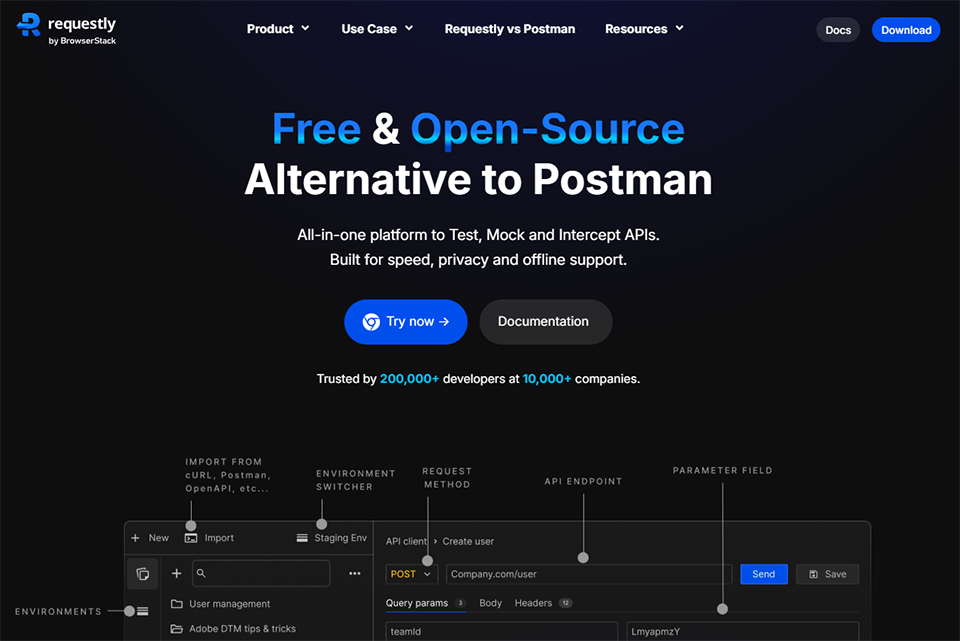
Requestly is a modern and powerful companion for API Development and Testing. It is an open-source tool purpose-built to speed up and simplify API development workflow for developers and QAs.

It is a combination of API Client and HTTP Interceptor that helps create and share API Contracts, testing APIs, and easily mock and integrate them into web and mobile apps.

Its key fonctionalities include :

  • HTTP Request and Response Modification: Intercept and modify HTTP requests and responses to test various scenarios without altering the backend.
  • API Client: Design, send, and test API requests directly within Requestly, facilitating efficient API development and debugging.
  • Mock Server : Create mock APIs to simulate backend responses, enabling frontend development and testing in isolation.
  • Session Recording: Capture and replay browser sessions to debug issues effectively and share detailed bug reports.
  • Rule Management via API: Programmatically create, update, delete, and retrieve rules to integrate with CI/CD pipelines and automate workflows.
  • Advanced Rule Features: Organize rules into groups, pin frequently used rules, apply advanced filters, and manage shared states across rules for efficient rule management.
  • GraphQL Support: Modify and test GraphQL queries and responses, providing control over GraphQL requests.
  • API Design and Testing: Define API paths, create collections, import APIs, and use variables to streamline API design and testing processes.
  • Collaboration Tools : Utilize team workspaces and shared lists to collaborate effectively with team members.

📋 Requestly features:

In this section, you will find our opinion the main features of Requestly. All of these features are subject to regular updates. We recommend that you check that they are available before purchasing any software.

Requestly is a web debugging and development tool that empowers developers, QA engineers, and web professionals to modify HTTP requests and responses in real time without touching server-side code. This browser-based solution transforms how teams approach web testing, debugging, and API manipulation by providing an intuitive interface for intercepting and modifying network traffic. Whether you're testing different API endpoints, simulating network conditions, or debugging complex web applications, Requestly eliminates the need for complex server configurations or code deployments.

The platform stands out for its no-code approach to request modification, making advanced debugging techniques accessible to both technical and non-technical team members. Rather than requiring developers to modify backend systems or set up test environments, Requestly operates entirely within the browser, offering immediate results and seamless integration with existing development workflows. This accessibility has made it an essential tool for frontend developers, QA teams, product managers, and sales engineers who need to demonstrate different application states or test various scenarios quickly.

What sets Requestly apart in the crowded field of development tools is its Focus on collaborative debugging and sharing capabilities. Teams can create, share, and manage versions of their modification rules, ensuring consistent testing environments across different team members and deployment stages. This collaborative aspect, combined with its powerful rule engine, makes Requestly particularly valuable for organizations that need to maintain complex testing scenarios or demonstrate different product configurations to stakeholders.

  • HTTP Request/Response Modification: allows you to intercept and modify any network request or response in real time, including headers, query parameters, request bodies, and response data. This feature is invaluable for testing different API responses, simulating error conditions, or modifying authentication tokens without requiring changes to the backend.
  • URL Redirection and Rewriting: enables you to redirect requests from one URL to another or dynamically modify URL patterns, making it ideal for testing different environments, A/B testing scenarios, or routing traffic to staging servers while maintaining a production-like user experience.
  • Mock Server Integration: provides a built-in mock server that can simulate API responses, allowing you to develop and test frontend applications even when backend services are unavailable or incomplete. You can create realistic mock responses with custom delays, status codes, and data structures.
  • Request Blocking and Filtering: allows you to selectively block specific network requests based on URL patterns, domains, or other criteria, enabling you to test application behavior under various network conditions or simulate blocked resources for performance testing.
  • Header Modification: provides granular control over HTTP headers, allowing you to add, remove, or modify request and response headers to test authentication scenarios, CORS policies, or content-type handling without server-side modifications.
  • Script Injection and Execution: allows you to inject custom JavaScript into web pages, modify DOM elements, or execute custom logic based on specific conditions, providing powerful customization capabilities for testing and demonstration purposes.
  • Session Recording and Playback: captures entire browsing sessions, including all network activity, user interactions, and changes, creating shareable recordings that help reproduce bugs or demonstrate specific scenarios to team members or clients.
  • Team Collaboration Features: include shared workspaces, rule versioning, and collaborative editing capabilities that ensure all team members can access and contribute to testing configurations, maintaining consistency across development and testing workflows.
  • Browser Extension and Desktop App: offer multiple deployment options with seamless synchronization across devices, ensuring that your modification rules and configurations are available whether you're working in Chrome, Firefox, or using the standalone desktop application.

These capabilities combine to create a powerful ecosystem that transforms web debugging from a reactive process into a proactive testing strategy, enabling teams to anticipate issues, validate functionality, and deliver more robust web applications with greater confidence and efficiency.

📊 Requestly Pros and Cons:

This section provides a summary of the advantages and limitations of using Requestly on a daily basis. We are not paid or influenced by brands, and this content is solely our own. These features, their advantages and disadvantages are likely to change regularly, both positively and negatively. If you have complex needs, we invite you to contact the software publisher directly for more information about your requirements. 

👍 Pros with Requestly:

  • No-code rule creation interface: Requestly eliminates the need for complex coding or browser extension development when you need to modify network requests. The platform offers an intuitive drag-and-drop interface where you can create sophisticated rules using simple dropdown menus and form fields. This accessibility means that QA testers, product managers, and designers can independently set up request modifications without waiting for developer assistance, significantly accelerating testing workflows and reducing bottlenecks in the development process.
  • Real-time request interception and modification: The tool operates seamlessly in real time, allowing you to intercept and modify HTTP requests as they occur without any delays or page refreshes. You can redirect URLs, modify headers, inject custom responses, or block specific requests instantly, making it invaluable for testing different API endpoints, simulating server responses, or debugging network-related issues. This immediate feedback loop enables rapid iteration and testing of different scenarios without the overhead of deploying code changes or setting up complex mock servers.
  • Comprehensive rule types for diverse testing needs: Requestly offers a wide range of rule types that cover virtually every network manipulation scenario you might encounter. From simple URL redirects and header modifications to complex response body replacements and request blocking, the platform provides specialized rules for A/B testing, API mocking, CORS handling, and user agent spoofing. This versatility eliminates the need for multiple tools, as you can handle everything from basic redirects to sophisticated testing scenarios within a single unified interface.
  • Wide browser and device coverage: The platform works consistently across Chrome, Firefox, Safari, and Edge, ensuring your rules remain portable. Beyond the browser, the desktop application for Mac, Windows, and Linux allows you to intercept traffic from other sources, including mobile devices and native apps. By acting as a local proxy, the tool lets you apply the same redirection and modification logic to your mobile testing environment, providing a central hub for network debugging across different screen sizes and operating systems.
  • Centralized team workspaces and sharing: The platform shifts network debugging away from individual setups by allowing teams to create shared rule sets. You can export configurations or share specific rules via a simple link, which helps developers and QA testers reproduce exact bugs without lengthy explanations of the environment. These workspaces act as a shared library, ensuring that everyone on a project is testing against the same API mocks or header modifications, which significantly reduces communication overhead during the debugging phase.

👎 Cons with Requestly:

  • Advanced security features are restricted to premium plans: While essential features such as SSO and role-based access control are available, they are typically restricted to high-level enterprise plans. For smaller teams or mid-sized companies that handle sensitive data, the cost of accessing these security and audit features can be quite high. Additionally, setting up detailed audit trails and monitoring user activity across a large organization requires a significant administrative effort that might feel excessive for smaller development teams.
  • Impact on performance in complex applications: When working with applications that make hundreds or thousands of network requests, Requestly can introduce noticeable latency, especially when multiple complex rules are active at the same time. The browser extension approach means all traffic is processed through additional layers, which can slow down page load times and affect the user experience during development. Performance degradation becomes more pronounced with JavaScript injection rules or when modifying large response payloads. Teams working on performance-critical applications may need to frequently toggle rules on and off, disrupting their testing workflow.
  • Setup hurdles for mobile and native apps: While the browser extension works almost instantly, debugging mobile applications requires a more manual setup. You must configure your mobile device to use the desktop app as a proxy and install specific security certificates to intercept encrypted traffic. This additional configuration step can be a hurdle for quick tests and may be restricted by certain corporate network policies or strict mobile security settings, making it less immediate than the desktop browser experience.
  • Steep learning curve for advanced features: Although basic request modification is straightforward, mastering Requestly's advanced capabilities-such as complex JavaScript injection, conditional rule execution, or sophisticated response transformation-requires a significant time investment. The documentation, while comprehensive, can be overwhelming for beginners who just want to perform simple tasks. Setting up collaborative team workflows and understanding how different rule types interact with each other often involves trial and error. New team members may struggle to become productive quickly, especially if they are not familiar with network debugging concepts.
  • Manual sync and workflow integration: Even with shared workspaces, the tool does not yet offer true real-time co-authoring where multiple people can edit the same rule simultaneously without overwriting changes. There is also a lack of native integration with Git or established CI/CD pipelines, meaning you have to manually manage your rule versions within the Requestly interface. For teams that want their testing rules to live alongside their source code in a repository, this creates a disconnected workflow that requires extra effort to keep in sync.

💰 Requestly pricing:

All prices listed are taken from the Requestly software website. However, these prices are subject to change regularly. We recommend that you check them directly on each software's website to be sure. 

Requestly offers a flexible pricing structure tailored to the needs of both individual developers and enterprise teams. The platform provides a generous free plan to get started, along with paid options for accessing advanced features.

The pricing is designed to scale with your projects, from personal testing to large-scale deployments that require extensive team collaboration.


Plan Pricing Includes
Free Free 5 active rules, basic features, browser extension
Basic $8/month 25 active rules, limited collaboration, email support
Professional $15/month 100 active rules, advanced features, team sharing
Company $25/month 500 active rules, full team management, priority support
Enterprise By quote Unlimited rules, on-premises deployment, dedicated support


The free planis an excellent starting point for exploring Requestly's capabilities. With its limit of 5 active rules at a time, it allows you to test core features such as header modification, URL redirection, and script injection. This limitation encourages careful use while providing enough flexibility for personal or small-scale projects.

The Basic plan, priced at $8 per month, increases the number of active rules fivefold and includes basic collaboration features. This plan is designed specifically for freelance developers or small teams just starting to organize their testing workflows. Email support ensures technical assistance when needed, while the 25 rules allow for more complex configurations.

With the Professional plan, Requestly unlocks its full potential for established development teams. The 100 active rules enable the management of multiple projects simultaneously, each with its own test configurations. Advanced features include sophisticated filtering options, more precise activation conditions, and enhanced debugging capabilities. Team sharing facilitates collaboration by allowing developers to synchronize rules.

The Company planis designed for organizations with extensive web testing needs. With 500 active rules, it supports complex development environments where multiple teams work on different aspects of large-scale web applications. Comprehensive team management features include granular permissions, administrative dashboards, and usage monitoring tools. Priority support ensures faster response times to minimize the impact of technical issues.

The Enterprise offeringis designed to meet the needs of large corporations that require complete control over their testing infrastructure. With unlimited rules, there are no usage restrictions, and on-premises deployment options ensure compliance with security and regulatory requirements. Dedicated support includes an account manager, phone assistance, and resolution times guaranteed by service level agreements.

Requestly's pricing reflects a tiered approach in which each tier offers significant benefits. Developers can start for free, assess the software's value in their daily workflow, and then upgrade to a paid plan when their needs outgrow the initial limitations. This structure helps avoid unnecessary upfront costs while providing a clear path for growth.

One particularly valuable feature is the transparency regarding limitations. Each plan clearly specifies the number of active rules allowed, preventing unpleasant surprises during use. This approach enables precise budget planning and helps teams anticipate future needs based on project growth.

For development teams, switching between plans is seamless. Existing rules are retained during upgrades, and new features become available immediately. This continuity minimizes disruptions to development cycles and allows for a gradual adoption of advanced capabilities.

The pricing structure also encourages the optimization of configurations. With clear limits on the number of active rules, users develop more efficient practices, creating versatile rather than specialized rules. This creative constraint paradoxically improves users’ mastery of the tool and the quality of test configurations.

💬 Frequently asked questions about Requestly's promo:

In this section, you will find all the main questions you may have about accessing this discount. We wanted to provide you with as much information as possible to help you save as much as possible on your software subscriptions. 

1️⃣ How to access to the deal with Requestly?

This promo code allows you to save money and enjoy premium features on Requestly paid plans and subscriptions. Check the eligibility criteria on this page to see if you can benefit from this discount. Don't miss out on the opportunity to pay less for your subscription to one of the best tools on the market.

2️⃣ Why Freelance Stack can help you to access to Requestly discount?

As a partner of Requestly, you can easily save on your subscription to this software. Without us or another affiliate partner, you will have difficulties to activate the discount. We are the largest discount promo code platform for software and SaaS in the world.

3️⃣ How to use Requestly deal?

To use the discount with Requestly, you need to click on the various buttons that may be available on the right side of the deal page and follow the instructions to unlock this promotion.

4️⃣ What are Requestly's promo requirements?

We specify all the terms and conditions on each deal page. You must click on the various buttons on the deal page to view all the terms and conditions. This deal is available to new customers or customers on a free plan with Requestly.

🔄 Alternatives to Requestly software:

Find the right software with our suggestions for alternative solutions.

When growing a business, comparing the right tools is essential. With thousands of options available, these solutions are strong alternatives to Requestly 
Indeed, Requestly is a solution that can adapt according to your needs:

1️⃣ If you are a freelancer or consultant:

As a freelancer, you need simple and effective tools to test your web applications without unnecessary complexity. Charles Proxy is an excellent option for intercepting and modifying HTTP/HTTPS traffic with an intuitive interface. Its throttling features and ability to simulate varying network conditions allow you to test your projects under realistic conditions. Postman is also essential for testing your APIs and automating your development workflows. Its shared collections facilitate collaboration with your clients and help you organize your tests. For a lighter approach, ModHeader (a Chrome extension) lets you quickly modify HTTP headers during your tests, making it perfect for validating authentication or simulating different user agents. These solutions will help you maintain a high level of quality while staying within a controlled budget.

2️⃣ If you are a startup:

Startups need scalable tools that can grow alongside their teams and technical needs. Cypress has established itself as a leader in end-to-end testing, offering a modern approach with an excellent developer experience and advanced debugging capabilities. Its rich ecosystem and active community are major assets for a growing team. Playwright is a robust alternative for cross-browser automation, particularly well-suited if your product needs to work across multiple browsers and devices. For team API management, Insomnia offers a modern interface and collaborative features that facilitate the sharing of configurations among developers. These tools provide the flexibility needed to adapt to rapidly evolving technical requirements while maintaining optimal productivity within your development team.

3️⃣ If you are a small or medium-sized business (SMB):

Established companies seek stable solutions with professional support and enterprise-grade features. BlazeMeter offers a comprehensive testing platform with load testing and continuous monitoring capabilities, ideal for maintaining the performance of your critical applications. Its compatibility with JMeter and detailed reports meet the traceability requirements of professional environments. TestComplete provides a comprehensive automated testing suite with support for desktop, web, and mobile applications, perfect for companies with diverse software ecosystems. For a more API-focused approach, ReadyAPI combines functional testing, load testing, and monitoring into an integrated solution with governance features tailored for large teams. These enterprise solutions offer the robustness, support, and advanced features needed to sustain your critical operations with guaranteed SLAs.

Otherwise, these other software programs may also be a good alternative to Requestly

🆕 Our new Premium deals:

We offer discounts on 650+ different software. We regularly add new discounts on the best software for freelancers, consultants and entrepreneurs.

Discover these new software in addition to the deal we offer with Requestly.

👤 Our members have just used these other deals:

We offer on 850+ different software. That's both a lot and a little compared to all the software that exists and that could help you in your business as entrepreneur or business owner.

Discover new software and discounts to complement the deal we offer on Requestly