Setmore
30% off on any monthly plan
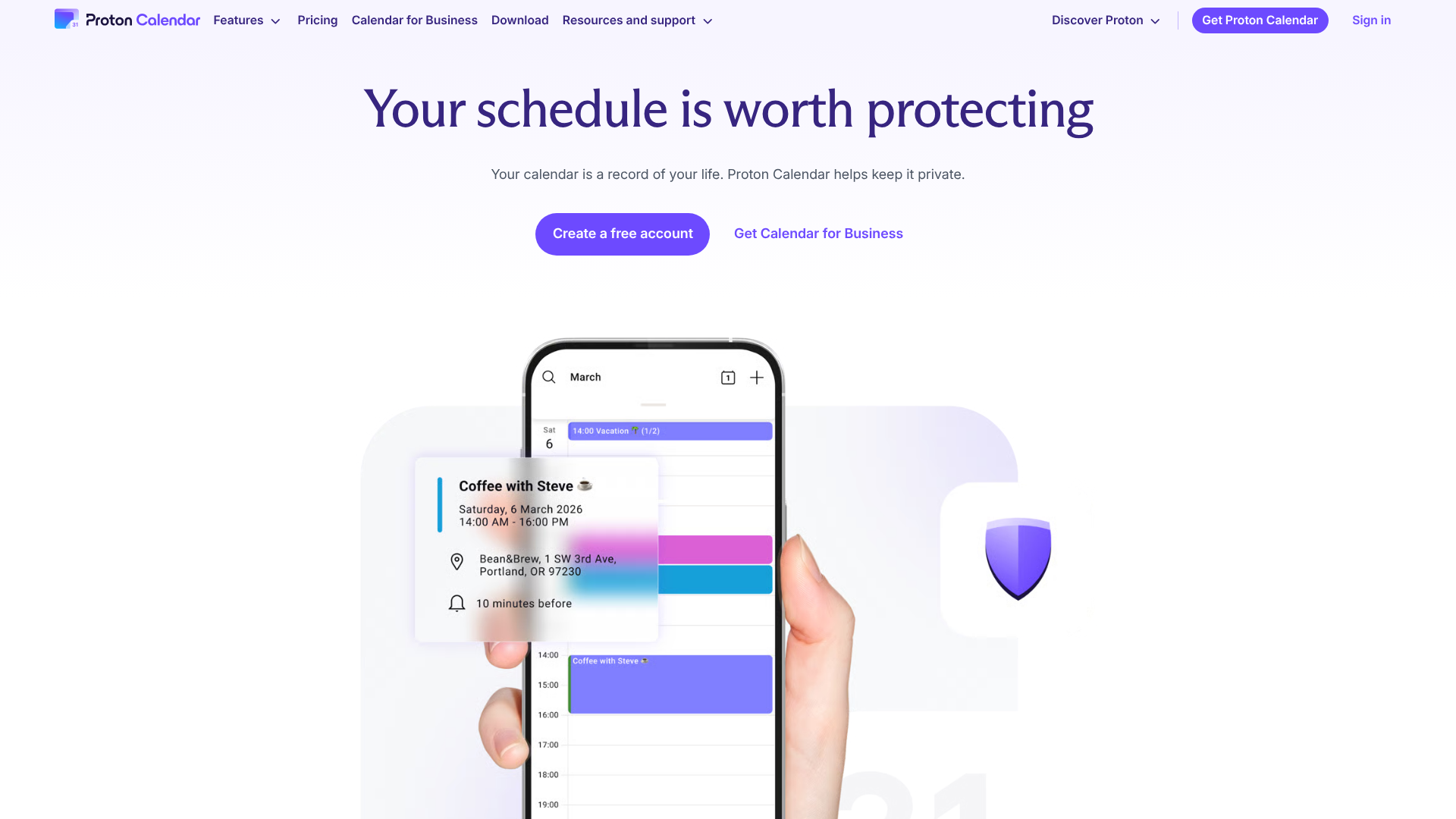






Proton Calendar is an online calendar designed to protect your privacy while allowing you to plan your appointments, meetings, and events. Thanks to end-to-end encryption, your data remains completely confidential and accessible only to you, even Proton has no access to your information. Based in Switzerland, Proton Calendar benefits from strict data protection laws, ensuring maximum security for your personal or professional schedule.
The platform offers an intuitive and easy-to-use interface, with features such as event planning, reminder and notification management, and multi-device synchronization. Ideal for individuals and professionals concerned about their privacy, Proton Calendar combines security, simplicity, and organization, allowing you to efficiently manage your days while protecting your sensitive information.
Choose the world's largest encrypted calendar service
Easily manage your schedule:
Proton Calendar is a calendar solution for anyone who refuses to sacrifice their privacy for the sake of productivity. Developed by the team behind ProtonMail, this end-to-end encrypted calendar radically transforms the traditional approach to online planning. Unlike tech giants that monetize your personal data, Proton Calendar uses Zero-Access encryption, ensuring that even Proton’s servers cannot access the content of your events, appointments, and private notes.
This " privacy by design " philosophy doesn't compromise on the user-friendliness and advanced features you expect from a modern calendar. The clean, intuitive interface makes it easy to get started right away, while the customization options are perfectly tailored to the needs of freelancers, entrepreneurs, and distributed teams. Cross-platform synchronization works seamlessly across your devices, creating a fully secure productivity ecosystem that respects your fundamental right to privacy.
Native integration with the Proton ecosystem offers a significant advantage for anyone looking to centralize their communication and planning tools under a single, secure umbrella. This holistic approach eliminates the vulnerabilities associated with using disparate services and creates a digital fortress around your business.
Proton Calendar is redefining the standards of professional calendars by demonstrating that technical excellence and privacy can coexist harmoniously, offering a credible alternative to traditional solutions that monetize your personal information.
Limited customization for experts: If you like to configure your calendar down to the last detail, you might find Proton Calendar a bit frustrating. The interface prioritizes simplicity, which means fewer layout options, complex color codes, or custom views compared to Outlook. It’s an effective tool for the basics, but it still lacks flexibility for those with very specific scheduling workflows.
Proton Calendar follows a pricing model aligned with the Proton ecosystem, offering plans tailored to individual needs. The free version already provides robust features for personal use, while paid plans unlock advanced capabilities for power users.
The pricing is particularly attractive when you opt for an annual subscription, and the native integration with other Proton services (Mail, Drive, VPN) is a major advantage for those looking for a comprehensive suite of secure tools.
| Plan | Rates | Included |
|---|---|---|
| Free | Free | 1 calendar, 3 events per day, limited sharing, end-to-end encryption |
| Mail Plus | 4,99€/month | 25 calendars, unlimited events, advanced sharing, 15 GB of total storage |
| Proton Unlimited | 9,99€/month | 25 calendars, access to all Proton services, 500 GB of storage, VPN included |
| Family | 23,99€/month | Up to 6 users, all Proton services, 3 TB of shared storage |
1️⃣ If you are a freelancer or consultant:
For your freelance business, Google Calendar remains a practical choice thanks to its native integrations with Gmail and Google Meet, which are particularly useful if your clients already use the Google ecosystem. The familiar interface makes it easy to share availability with your prospects, and automatic synchronization with your smartphone helps you avoid missing appointments. Calendly is indispensable for automating your client appointments: set up your availability once, share your booking link, and let your prospects choose their time slot without endless email exchanges. The free version covers basic needs, while paid plans add advanced features such as qualification questions or SMS reminders. Apple Calendar is an excellent alternative if you operate within the Apple ecosystem, offering seamless synchronization across your devices and a streamlined interface that respects your focus time.
2️⃣ If you are a startup:
Notion Calendar (formerly Cron) offers a modern approach to scheduling with advanced keyboard shortcuts and seamless integration with Notion for your projects. This solution is ideal for tech teams that prioritize efficiency and customization. Microsoft Outlook Calendar has become the industry standard in the professional world, especially if your startup already uses Office 365 or Teams for communication. Features for scheduling meetings, managing rooms, and sharing team calendars make it easy to coordinate between partners and early employees. Fantastical offers a premium experience with its natural language parser, which lets you create events by typing phrases like “lunch with the investor Tuesday at 2 p.m.” Although it requires a subscription, this investment can significantly speed up event entry for busy schedules where every minute counts.
3️⃣ If you are a small business or an SME:
Google Workspace Calendar offers a comprehensive solution for organizing your teams with shared calendars, shared resource management, and integration with Gmail and Google Meet. Its affordable pricing and ease of deployment make it a smart choice for businesses looking to streamline their operations without technical complexity. Microsoft 365 Calendar excels in Windows environments with its advanced meeting scheduling features, conflict resolution, and integration with other Microsoft tools. The ability to create resource calendars for your meeting rooms or equipment optimizes the use of your workspaces. Zoho Calendar is worth considering if you already use other Zoho solutions, offering native integration with Zoho CRM, Projects, and Mail. This consistency across tools simplifies workflows and reduces friction in the day-to-day management of your business.
Otherwise, these other software programs may also be a good alternative to Proton Calendar.No resources currently available.