logo anime freelance stack white
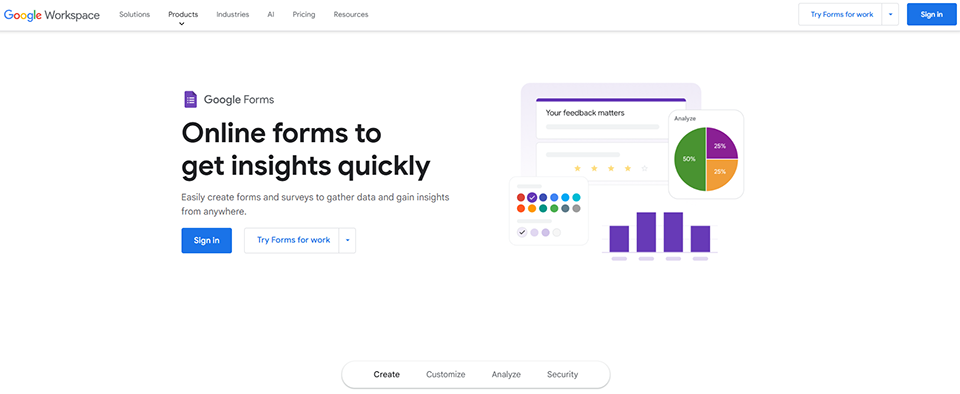
Logo de l'outil Google Forms sur Freelance Stack
All deals (850+)
Freelance Stack > Legal > Form & Online Survey >

Google Forms Promo Code

Logo de l'outil Google Forms sur Freelance Stack

Google Forms

Premium Deal
1 deal available
online form creation tool
Easily create and share online forms and surveys, and analyze responses in real time.
Save big with 850+ deals 💶
Explore all deals
Illustration of Google Forms on Freelance Stack's deal page
1 deal available
Premium Deal #1

15% off on any plan

All our deals are negotiated by our team to give you the best discount and are updated regularly.
This deal is available to new customers or customers on a free plan of the tool.
Save Money !
Logo Freelance Stack blanc
Freelance Stack 
Premium
Access our 850+ exclusive promo code for $55/year.
and over 850 other deals.
and +850...
general information
ALTERNATIVES
YOU MAY ALSO LIKE...

📅 April 2026 -

 Our promo code verified with the software 

Google Forms

Benefit from 15% off on any plan on Google Forms.

Save 15% off on any plan on Google Forms thanks to our exclusive partnership.

Freelance Stack is the first deals platform to access best discounts, coupon codes and credits on 650+ software, SaaS and online services for entrepreneurs and startups. We offer exclusive and validated discounts that we negotiate directly with partners to help you to grow and save money. Our coupon codes enable thousands of entrepreneurs, startups, freelancers and consultants to save thousands of euros on best software.

Don't wait any longer and save 15% off on any plan on Google Forms.

📄 Information about 

Google Forms

Google Forms is a free online tool from Google that makes it easy to create questionnaires, surveys, polls and registration forms. Accessible from any Internet-connected device, it lets you design customized forms in minutes, with options for adding multiple-choice questions, text fields, checkboxes and more.

Responses can be collected and viewed in real time, with the option of analyzing results in graphical form or exporting them to Google Sheets for further processing. Google Forms is particularly useful for businesses, educators, researchers and event organizers wishing to gather information simply and efficiently. It is integrated with other Google applications, making it easy to share, collaborate and automate tasks.

Create an online form as easily as a document: Choose from the different types of questions available, rearrange questions by drag-and-drop, and customize values by simply copying and pasting lists.

Send polished surveys and forms: Customize colors, images and fonts to refine the look of your documents or reflect your corporate image. Add personalized logic that matches questions to answers for a smoother experience.

Analyze responses from automatic summaries: View graphs updated in real time with collected responses. You can also access raw data via Google Sheets for further analysis or to automate procedures.

Create and answer surveys wherever you are: View, create and modify forms, wherever you're working and whatever the size of your screen. Respondents can take your survey wherever they are, and from any mobile device, tablet or computer.

  • Create forms and analyze results as a team: Add collaborators, as in Google Docs, Sheets and Slides, to write multiple questions in real time. Analyze results together, without having to share different versions of the file.
  • Work with cleansed response data: Use built-in intelligence to define rules for validating responses. For example, check that e-mail address formats are valid, or that numbers are within a specific range.
  • Share forms by e-mail, link or website: You can easily share forms with specific people or a wider audience by embedding them on your website or posting links on social networks.

📋 Google Forms features:

In this section, you will find our opinion the main features of Google Forms. All of these features are subject to regular updates. We recommend that you check that they are available before purchasing any software.

Google Forms is one of the most accessible form-building tools on the market. Natively integrated into the Google Workspace ecosystem, this free service allows users to create questionnaires, surveys, and data collection forms without any technical expertise. Its strength lies in its ease of use combined with features robust enough to meet the needs of most users, from individuals to large enterprises.

The platform stands out for its intuitive approach, which lets you go from an idea to a fully functional form in just a few minutes. The drag-and-drop interface, ready-to-use templates, and automatic synchronization with Google Sheets make it a natural choice for anyone looking to collect information in a structured way. Whether you want to organize an event, conduct a satisfaction survey, or collect applications, Google Forms provides the necessary tools without unnecessary complexity.

The tool also leverages Google's infrastructure, ensuring near-perfect uptime, enhanced security, and impressive scalability. This technical robustness, combined with the fact that the service is free, explains why Google Forms has become the industry standard, used by millions of organizations around the world.

  • Create forms with drag-and-drop: The intuitive interface lets you add different types of questions (multiple choice, checkboxes, rating scales, short or long answers) in just a few clicks. You can freely rearrange elements, duplicate sections, and customize the overall appearance without any technical knowledge.
  • Pre-designed templates and themes: Google Forms offers a library of templates for common use cases such as satisfaction surveys, registration forms, and evaluation questionnaires. Visual themes let you customize colors, fonts, and header images to align the form with your brand identity.
  • Conditional logic and sections: You can create dynamic forms that adapt to users' responses using redirection rules. This feature allows you to direct respondents to different sections based on their choices, thereby optimizing the user experience and the relevance of the data collected.
  • Real-time collaboration: Multiple users can edit the same form at the same time, using a built-in system for comments and suggestions. This collaborative feature greatly facilitates teamwork and allows for rapid iterations on the questionnaire design.
  • Native integration with Google Sheets: Responses are automatically collected in a Google Sheets spreadsheet, enabling immediate data analysis. This two-way synchronization offers advanced analytics capabilities and the ability to create real-time dashboards.
  • Sharing and multi-channel distribution: Google Forms automatically generates a customizable sharing link and allows for iframe embedding on websites. You can also send the form directly via email from the interface, with a customizable cover message.
  • Analysis and visualization of responses: The tool provides automatic charts (pie charts, bar charts, histograms) to visualize response trends. Descriptive statistics and the ability to export data to other analysis tools round out these reporting features.
  • Security and validation controls: You can limit responses to one per person, restrict access to members of your organization, or set time windows for availability. Validation rules help ensure the quality of the collected data by defining required formats or acceptable value ranges.

This combination of features makes Google Forms a tool that is particularly well-suited to modern data collection needs, offering an optimal balance between ease of use and advanced technical capabilities.

📊 Google Forms Pros and Cons:

This section provides a summary of the advantages and limitations of using Google Forms on a daily basis. We are not paid or influenced by brands, and this content is solely our own. These features, their advantages and disadvantages are likely to change regularly, both positively and negatively. If you have complex needs, we invite you to contact the software publisher directly for more information about your requirements. 

👍 Pros with Google Forms:

  • Completely free and universally accessible: Google Forms stands out for its entirely free business model, with no hidden limitations or premium versions that restrict usage. Unlike many competing solutions that impose response quotas or offer limited functionality, Google Forms allows you to create an unlimited number of forms and collect as many responses as needed. This approach democratizes access to data collection tools for all types of users, from students to large corporations, as well as organizations and freelancers who often have limited budgets.
  • Seamless native integration with the Google Workspace ecosystem: One of the key benefits is automatic synchronization with Google Sheets, which instantly converts each response into actionable data. This integration eliminates the tedious steps of exporting and importing, enabling real-time tracking of responses and greatly simplifying the analysis of collected data. Compatibility with Google Drive also ensures centralized and secure storage, while Google permissions allow you to share and collaborate on forms with precise control over access rights.
  • Easy to use with a minimal learning curve: Google Forms’ intuitive interface allows anyone to create a professional form in just a few minutes, without any prior training or special technical skills. The drag-and-drop system for rearranging questions, real-time previews, and ready-to-use templates significantly speed up the creation process. This technical accessibility allows teams to focus on the content and objectives of their survey rather than on mastering the tool, thereby promoting the autonomy of non-technical users.
  • Automatic adaptation to all devices and responsive design: Google Forms automatically generates forms that are perfectly optimized for all devices, whether desktops, tablets, or smartphones. This adaptability ensures a consistent and professional user experience regardless of the response context, which is crucial for maximizing completion rates. The interface intelligently adjusts to the available screen size, ensuring optimal readability and smooth navigation that encourages respondent participation.
  • Advanced conditional logic and validation features: Although simple at first glance, Google Forms offers sophisticated options such as skip logic, which adapts the form flow based on the responses provided, thereby creating personalized and more engaging surveys. Validation rules allow you to control the quality of collected data by enforcing specific formats, value ranges, or regular expressions for text fields. These advanced features enable you to create complex and intelligent forms without compromising ease of use, offering the best of both worlds.
  • Real-time collaboration and simplified sharing: Google Workspace’s built-in collaboration system allows multiple users to work on the same form simultaneously, with a revision history and comments to facilitate communication. Sharing can be done via a simple link, by email, or through integration a website, with flexible privacy options that adapt to the needs of each project. This collaborative approach speeds up validation and publishing processes, which is particularly useful in team-based work environments where multiple stakeholders need to contribute to the form’s design.

👎 Cons with Google Forms:

  • Visual standardization and brand constraints: The tool’s strength lies in its responsive design, but this efficiency comes at the cost of structural rigidity. You can change the colors, fonts, and header, but the layout of the fields remains fixed. For a company whose strategy relies on a highly personalized customer experience, the recognizable style of Google Forms may lack prestige or distinction, immediately signaling the use of a free tool rather than an integrated proprietary interface.
  • Linearity of decision flows: The section-skipping logic mentioned in the strengths section is ideal for simple surveys, but it reaches its limits as soon as you want to cross-reference multiple variables. Unlike civil engineering-style builder tools, you cannot create real-time dynamic scores or complex mathematical calculations based on previous responses. The drawback lies in this section-based structure, which imposes a sequential narrative, preventing the creation of truly conversational forms or interactive simulators.
  • Reliance on spreadsheet expertise for in-depth analysis: Google Forms delivers perfectly structured raw data, but the built-in dashboard offers only general visual summaries. The real bottleneck isn’t the tool itself, but the need to master Google Sheets to perform cross-tabs, profile-based segmentation, or dynamic dashboards. For a user who doesn’t want to deal with spreadsheet formulas, detailed trend analysis will remain superficial without the addition of an external data visualization tool.
  • Lack of a native workflow engine for approvals: Collaboration form design is excellent, but there is no lifecycle management for a response after submission. Once a user submits a form, there is no built-in workflow to have that entry approved by a manager or to trigger a series of complex conditional steps. To turn a response into a validated business process, you’ll have to rely on add-ons or custom scripts, which complicates long-term maintenance.
  • Limited collaboration and workflow features: Although multiple people can collaborate on a Google Form, the workflow features remain basic. There is no approval system, multi-step validation, or automatic notifications based on specific criteria. For complex business processes requiring multiple levels of validation or automated actions based on responses, Google Forms will quickly reach its limits.

💰 Google Forms pricing:

All prices listed are taken from the Google Forms software website. However, these prices are subject to change regularly. We recommend that you check them directly on each software's website to be sure. 

Google Forms is part of the Google Workspace ecosystem and offers a particularly affordable pricing structure. The platform provides a feature-rich free version that covers most standard needs, as well as paid plans for organizations requiring advanced features and professional support.

This pricing structure makes Google Forms appealing to all types of users, from individuals to large enterprises, with pricing tiers that scale gradually to meet the specific needs of each organization.


Plan Rates Included
Staff Free Unlimited forms, 15 GB of Google Drive storage, basic Sheets integration
Google Workspace Business Starter €5.75 per user per month 30 GB of storage per user, custom domain, professional support
Google Workspace Business Standard €11.50 per user per month 2 TB of storage per user, advanced security features, Meet Premium
Google Workspace Business Plus €17.25 per user per month 5 TB of storage per user, enhanced security controls, archiving, and eDiscovery
Google Workspace for Enterprise Upon request Unlimited storage, enterprise-grade security, advanced compliance, premium support

💬 Frequently asked questions about Google Forms's promo:

In this section, you will find all the main questions you may have about accessing this discount. We wanted to provide you with as much information as possible to help you save as much as possible on your software subscriptions. 

1️⃣ How to access to the deal with Google Forms?

This promo code allows you to save money and enjoy premium features on Google Forms paid plans and subscriptions. Check the eligibility criteria on this page to see if you can benefit from this discount. Don't miss out on the opportunity to pay less for your subscription to one of the best tools on the market.

2️⃣ Why Freelance Stack can help you to access to Google Forms discount?

As a partner of Google Forms, you can easily save on your subscription to this software. Without us or another affiliate partner, you will have difficulties to activate the discount. We are the largest discount promo code platform for software and SaaS in the world.

3️⃣ How to use Google Forms deal?

To use the discount with Google Forms, you need to click on the various buttons that may be available on the right side of the deal page and follow the instructions to unlock this promotion.

4️⃣ What are Google Forms's promo requirements?

We specify all the terms and conditions on each deal page. You must click on the various buttons on the deal page to view all the terms and conditions. This deal is available to new customers or customers on a free plan with Google Forms.

🔄 Alternatives to Google Forms software:

Find the right software with our suggestions for alternative solutions.

When growing a business, comparing the right tools is essential. With thousands of options available, these solutions are strong alternatives to Google Forms 
Indeed, Google Forms is a solution that can adapt according to your needs:

1️⃣ If you are a freelancer or consultant:

As a freelancer, you need simple yet professional tools to collect client information. Typeform stands out for its conversational interface that turns your questionnaires into engaging experiences, particularly useful for satisfaction surveys or creative briefs. The tool offers elegant templates that reinforce your professional brand image. Tally is a remarkable free alternative with advanced features like conditional logic and Notion integration-perfect if you already manage your projects on that platform. For a more technical approach, JotForm offers exceptional flexibility with its customizable widgets and payment integrations, ideal if you offer recurring services or training. These solutions allow you to professionalize your customer interactions while automating data collection-a valuable time-saver when every hour counts in your business.

2️⃣ If you are a startup:

Startups need scalable tools that can keep pace with their rapid growth. Airtable Forms excels in this context by combining forms with a relational database, allowing you to immediately structure the collected data for your product analysis or market research. This solution integrates seamlessly into a broader Airtable ecosystem for CRM or project management. Notion Forms is an attractive option if your team already uses Notion as a central hub, creating seamless continuity between data collection and internal documentation. For more sophisticated needs, Paperform offers a unique approach resembling a Word document, ideal for creating customer onboarding forms or detailed product questionnaires. These alternatives provide the flexibility needed to quickly experiment with different formats while maintaining consistency with your other collaborative work tools.

3️⃣ If you are a small business or an SME:

Established companies are looking for robust solutions with reliable customer support and advanced professional features. Microsoft Forms is the natural choice if your organization uses Office 365, offering native integration with Excel, SharePoint, and Teams for a seamless workflow. The solution benefits from Microsoft’s enterprise-grade security, which is crucial for GDPR compliance. SurveyMonkey remains the gold standard for sophisticated professional surveys with its advanced statistical analysis tools and extensive customization options, particularly well-suited for customer satisfaction surveys or HR surveys. Cognito Forms deserves attention for its ability to handle complex forms with automatic calculations and approval workflows, perfect for structured internal processes such as leave requests or performance reviews. These platforms offer the level of professionalism and reliability needed to support your daily operations while staying within your budgetary and organizational constraints.

Otherwise, these other software programs may also be a good alternative to Google Forms

🆕 Our new Premium deals:

We offer discounts on 650+ different software. We regularly add new discounts on the best software for freelancers, consultants and entrepreneurs.

Discover these new software in addition to the deal we offer with Google Forms.

👤 Our members have just used these other deals:

We offer on 850+ different software. That's both a lot and a little compared to all the software that exists and that could help you in your business as entrepreneur or business owner.

Discover new software and discounts to complement the deal we offer on Google Forms