logo anime freelance stack white
Logo de l'outil Animoto sur Freelance Stack
All deals (850+)
Logo de l'outil Animoto sur Freelance Stack

Animoto

Free Deal
2 deals available
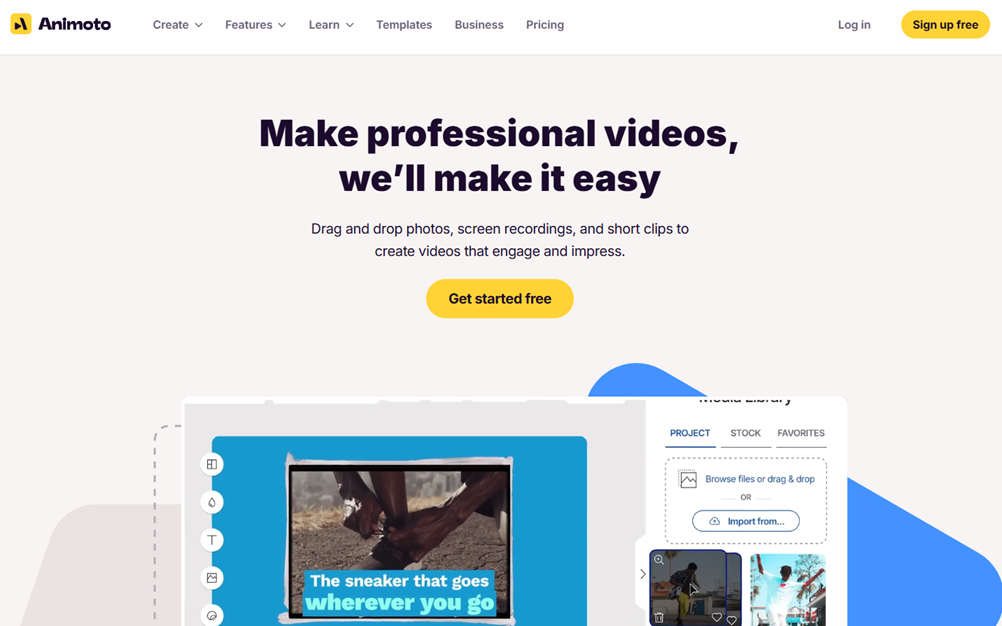
Make professional videos, we'll make it easy.
Animoto delivers a fast, user-friendly way to craft high-quality videos with graphics, effects, and brand elements that elevate any visual message.
Save big with 850+ deals 💶
Explore all deals
Illustration of Animoto on Freelance Stack's deal page
2 deals available
Free Deal
Premium Deal #1

Up to 50% off on annual plan

All our deals are negotiated by our team to give you the best discount and are updated regularly.
This deal requires you to create a new account to benefit from the discount. It is reserved for new customers

Additional 5% off on any plan

All our deals are negotiated by our team to give you the best discount and are updated regularly.
This deal requires you to create a new account to benefit from the discount. It is reserved for new customers
Save Money !
Logo Freelance Stack blanc
Freelance Stack 
Premium
Access our 850+ exclusive promo code for $55/year.
and over 850 other deals.
and +850...
general information
ALTERNATIVES
YOU MAY ALSO LIKE...

📅 April 2026 -

 Our promo code verified with the software 

Animoto

Benefit from an additional 5% off on any plan on Animoto.

Save an additional 5% off on any plan on Animoto through our exclusive partnership.

Freelance Stack is the first deals platform to access best discounts, coupon codes and credits on 850+ software, SaaS and online services for entrepreneurs and startups. We offer exclusive and validated discounts that we negotiate directly with partners to help you to grow and save money. Our coupon codes enable thousands of entrepreneurs, startups, freelancers and consultants to save thousands of euros on the best softwares.

Don’t wait any longer and save an additional 5% off on any plan on Animoto.

📄 Information about 

Animoto

Animoto is an online video maker that turns photos, clips, and screen recordings into professional-looking content in minutes. Its drag-and-drop interface makes it easy to create engaging videos for social media, marketing campaigns, or internal communications.

With customizable templates, a royalty-free music library, and access to premium stock images and footage, Animoto empowers businesses and creators to produce impactful videos quickly-no advanced editing skills required.

Here are the key functions of Animoto:

  • Drag-and-Drop Video Editor:

Create professional-looking videos by simply dragging and dropping photos, clips, and screen recordings, no advanced editing skills required.

  • Customizable Templates:

Start from professionally designed templates for social media, ads, training, or internal communications, and adapt them to your brand in minutes.

  • Royalty-Free Music Library:

Choose from a wide selection of licensed, worry-free soundtracks or upload your own music to set the perfect tone for your videos.

  • Screen & Webcam Recording:

Capture your screen, webcam, or both directly within Animoto to create demos, tutorials, or onboarding videos without extra software.

  • Stock Images & Video:

Access millions of high-quality stock photos and footage from Getty Images to enhance your content with professional visuals.

  • Branding Tools:

Save your brand colors, fonts, logos, and custom templates to ensure consistent visual identity across all your videos.

  • Graphics, Animations & Effects:

Enhance your videos with professional-grade text overlays, motion graphics, and transitions-all applied with a simple click.

  • Collaboration Features:

Work as a team with cloud storage, multi-user editing, and the ability to comment on drafts for streamlined feedback.

  • Beginner-Friendly Workflow:

From upload to final export, Animoto's intuitive interface guides you through every step, making video creation fast and stress-free.

📋 Animoto features:

In this section, you will find our opinion the main features of Animoto. All of these features are subject to regular updates. We recommend that you check that they are available before purchasing any software.

Animoto is a video creation platformspecifically designed to help users turn static content into engaging video presentations without requiring advanced technical skills. The platform has carved out a unique niche by focusing on automated video generation, allowing users to simply upload their photos, video clips, and text, and then let Animoto’s intelligent system create professional-looking videos with minimal manual effort.

What sets Animoto apart from traditional video editing software is its template-driven approach combined with sophisticated automation capabilities. Rather than starting with a blank canvas, users work within professionally designed frameworks that ensure consistent quality and visual appeal. This approach makes Animoto particularly valuable for small businesses, marketers, and content creators who need to produce regular video content but lack the time, budget, or expertise for complex video production workflows.

The platform's strength lies in its ability to democratize video creation by removing technical barriers while maintaining professional-quality results. Animoto's algorithms analyze uploaded content and automatically apply appropriate transitions, timing, and visual effects, creating videos that look far more polished than what most users could achieve manually in the same amount of time.

  • Drag-and-Drop Video Builder: Animoto's core interface allows users to simply drag photos, video clips, and text blocks into pre-designed templates, with the system automatically handling the technical aspects of video assembly. The builder includes intelligent suggestions for timing and transitions based on the content type and selected template style.
  • Professional Template Library: The platform offers hundreds of professionally designed templates across various categories, including business presentations, social media content, real estate showcases, and personal celebrations. Each template features carefully crafted color schemes, typography, and animation styles that ensure visual consistency throughout the final video.
  • Automatic Video Resizing: Users can create a single video project and automatically generate versions optimized for different platforms, including square formats for Instagram, vertical layouts for TikTok and Instagram Stories, and traditional landscape orientations for YouTube and Facebook.
  • Music and Audio Integration: Animoto provides access to a substantial library of licensed music tracks that can be automatically synchronized with video content, with volume levels automatically adjusted to ensure audio clarity. Users can also upload their own audio files or record voice-overs directly within the platform.
  • Brand Customization Tools: The platform includes features for maintaining brand consistency, allowing users to upload custom logos, define brand color palettes, and save frequently used design elements for quick access across multiple video projects.
  • Stock Photo and Video Library: Integrated access to millions of high-quality stock images and video clips from Getty Images, allowing users to enhance their projects with professional visual content without leaving the platform or managing separate licensing agreements.
  • Text Animation and Typography: Multiple text animation options allow users to create dynamic title sequences and informational overlays, with typography tools that ensure readability across different screen sizes and viewing conditions.
  • Social Media Publishing: Direct publishing capabilities allow users to share finished videos immediately on major social media platforms, with automatic optimization for each platform’s specific requirements and technical specifications.
  • Video Analytics and Performance Tracking: Built-in analytics tools provide insights into video performance across different platforms, helping users understand audience engagement and optimize their content strategy based on actual viewing data.
  • Collaboration Features: Team functionality allows multiple users to work on video projects, with commenting systems and approval workflows that streamline the review process for businesses and agencies managing multiple client accounts.

Animoto's comprehensive approach to video creation addresses the common challenge of producing consistent, professional video content at scale. The platform's focus on automation and template-based design ensures that even users with no video editing experience can create compelling visual content that effectively communicates their message and maintains professional standards across all their marketing materials.

📊 Animoto Pros and Cons:

This section provides a summary of the advantages and limitations of using Animoto on a daily basis. We are not paid or influenced by brands, and this content is solely our own. These features, their advantages and disadvantages are likely to change regularly, both positively and negatively. If you have complex needs, we invite you to contact the software publisher directly for more information about your requirements. 

👍 Pros with Animoto:

  • Professional templates without design expertise: Animoto provides access to hundreds of professionally crafted video templates that eliminate the need for advanced design skills or video editing knowledge. These templates are specifically designed for various industries and use cases, from social media marketing to corporate presentations, allowing you to create polished videos that maintain visual consistency and professional standards. The templates are regularly updated to reflect current design trends and platform requirements, ensuring your content always looks fresh and relevant.
  • Automated video optimization for multiple platforms: The platform automatically adapts your video content to meet the specific requirements of different social media platforms and marketing channels. Whether you're creating content for Instagram Stories, YouTube, Facebook, or LinkedIn, Animoto handles the technical aspects of formatting, resolution, and aspect ratios without requiring manual adjustments. This automation saves a significant amount of time and ensures your videos perform optimally across all channels, maintaining quality while maximizing reach and engagement potential.
  • Shared access for small teams: On the higher-tier plans, you can have multiple users working within the same account, which is handy for sharing assets or jumping into a project to make a quick edit. It keeps everything in one place so you aren't constantly emailing files back and forth. It isn't a full-fledged project management tool with feedback threads, but for a small team or a freelancer working with an assistant, it provides enough shared space to keep the workflow moving.
  • Extensive library of licensed stock media: You get access to a large collection of photos, video clips, and music tracks right inside the editor. This saves you a lot of time because you don’t have to search for visuals on third-party sites or worry about copyright issues later. The selection is high-quality and covers most common business themes, making it easy to create a professional-looking video even if you don’t have your own footage. It’s a great way to fill in the gaps in your content without spending a fortune on additional stock fees.
  • Brand consistency tools and asset management: Animoto offers robust brand management features that allow you to upload and store your brand assets, including logos, fonts, color palettes, and custom graphics. These elements can be automatically applied across all your video projects, ensuring consistent brand representation without manual effort. The platform also allows you to create brand templates that team members can use, maintaining visual consistency even when multiple people are creating content. This systematic approach to branding helps build stronger brand recognition and professional credibility.
  • Easy social media sharing and export: The platform is designed specifically to get your content live as quickly as possible. Once your video is ready, you can post it directly to your social media channels or download it for your own use. While it doesn’t offer built-in tracking for views or clicks, its tight integration with platforms like Facebook and YouTube makes the transition from editing to posting very smooth. It’s a solid choice for freelancers who need to maintain a high volume of social media posts without getting bogged down in technical export settings.

👎 Cons with Animoto:

  • Limited advanced editing capabilities: While Animoto excels at quick video creation, it lacks the sophisticated editing tools that experienced video creators might expect. You cannot perform frame-by-frame editing, add complex transitions, or create custom animations. The platform's template-based approach, while user-friendly, can feel restrictive when you need precise control over timing, layering multiple elements, or implementing advanced visual effects that professional video editors typically require.
  • Limited customization options: While the template system is convenient, it significantly restricts your ability to create truly unique content. You are limited to predetermined layouts, animation styles, and transition effects, which can make your videos look similar to other Animoto creations. Brand customization is possible but remains within the confines of the existing templates, making it difficult to develop a distinctive visual identity that stands out from the crowd.
  • Costs of subscribing to high-quality features: The free version severely limits video quality and length and includes watermarks, making it unsuitable for professional use. To access HD quality, longer video lengths, and commercial usage rights, you need to upgrade to paid plans, which can become expensive for freelancers or small businesses that create multiple videos each month. The pricing structure may not be well-suited to occasional usage or budget constraints.
  • Limited audio editing and music library: While Animoto offers a selection of royalty-free music, its library is relatively small compared to dedicated audio platforms. You cannot edit audio tracks within the platform, adjust volume levels for different segments, or precisely synchronize music with specific visual elements. This limitation becomes apparent when you need custom audio solutions or want to match music beats with visual transitions to create more engaging content.
  • Export and sharing limitations: Depending on your subscription plan, you may encounter restrictions on video resolution, download formats, and usage rights. The platform is primarily designed for social media sharing, which means export options for other purposes—such as presentations, email marketing, or professional broadcasting—may be limited. Additionally, the rendering process can be slow for longer videos, and you cannot pause or modify the rendering queue once processing begins.

💰 Animoto pricing:

All prices listed are taken from the Animoto software website. However, these prices are subject to change regularly. We recommend that you check them directly on each software's website to be sure. 

Animoto offers a variety of pricing plans designed to meet the diverse needs of content creators, entrepreneurs, and marketing teams. The platform offers a free version to get started, as well as premium subscriptions that provide access to advanced features.

The rates are competitive compared to other video creation tools on the market, with monthly or annual billing options to help keep costs down.


Plan Price Included
Free Free 30-second videos, Animoto watermark, limited library
Personal $8/month Unlimited HD videos, no watermark, commercial music, 1 GB of storage
Professional $15/month All Personal features + brand colors, custom logos, 10 GB of storage
Team $39/month 3 user licenses, team collaboration, 100 GB of shared storage, brand management

💬 Frequently asked questions about Animoto's promo:

In this section, you will find all the main questions you may have about accessing this discount. We wanted to provide you with as much information as possible to help you save as much as possible on your software subscriptions. 

1️⃣ How to access to the deal with Animoto?

This promo code allows you to save money and enjoy premium features on Animoto paid plans and subscriptions. Check the eligibility criteria on this page to see if you can benefit from this discount. Don't miss out on the opportunity to pay less for your subscription to one of the best tools on the market.

2️⃣ Why Freelance Stack can help you to access to Animoto discount?

As a partner of Animoto, you can easily save on your subscription to this software. Without us or another affiliate partner, you will have difficulties to activate the discount. We are the largest discount promo code platform for software and SaaS in the world.

3️⃣ How to use Animoto deal?

To use the discount with Animoto, you need to click on the various buttons that may be available on the right side of the deal page and follow the instructions to unlock this promotion.

4️⃣ What are Animoto's promo requirements?

We specify all the terms and conditions on each deal page. You must click on the various buttons on the deal page to view all the terms and conditions. This deal requires you to create a new account to benefit from the discount. It is reserved for new customers of Animoto.

🔄 Alternatives to Animoto software:

Find the right software with our suggestions for alternative solutions.

When growing a business, comparing the right tools is essential. With thousands of options available, these solutions are strong alternatives to Animoto 
Indeed, Animoto is a solution that can adapt according to your needs:

1️⃣ If you are a freelancer or consultant:

For independent professionals looking for a cost-effective way to create videos, Canva stands out as an excellent option thanks to its intuitive drag-and-drop interface and extensive library of templates. Although primarily known for graphic design, Canva’s video capabilities have improved significantly, offering animated templates, stock footage, and music tracks that make it easy to create professional-looking content even without technical expertise. The platform’s collaborative features allow you to easily share drafts with clients for feedback. Loom represents another compelling option, particularly for consultants creating educational or explanatory content. Its screen recording capabilities combined with webcam integration make it perfect for tutorials, client presentations, or course materials. The platform excels at creating personalized video messages that help build stronger client relationships. For freelancers requiring more advanced features, DaVinci Resolve offers professional-grade video editing capabilities completely free of charge. While it has a steeper learning curve, mastering this tool can significantly set your services apart and justify premium pricing for video production projects.

2️⃣ If you are a startup:

Startups operating on limited budgets and tight deadlines should consider Renderforest, which offers an impressive range of video templates specifically designed for business use cases, including product demos, explainer videos, and social media content. The platform’s automation features allow non-technical team members to quickly produce consistent, branded content. Biteable offers another startup-friendly solution with its Focus on social media and marketing videos. The platform addresses startup constraints by providing templates optimized for various social media platforms and marketing campaigns. Its collaboration tools enable distributed teams to work together efficiently on video projects. For startups with slightly larger budgets, Vyond offers sophisticated animated video creation capabilities that can help explain complex products or services through engaging character-based storytelling. This approach is particularly valuable for B2B startups that need to simplify technical concepts for potential customers and investors. The platform’s analytics features also help track video performance across different channels, providing valuable insights for refining content strategy.

3️⃣ If you are an SMB:

Small and medium-sized businesses in need of scalable video solutions should consider Wistia for its comprehensive video hosting and analytics platform, which goes beyond basic creation tools. While Wistia does offer basic editing capabilities, its strength lies in professional video hosting, detailed viewer analytics, and lead generation features that can directly drive business growth. The platform integrates seamlessly with CRM systems and marketing automation tools. Pictory offers an innovative AI-powered approach that automatically transforms written content into engaging videos. This solution is particularly valuable for companies with existing blog content or documentation that can be repurposed into video format without requiring extensive production resources. For businesses seeking broadcast-quality results, Adobe Premiere Pro paired with After Effects provides industry-standard capabilities. While requiring more investment in training and software costs, this combination enables businesses to create truly professional content that can compete with larger competitors. The Creative Cloud ecosystem also provides access to stock assets and seamless integration between different Adobe tools, streamlining the entire content creation workflow from initial concept to final delivery.

Otherwise, these other software programs may also be a good alternative to Animoto

🆕 Our new Premium deals:

We offer discounts on 650+ different software. We regularly add new discounts on the best software for freelancers, consultants and entrepreneurs.

Discover these new software in addition to the deal we offer with Animoto.

👤 Our members have just used these other deals:

We offer on 850+ different software. That's both a lot and a little compared to all the software that exists and that could help you in your business as entrepreneur or business owner.

Discover new software and discounts to complement the deal we offer on Animoto