Format
-40% sur le plan "Pro+"








✅ Informations sur le deal :
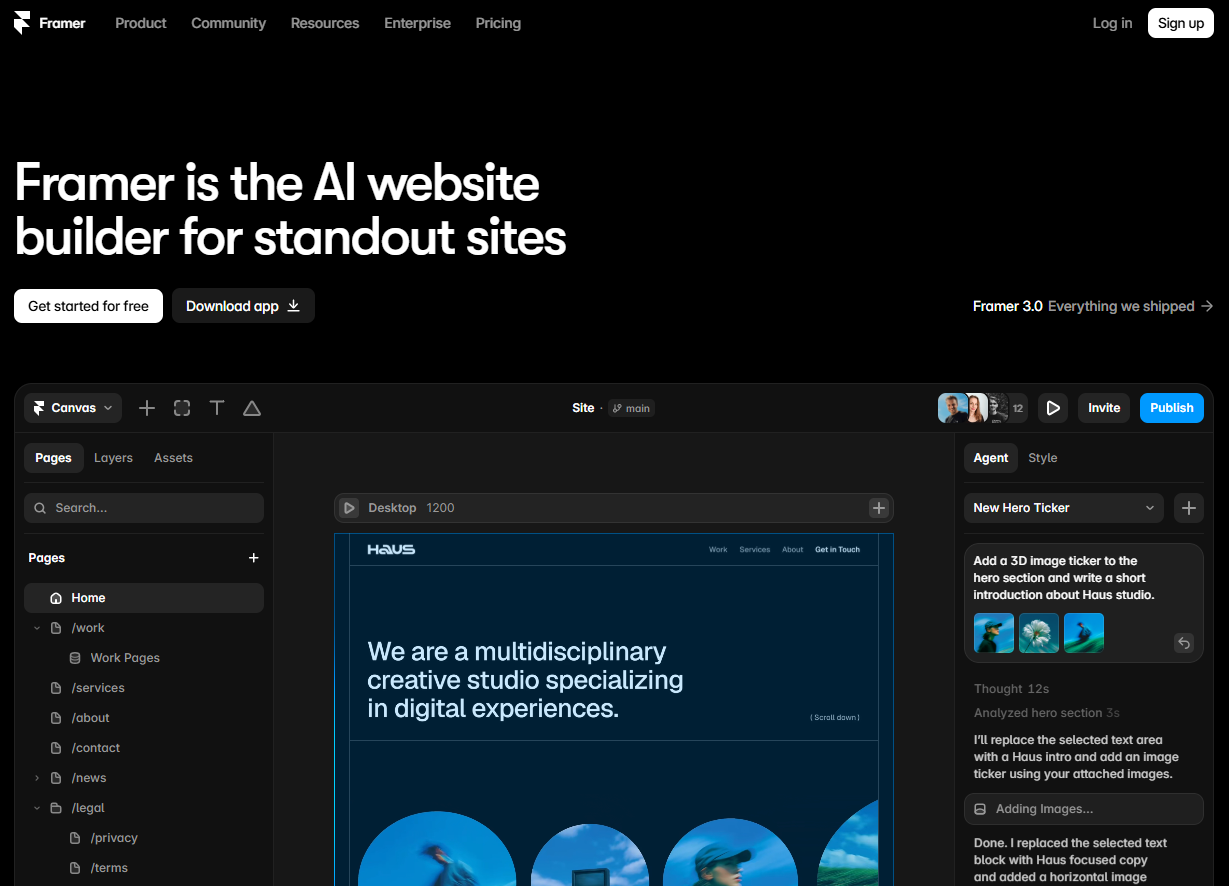
Framer is a design and prototyping platform that allows users to create high-quality, interactive user interfaces and web experiences. It features an intuitive interface with drag-and-drop tools, enabling users to design mockups and prototypes without coding skills. Framer also supports the addition of dynamic animations and interactions, offering a realistic visualization of projects.
With integrations for collaboration tools, teams can work together in real-time, making feedback and iteration easier. By using Framer, designers can quickly turn their ideas into functional prototypes, streamlining the design and development process.
The web builder for stunning sites: Design and publish modern sites at any scale with Framer’s web builder.
Templates: Design in minutes, publish sites in seconds.
Turn your ideas into a real website quickly. Select from thousands of free and premium website templates and customize them as you see fit.
A complete website builder with all the features you need: Framer is packed with powerful features, making it easy to grow and expand your website to fit your needs.
Framer has revolutionized the way designers and developers approach web creation by combining intuitive visual design with powerful interactive capabilities. This no-code platform enables you to build sophisticated websites, prototypes, and web applications without writing a single line of code, while still offering the flexibility to integrate custom code when needed. What sets Framer apart is its unique ability to bridge the gap between static design and dynamic web experiences, making it equally valuable for rapid prototyping and production-ready website deployment.
The platform caters to a diverse range of users, from UI/UX designers looking to create interactive prototypes to marketing teams building landing pages, and even small businesses seeking professional web presence without technical overhead. Framer's strength lies in its component-based architecture and real-time collaboration features, allowing teams to work seamlessly together while maintaining design consistency across projects. The tool's philosophy centers around empowering creativity through technology, ensuring that your vision isn't limited by technical constraints.
Built on modern web standards, Framer automatically generates responsive, SEO-optimized websites that perform excellently across all devices and search engines. The platform's visual breakpoint system ensures your designs adapt flawlessly to different screen sizes, while its built-in CMS capabilities make content management straightforward for both technical and non-technical team members.
This comprehensive feature set positions Framer as more than just a design tool, it's a complete web creation ecosystem that scales from initial concept to production deployment while maintaining the creative freedom that designers demand.
Framer offers flexible pricing that adapts to the needs of designers, teams, and businesses. Whether you want to create a personal site or manage complex projects with your team, you will find a suitable plan.
Rates are set per seat for paid plans, with features that evolve according to your level of usage. Here is a detailed overview of each available plan.
| Plan | Pricing | Includes |
|---|---|---|
| Free | $0 | 3 sites, framer.website domain, basic animations, limited collaboration |
| Mini | $5/month | 1 site, custom domain, Framer badge removal, 100 CMS pages |
| Basic | $15/month | 10 sites, 1,000 CMS pages, analytics, forms, password protection |
| Pro | $30/month | 50 sites, 10,000 CMS pages, A/B testing, localization, staging environments |
The Free plan is perfect for designers who are discovering the tool or working on personal projects. You already benefit from a full environment to create up to three websites with all essential design features. Sites are hosted on Framer subdomains, which is ideal for testing or portfolios under development.
The Mini plan at $5 per month represents the perfect option for freelancers or small businesses that want a professional site with their own domain. The removal of the Framer badge and access to 100 CMS pages allow for the creation of landing pages or simple blogs with a completely professional appearance.
With the Basic plan at $15 monthly, you access a more advanced professional level. The ability to manage up to 10 sites simultaneously makes it an attractive solution for web agencies or consultants managing multiple clients. Integrated analytics features allow you to track your sites' performance without the need for additional external tools.
The Pro plan at $30 per month is aimed at teams and businesses that need advanced features. The ability to create up to 50 sites, combined with 10,000 CMS pages, meets the needs of large organizations. A/B testing features allow for conversion optimization, while localization facilitates the creation of multilingual sites.
The staging environments included in the Pro plan represent a major advantage for development teams. You can safely test your changes before deploying them to production, which significantly reduces the risk of errors on your live sites.
All paid plans include unlimited hosting with optimized performance. Framer uses a global CDN to guarantee fast loading times anywhere in the world. Security is also included with automatic SSL certificates and regular backups of your projects.
It is important to note that Framer offers significant discounts for annual payments. You typically save the equivalent of two months on each plan, which represents substantial savings for regular users. This approach is particularly interesting for freelancers and agencies that use the platform as their primary tool.
For larger teams, Framer also offers custom Enterprise plans with additional features such as priority support, custom integrations, and specific service level agreements (SLAs). These plans are negotiated directly with the sales team according to your organization's specific needs.
1️⃣ If you are a freelancer or consultant:
As a freelancer, you need tools that allow you to quickly create professional prototypes and websites without breaking the bank. Figma remains your best ally for interface design, with its generous free version and interactive prototyping features that rival Framer. For website creation, Webflow offers a powerful no-code approach, perfect for delivering client projects without coding. Its integrated CMS system and high-quality templates will save you precious time. If your budget is tight, Editor X by Wix offers advanced design features with a gentler learning curve. For simple projects, Carrd excels at creating elegant landing pages in minutes, ideal for your own marketing needs or those of clients with basic requirements.
2️⃣ If you are a startup:
Startups need to validate their ideas quickly with convincing prototypes while managing costs. Figma stands out as the go-to tool for collaborative design, allowing your entire team to work simultaneously on the same files. Its commenting and versioning features facilitate the rapid iterations essential for product development. To turn your designs into functional websites, Webflow offers a comprehensive solution with integrated hosting and e-commerce capabilities. Bubble also deserves your attention if you are developing a complex web application: this no-code platform allows for the creation of sophisticated apps with databases, user authentication, and advanced business logic. Its plugin ecosystem prevents you from reinventing the wheel for common features.
3️⃣ If you are a small or medium-sized business (SMB):
Established businesses often prioritize stability and integration with their existing tools. WordPress with builders like Elementor or Divi remains a safe bet for creating professional websites that are maintainable in the long term. The WordPress ecosystem offers incomparable flexibility with its thousands of plugins and themes. For internal prototyping needs, Adobe XD integrates perfectly into the Creative Cloud suite if you already use Adobe tools. Squarespace is an elegant alternative for companies wanting an all-in-one solution without technical maintenance, featuring professional templates and responsive customer support. If you manage multiple client projects, Webflow allows you to create custom sites while providing your clients with an intuitive content management interface.
Sinon, ces autres logiciels peuvent également être une alternative intéressante à Framer (Startups).Aucune ressource actuellement disponible.