logo anime freelance stack white
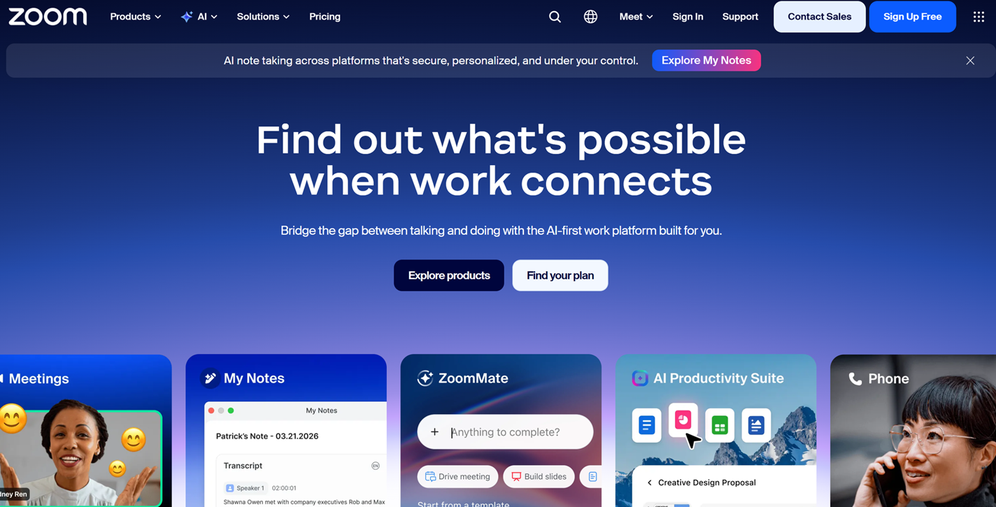
Zoom website logo image
All deals (850+)
Zoom website logo image

Zoom Meetings

Premium Deal
1 deal available
Just one platform to get in touch.
Bring teams together and interact with new audiences on the Zoom platform you know and love.
Save big with 850+ deals 💶
Explore all deals
Illustration of Zoom Meetings on Freelance Stack's deal page
1 deal available
Premium Deal #1

15% off on monthly plan

All our deals are negotiated by our team to give you the best discount and are updated regularly.
This deal is available to new customers or customers on a free plan of the tool.
Save Money !
Logo Freelance Stack blanc
Freelance Stack 
Premium
Access our 850+ exclusive promo code for $55/year.
and over 850 other deals.
and +850...
general information
ALTERNATIVES
YOU MAY ALSO LIKE...

📅 May 2026 -

 Our promo code verified with the software 

Zoom Meetings

Benefit from a 15% off on any monthly plan on Zoom Meetings.

Save 15% off on any monthly plan on Zoom Meetings thanks to our exclusive partnership.

Freelance Stack is the first deal platform to offer discountss, coupon codes and credits on 650+ software, SaaS and online services for entrepreneurs and startups. We offer exclusive, validated discounts that we negotiate directly with vendors to save you money. Our coupon codes enable thousands of entrepreneurs, startups, freelancers and consultants to save thousands of euros on software subscriptions.

Don't wait any longer and save 15% off on any monthly plan on Zoom Meetings.

📄 Information about 

Zoom Meetings

Zoom Meetings is a Video Conferencing platform that enables users to connect and collaborate in real time, regardless of their location. Designed for businesses, teams and individuals, it offers features such as screen sharing, meeting recording and live chat options. Zoom Meetings also supports sub-commission rooms, enabling participants to split into groups for more focused discussions.

The platform is accessible on a variety of devices, including computers, tablets and smartphones, guaranteeing flexibility of use. With its user-friendly interface and robust tools, Zoom Meetings facilitates communication and collaboration, making remote working more efficient and productive.

Unified collaboration and communication tools:

Communicate effectively with a solution that combines meeting, chat, whiteboard, phone and more.

  • Virtual meetings
  • VoIP phone system
  • Conversational intelligence
  • Virtual workspaces
  • Team chat
  • Online whiteboard
  • E-mail and calendar

Workspaces reinvented:

Innovative solutions for every meeting space.

  • Conference room systems
  • Workspaces
  • Connected conference rooms

Optimized experiences:

Solutions offering powerful virtual and hybrid experiences.

  • Online Webinars
  • Events platform
  • Single-session events
  • Community events

Modern customer support:

An omnichannel contact center cloud solution optimized for video.

  • Contact center in the cloud
  • Virtual agent

Zoom for developers:

Create innovative applications and integrations using the Zoom platform.

  • Platform
  • Apps
  • API and SDK
  • Platform solutions

Open up the field of possibilities for organizations in all sectors and geographical areas:

Zoom consolidates communications, connects people and enables them to work better together in the boardroom, the classroom, the operating theatre and everywhere in between.

  • Education
  • Public administration
  • Manufacturing
  • Financial Services
  • Health
  • Sales

📋 Zoom Meetings features:

In this section, you will find our opinion the main features of Zoom Meetings. All of these features are subject to regular updates. We recommend that you check that they are available before purchasing any software.

Zoom Meetings has established itself as the must-have professional video conferencing, radically transforming the way we communicate and collaborate remotely. This versatile platform goes far beyond simple video calls to offer a comprehensive unified communications ecosystem that meets the needs of individual entrepreneurs as well as the demands of large international corporations.

The tool stands out for its remarkable ease of use and its ability to maintain a stable connection even under challenging network conditions. Whether you're hosting a weekly team meeting, a webinar for hundreds of participants, or an interactive training session, Zoom Meetings offers the features you need to turn every interaction into a seamless and productive experience.

The strength of this solution lies in its all-in-one approach, which eliminates the need to juggle multiple tools. From scheduling meetings to recording them, as well as screen sharing and real-time collaboration, Zoom brings together all the essential features of modern communication in an intuitive and user-friendly interface.

  • High-definition video conferencing: The platform offers exceptional video and audio quality with resolutions up to 1080p and high-fidelity stereo sound. The system automatically adjusts to the available bandwidth to maintain a stable connection, even when multiple participants join simultaneously from different time zones.
  • Advanced screen sharing: This feature lets you share your entire screen, a specific application, or even a collaborative whiteboard in real time. Participants can annotate directly on the shared content, making brainstorming sessions and interactive presentations easier.
  • Virtual meeting rooms (Breakout Rooms): Zoom allows you to automatically or manually divide participants into smaller working groups in separate rooms. This feature is particularly useful for training sessions, collaborative workshops, or meetings that require small-group discussions before a group debrief.
  • Recording and Automatic Transcription: Every meeting can be recorded locally or in the cloud, with an automatic transcript generated in real time. This feature makes it easier to track decisions made, allows those who were absent to catch up on the content, and serves as a valuable reference for your projects.
  • Chat and reactions: The instant messaging system allows participants to share links, files, or comments without interrupting the flow of the presentation. Emoji reactions and digital hand-raising features enhance the interactivity of the sessions.
  • Calendar and Smart Scheduling: Native integration with Google Calendar, Outlook, and other scheduling solutions makes it easy to organize recurring meetings. The system automatically generates meeting links and sends reminders to participants.
  • Enhanced security: Zoom includes advanced security features such as end-to-end encryption, virtual waiting rooms to control access, and the ability to lock meetings once all participants have joined.
  • Webinars and large-scale events: The platform supports events with thousands of participants, offering sophisticated moderation tools, live polls, and streaming capabilities to reach an even wider audience.

With its wide range of features, Zoom Meetings is much more than just a video conferencing tool: it’s a true collaboration platform that adapts to your evolving business needs while maintaining a seamless and intuitive user experience.

📊 Zoom Meetings Pros and Cons:

This section provides a summary of the advantages and limitations of using Zoom Meetings on a daily basis. We are not paid or influenced by brands, and this content is solely our own. These features, their advantages and disadvantages are likely to change regularly, both positively and negatively. If you have complex needs, we invite you to contact the software publisher directly for more information about your requirements. 

👍 Pros with Zoom Meetings:

  • Solid audio and video quality under normal conditions: Zoom stands out for its compression technology, which maintains decent image and sound quality in the vast majority of situations. The software automatically adjusts the resolution based on your internet connection, minimizing interruptions on both stable and slightly variable connections. This technical reliability is crucial during important presentations or online training sessions. HD audio and intelligent background noise suppression enable natural conversations, even in noisy environments, provided you have a sufficient internet connection.
  • An intuitive interface for participants, with more features for organizers: Zoom’s user-friendly design makes video conferencing accessible even to users who are less familiar with digital tools. Joining a meeting requires just a single click, with no account required for participants. Essential features such as screen sharing or microphone activation are easily identifiable for basic use. However, more advanced features such as managing breakout rooms or screen-sharing options require a bit of practice for organizers, which should be anticipated during team onboarding.
  • Capacity and flexible plans: Zoom adapts to all needs, from small team meetings to webinars with thousands of participants. The free version already allows you to host meetings lasting up to 40 minutes with 100 participants, which covers the majority of professional use cases. For larger needs, paid plans offer unlimited meeting durations and expanded capacities. This scalability allows organizations to start small and scale up as needed without switching tools.
  • Advanced collaboration features: Beyond simple video conferencing, Zoom includes collaboration tools that transform meetings into true shared workspaces. The interactive whiteboard enables real-time brainstorming, breakout rooms allow participants to be divided into subgroups for focused workshops, and the screen-sharing annotation feature facilitates collaborative feedback. These features create a rich work environment that often surpasses what is possible in an in-person setting.
  • Exceptional reliability and stability: Zoom relies on a robust cloud infrastructure that ensures near-constant service availability. Disconnections are rare, and automatic reconnection ensures uninterrupted communication. This technical reliability was particularly evident during the surge in remote work, when Zoom was able to handle a massive increase in user traffic without any noticeable degradation in service. For businesses, this stability is a crucial mark of professionalism when interacting with clients or partners.
  • Advanced integrations with the business ecosystem: Zoom integrates natively with most business tools on the market, from Outlook and Google Calendars to project management platforms like Slack and Microsoft Teams. This interoperability allows you to schedule and join meetings directly from your usual tools, creating a seamless workflow. Zoom’s open API also offers the ability to develop custom integrations for specific needs, making the platform particularly attractive for businesses with complex business processes.

👎 Cons with Zoom Meetings:

  • Security and privacy could be improved: Zoom has experienced several major security incidents, including "Zoombombing," where intruders crash meetings. Although improvements have been made, the platform remains vulnerable to intrusions if security settings are not properly configured. Companies handling sensitive data may legitimately question the robustness of security measures, especially since certain advanced security features are only available in the most expensive paid plans.
  • Audio and video quality depends on the connection: Unlike some competitors that optimize compression more effectively, Zoom can quickly become unusable with an unstable internet connection. Audio dropouts, video lag, and pixelation are common as soon as bandwidth drops. This sensitivity to fluctuations in connection speed causes recurring issues during important meetings, which is particularly frustrating when relying on a mobile connection or in areas with poor coverage.
  • High system resource usage: Zoom places heavy demands on the CPU and RAM, which can significantly slow down less powerful computers. This high resource consumption becomes a problem during long meetings or when you need to multitask. Users of older or entry-level machines often find themselves forced to close all other applications to maintain acceptable video conferencing quality, which hinders their productivity.
  • Frustrating limitations of the free plan: The free version imposes a 40-minute limit on group meetings, which abruptly interrupts discussions and forces users to start a new session. This artificial restriction encourages users to purchase a subscription, even for occasional use. Furthermore, advanced collaboration features, cloud recording, and interface customization remain locked, which significantly limits the user experience for small businesses and entrepreneurs.
  • An interface that can sometimes be counterintuitive: Despite its popularity, Zoom has a significant learning curve for certain features. Managing virtual meeting rooms, screen-sharing settings, or enabling certain options during meeting can be confusing for new users. This complexity often leads to interruptions during , as participants struggle to figure out how to unmute their microphones, share their screens, or join a breakout room.

💰 Zoom Meetings pricing:

All prices listed are taken from the Zoom Meetings software website. However, these prices are subject to change regularly. We recommend that you check them directly on each software's website to be sure. 

Zoom Meetings offers a range of pricing plans designed to meet the diverse needs of users, from individuals to large enterprises. The platform stands out for its generous free plan and scalable paid plans that include advanced features tailored to professional needs.

Pricing is based on a per-user, per-month basis, with the option to receive discount when signing up for an annual subscription rather than a monthly one.


Plan Rates Included
Basic Free Meetings up to 40 minutes, 100 participants, built-in chat
Pro $14.99/month Unlimited meetings, 5 GB of cloud storage, Outlook/Google Calendar
Business $19.99/month Custom URL, admin dashboards, custom branding
Enterprise $19.99/month Unlimited cloud storage, automatic transcription, SSO
Enterprise Plus €24.99/month Advanced analytics, secure archiving, enhanced compliance


The free Basic planis a great way to try out Zoom’s core features. With meetings limited to 40 minutes but accommodating up to 100 participants, it’s perfect for occasional use or small teams. This version includes screen sharing, meeting rooms, and built-in chat, offering a comprehensive experience to get started.

The Pro and Business paid plansare designed for professionals and small businesses that regularly host meetings. Upgrading to the Pro plan at €14.99 per month removes the 40-minute time limit and adds 5 GB of cloud storage for recording sessions. The Business plan, at €19.99 per month, enhances the experience with customization features such as a custom meeting URL and White Label options, which are particularly popular with companies concerned about their brand image.

The Enterprise plansare designed for large organizations with specific security and management needs. The Enterprise plan, priced at €19.99 per user per month, offers unlimited cloud storage and advanced features such as automatic meeting transcription. The Enterprise Plus plan, priced at €24.99, rounds out the suite with advanced analytics tools, secure archiving, and enhanced compliance options-essential for regulated industries.

It is worth noting that Zoom consistently offers on annual subscriptions, which can result in savings of up to 16% compared to monthly payments. Businesses can also take advantage of volume licensing discounts, with negotiable rates based on the number of users and the length of the contract.

The platform also offers add-ons that arebilled separately, such as Zoom Phone for VoIP telephony, Zoom Webinars for online events, and Zoom Rooms for equipping conference rooms. These add-ons allow you to create a unified communications ecosystem tailored to the specific needs of each organization, with pricing that varies depending on the features selected and the number of users involved.

💬 Frequently asked questions about Zoom Meetings's promo:

In this section, you will find all the main questions you may have about accessing this discount. We wanted to provide you with as much information as possible to help you save as much as possible on your software subscriptions. 

1️⃣ How to access to the deal with Zoom Meetings?

This promo code allows you to save money and enjoy premium features on Zoom Meetings paid plans and subscriptions. Check the eligibility criteria on this page to see if you can benefit from this discount. Don't miss out on the opportunity to pay less for your subscription to one of the best tools on the market.

2️⃣ Why Freelance Stack can help you to access to Zoom Meetings discount?

As a partner of Zoom Meetings, you can easily save on your subscription to this software. Without us or another affiliate partner, you will have difficulties to activate the discount. We are the largest discount promo code platform for software and SaaS in the world.

3️⃣ How to use Zoom Meetings deal?

To use the discount with Zoom Meetings, you need to click on the various buttons that may be available on the right side of the deal page and follow the instructions to unlock this promotion.

4️⃣ What are Zoom Meetings's promo requirements?

We specify all the terms and conditions on each deal page. You must click on the various buttons on the deal page to view all the terms and conditions. This deal is available to new customers or customers on a free plan with Zoom Meetings.

🔄 Alternatives to Zoom Meetings software:

Find the right software with our suggestions for alternative solutions.

When growing a business, comparing the right tools is essential. With thousands of options available, these solutions are strong alternatives to Zoom Meetings 
Indeed, Zoom Meetings is a solution that can adapt according to your needs:

1️⃣ If you are a freelancer or consultant:

For your client appointments and consultations, Calendly is an excellent option that combines scheduling and video conferencing. You can automate your availability slots and let your clients choose their preferred times. The platform integrates seamlessly with Google Meet or Microsoft Teams for video calls. Whereby is also a great choice, with its customizable permanent meeting rooms. You get your own URL that you can share directly with your clients, without them needing to create an account. The streamlined interface and high-quality audio and video make it an ideal professional tool for one-on-one consultations. These solutions make managing your appointments easier while maintaining a premium customer experience.

2️⃣ If you are a startup:

Google Meet stands out as the most accessible option for startups already using the Google Workspace ecosystem. Meetings are seamlessly integrated into your Google Calendar, and the quality remains excellent for medium-sized teams. For a more modern approach, Discord offers a free solution that’s particularly well-suited for tech and creative teams. Its features for continuous voice chat and screen sharing facilitate ongoing collaboration between developers and designers. Jitsi Meet is the perfect open-source option if you prioritize data privacy and want to host your own servers. This free and secure solution allows you to create meetings with no time limits-a significant advantage when budgets are tight and brainstorming sessions run long.

3️⃣ If you are a small business or an SME:

Microsoft Teams is the natural choice if you already use the Office 365 suite, offering native integration with all your productivity tools. Team management and real-time document collaboration greatly facilitate hybrid work. For a more cost-effective alternative, Skype for Business continues to meet the needs of small and medium-sized businesses with its solid core features and familiar interface. GoToMeeting stands out for its proven reliability and advanced recording tools, which are particularly useful for archiving your internal training sessions or client presentations. Its intuitive interface allows all your employees to adapt quickly, while the interactive whiteboard features enhance your training sessions. These solutions offer excellent value for organizations that need stability and professional features without the complexity of large platforms.

Otherwise, these other software programs may also be a good alternative to Zoom Meetings

🆕 Our new Premium deals:

We offer discounts on 650+ different software. We regularly add new discounts on the best software for freelancers, consultants and entrepreneurs.

Discover these new software in addition to the deal we offer with Zoom Meetings.

👤 Our members have just used these other deals:

We offer on 850+ different software. That's both a lot and a little compared to all the software that exists and that could help you in your business as entrepreneur or business owner.

Discover new software and discounts to complement the deal we offer on Zoom Meetings