logo anime freelance stack white
Logo de l'outil Shield sur Freelance Stack
All deals (850+)
Freelance Stack > Marketing > Social Networks >

Shield Promo Code

Logo de l'outil Shield sur Freelance Stack

Shield

Free Deal
2 deals available
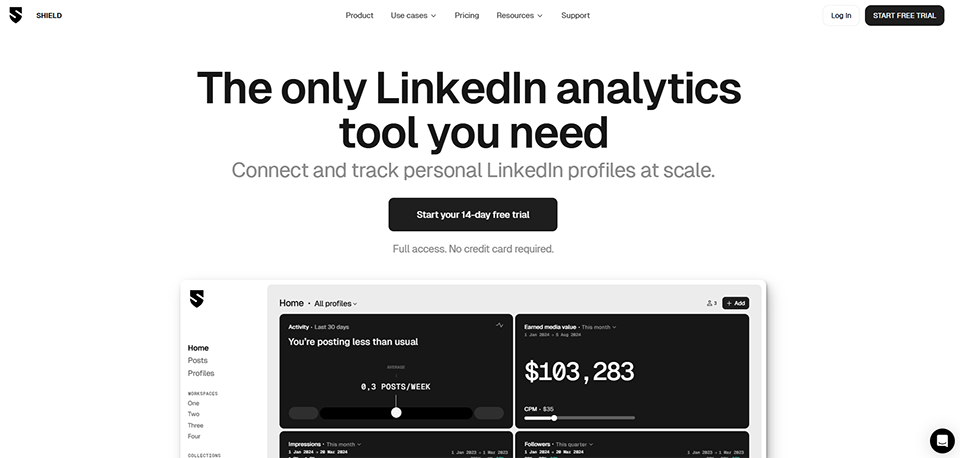
Stats and analytics for your personal brand on LinkedIn.
Shield helps you to understand what works and what doesn't from your own LinkedIn content.
Save big with 850+ deals 💶
Explore all deals
Illustration of Shield on Freelance Stack's deal page
2 deals available
Free Deal
Premium Deal #1

7 days free

All our deals are negotiated by our team to give you the best discount and are updated regularly.
This deal requires you to create a new account to benefit from the discount. It is reserved for new customers

25% off on annual plan

All our deals are negotiated by our team to give you the best discount and are updated regularly.
This deal is available to new customers or customers on a free plan of the tool.
Save Money !
Logo Freelance Stack blanc
Freelance Stack 
Premium
Access our 850+ exclusive promo code for $55/year.
and over 850 other deals.
and +850...
general information
ALTERNATIVES
YOU MAY ALSO LIKE...

📅 April 2026 -

 Our promo code verified with the software 

Shield

Benefit from 25% off on annual plan on Shield.

Save 25% off on annual plan on Shield thanks to our exclusive partnership.

Freelance Stack is the first deals platform to access best discounts, coupon codes and credits on 650+ software, SaaS and online services for entrepreneurs and startups. We offer exclusive and validated discounts that we negotiate directly with partners to help you to grow and save money. Our coupon codes enable thousands of entrepreneurs, startups, freelancers and consultants to save thousands of euros on best software.

Don't wait any longer and save 25% off on annual plan on Shield.

📄 Information about 

Shield

Shield is a LinkedIn analytics tool designed to help content creators and businesses track the performance of their posts on LinkedIn. It offers detailed insights into how content is performing over time, what type of posts are working, and who is engaging with the content. The platform also provides features like custom filters, historical data, and CSV export to help users analyze trends and optimize their LinkedIn strategies.

By connecting directly with LinkedIn profiles, Shield allows users to see granular data about each post and gain valuable insights into their audience's preferences and behavior. With its easy-to-understand dashboards and analytics, Shield helps LinkedIn users improve their content strategy and maximize their engagement. It is particularly useful for solopreneurs, marketers, and business professionals looking to enhance their LinkedIn presence and grow their audience.

LinkedIn analytics made easy with Shield: Ditch the spreadsheet. Track and measure organic posts and personal profiles in one simple dashboard.

Your all-in-one LinkedIn analytics dashboard to track and measure profile and content performance across any number of personal LinkedIn profiles. Shield is for businesses using LinkedIn to grow by empowering their employees to post.

Shield is also for agencies who help clients build and grow their personal brands or run employee advocacy programs.

  • All posts in one place: Browse through all posts from all your connected profiles. Search, sort, and filter with ease.
  • Full post analytics at your fingertips: Audience demographics, post metrics, engagement over time, and comments.
  • Your audience, your engagement: Calibrate your approach on LinkedIn with audience demographics and engagement tracking.
  • Save posts for later with Collections: Create collections and save posts for easy access and reporting.
  • Stay on top of profile activity: See profile performance across key metrics like posts per week, engagement, profile views, follower growth and more.
  • Group people in Workspaces: Keep people, profiles, and data separate with workspaces.
  • Configure things your way: People, profiles, access to data, user permissions, billing and more. Manage everything right from within the application.

📋 Shield features:

In this section, you will find our opinion the main features of Shield. All of these features are subject to regular updates. We recommend that you check that they are available before purchasing any software.

Shield is a LinkedIn analytics platform founded in 2019, specifically designed for individual creators, marketing teams, and agencies that view LinkedIn as a serious distribution channel rather than just an occasional social network. Trusted by over 10,000 creators and brands across more than 50 countries, it provides the analytics capabilities that LinkedIn’s native tools lack: deep historical data, audience demographics at the profile level, and an AI agent that can answer questions about content performance in plain language.

  • Full lifetime post history: is Shield's most distinctive technical feature. The moment a LinkedIn account is connected, Shield pulls every post ever published on that profile, not just data from the date of installation forward. This means a creator who has been active on LinkedIn for three years can immediately see how their engagement rate in Q1 2024 compares to Q1 2025, identify which content themes produced the best reach over time, and measure the actual compounded effect of their LinkedIn investment. Most analytics tools, including LinkedIn's own Creator Analytics, only show a rolling window of recent data. Shield's full archive changes what questions are answerable.
  • The analytics dashboard: consolidates performance data across impressions, engagement rate, clicks, comments, shares, saves, and follower growth. Posts can be sorted, filtered, and compared by date range, post type, keyword, or hashtag. Period comparisons provide side-by-side views of any two custom time frames, complete with percentage change calculations, so marketers can quickly determine whether Q4 outperformed Q3 without having to create a spreadsheet. Collections allow posts to be saved into custom groups for ongoing reference or reporting.
  • Audience demographics: identify who is actually watching and engaging, broken down by job title, industry, company size, and geography. This is the data that matters most to B2B professionals and thought leaders: not total impressions, but whether those impressions are reaching the right decision-makers. Knowing that 60% of engagements come from directors and above, rather than primarily from entry-level professionals, changes the entire content strategy and the conclusions drawn from performance metrics.
  • Earned Media Value: assigns a dollar value to organic LinkedIn activity based on a configurable CPM model. This feature is particularly useful for marketing teams that need to justify LinkedIn investment to stakeholders who think in terms of advertising budgets. Being able to say, “Our organic content this quarter generated the equivalent of $47,000 in earned media value,” shifts the conversation from activity metrics to business value.
  • Shield Agent: is the AI-powered analytics co-pilot. It has full access to the connected account’s complete LinkedIn history and responds to natural language questions: what content is driving the most impact, what is the optimal posting schedule based on past performance, what topics resonate most with the audience, or generate a monthly performance report. The agent eliminates the need for users to manually navigate reports; it highlights relevant data in response to specific questions and bases its answers on the user’s own metrics rather than generic best practices.
  • Multi-profile management: allows teams and agencies to connect, track, and compare multiple LinkedIn personal profiles from a single workspace. User roles (Owner, Admin, Member, Profile) define access levels, and a shared dashboard displays all connected profiles in a single view. Volume discounts apply automatically for 10 or more profiles. This makes Shield the practical tool of choice for employee advocacy programs, where a company needs to monitor and measure the LinkedIn activity of multiple executives or team members simultaneously.

📊 Shield Pros and Cons:

This section provides a summary of the advantages and limitations of using Shield on a daily basis. We are not paid or influenced by brands, and this content is solely our own. These features, their advantages and disadvantages are likely to change regularly, both positively and negatively. If you have complex needs, we invite you to contact the software publisher directly for more information about your requirements. 

👍 Pros with Shield:

  • Shield addresses a specific and genuinely frustrating data gap in LinkedIn's own tools: LinkedIn's native Creator Analytics covers approximately the last 90 days and provides impressions, views, and basic engagement breakdowns. What it does not do is maintain a searchable, sortable, filterable archive of every post ever published with comparative period data. For a creator or marketer who needs to answer questions like “which content categories have consistently outperformed over the past 18 months” or “has my engagement rate improved since I changed my content strategy six months ago,” the answer cannot be found within LinkedIn. Shield makes these questions answerable by archiving the data LinkedIn does not retain and presenting it in a way that supports real strategic analysis rather than just reporting recent activity.
  • The audience demographics layer is the most commercially relevant data Shield provides: Impression counts are vanity metrics for anyone using LinkedIn to generate business. What matters is whether the right people are seeing the content. Shield’s breakdown by job title, industry, and geography allows a B2B founder or consultant to verify whether their LinkedIn efforts are building an audience of buyers, partners, and peers, or simply accumulating followers who will never convert to anything. This qualification capability changes how investment in LinkedIn content is evaluated.
  • Shield Agent lowers the barrier to turning data into decisions: A common pitfall with analytics tools is that data is collected but rarely acted upon, because interpreting dashboards requires time and analytical expertise that most content creators lack. Shield Agent lowers this barrier by letting users ask questions in plain language and receive synthesized answers drawn from their actual data. An early-stage founder who wants to know what to post next week doesn’t need to navigate filters and comparison views; they ask the question and get a data-backed answer.
  • Setup takes less than two minutes, and the data appears immediately: Connecting a LinkedIn account and populating the full post history takes just a few minutes. There is no migration project, no CSV import, and no complex onboarding process. For a solo creator or a marketer adding a new client profile to an agency workspace, this frictionless setup means the tool delivers value within the same session it is tried. The 7-day free trial, which requires no credit card, reduces the evaluation risk to essentially zero.
  • Trusted by well-known brands and seasoned LinkedIn professionals, not just early adopters: With over 10,000 users across more than 50 countries, Shield has long since moved beyond being a niche tool for enthusiasts. Companies using it for employee advocacy programs, agencies integrating it into their reporting workflows, and individual thought leaders who generate millions of impressions per year are all documented use cases. This broad adoption signals that the product delivers consistent value across a wide range of LinkedIn activity scales.

👎 Cons with Shield:

  • Shield does not create, schedule, or optimize content: It is purely an analytics and measurement tool. A creator who wants to understand what to post next still needs to write and publish that content on LinkedIn or through a separate scheduling tool. This separation is a deliberate product choice, but it creates a workflow gap: moving from insight to execution requires switching to another tool. For users whose primary frustration is not understanding what works but finding the time to create consistent content, Shield addresses only half of the problem.
  • The interface has consistently drawn criticism in user reviews for being clunky and difficult to navigate: Multiple G2 and Capterra reviewers specifically describe the product as "underdeveloped" and "hard to navigate," particularly when trying to add team members or perform administrative tasks. One reviewer noted that nearly every team management action required contacting customer support rather than being self-serviceable through the dashboard. For a solo creator using a single profile, this friction is minor. For an agency managing dozens of profiles or a company rolling out an employee advocacy program, clunky onboarding and team management workflows create real operational overhead.
  • At $25 per profile per month, the cost adds up quickly for use cases involving multiple profiles: A company tracking 10 executive profiles is looking at $250 per month before volume discounts. An agency with 20 client profiles is spending $500 per month on analytics alone, with no scheduling or content creation included. While volume discounts apply automatically for more than 10 profiles, the per-profile pricing model means Shield is significantly more expensive at scale than it appears when evaluated at a single-profile level. Tools that bundle LinkedIn analytics within broader social media management platforms become considerably more competitive as the number of profiles increases.
  • One review specifically noted that connecting a LinkedIn account through Shield's extension resulted in an account restriction within an hour: This is an isolated case among the G2 reviews, but it highlights a real concern: LinkedIn’s terms of service are restrictive regarding third-party tools accessing profile data, and while Shield has been operating in this space since 2019, the risk of account-level issues is not zero. For professionals whose LinkedIn presence is a primary business development channel, any tool interaction that risks even a temporary account restriction warrants careful evaluation.

💰 Shield pricing:

All prices listed are taken from the Shield software website. However, these prices are subject to change regularly. We recommend that you check them directly on each software's website to be sure. 

Shield uses a monthly pricing model based on the number of profiles, with a simplified structure: a single price per profile, regardless of whether the plan is for individual or team use. Volume discounts apply automatically for 10 or more profiles. A 7-day free trial is available with full access to all features and no credit card required. Annual billing through the business pricing page saves approximately 20% compared to monthly billing.


Plan Price Key features
Personal $25 per profile per month Full analytics dashboard, Shield Agent (AI co-pilot), complete post history, content performance metrics, audience demographics (job titles, industries, geography), period comparisons, earned media value, search and filters, collections, 7-day free trial
Team $25 per profile per month (volume discounts for 10 or more profiles) Everything in Personal, plus a multi-profile shared dashboard, team member invitations, user roles and permissions (Owner, Admin, Member, Profile), and a centralized workspace for all connected profiles
Agency / Business (annual, multi-profile) Starting at $222 per profile per year (equivalent to $18.50 per month) Everything in Team, annual billing with approximately 20% savings compared to monthly billing, and volume pricing for agencies managing multiple client accounts
Enterprise Custom, contact sales Custom volume, advanced security requirements, dedicated support, and customized onboarding for large employee advocacy programs


All plans include Shield Agent at no additional cost. No credit card is required to start the 7-day free trial. A 48-hour refund window is available after the first charge for users who change their mind after upgrading from the trial.

💬 Frequently asked questions about Shield's promo:

In this section, you will find all the main questions you may have about accessing this discount. We wanted to provide you with as much information as possible to help you save as much as possible on your software subscriptions. 

1️⃣ How to access to the deal with Shield?

This promo code allows you to save money and enjoy premium features on Shield paid plans and subscriptions. Check the eligibility criteria on this page to see if you can benefit from this discount. Don't miss out on the opportunity to pay less for your subscription to one of the best tools on the market.

2️⃣ Why Freelance Stack can help you to access to Shield discount?

As a partner of Shield, you can easily save on your subscription to this software. Without us or another affiliate partner, you will have difficulties to activate the discount. We are the largest discount promo code platform for software and SaaS in the world.

3️⃣ How to use Shield deal?

To use the discount with Shield, you need to click on the various buttons that may be available on the right side of the deal page and follow the instructions to unlock this promotion.

4️⃣ What are Shield's promo requirements?

We specify all the terms and conditions on each deal page. You must click on the various buttons on the deal page to view all the terms and conditions. This deal is available to new customers or customers on a free plan with Shield.

🔄 Alternatives to Shield software:

Find the right software with our suggestions for alternative solutions.

When growing a business, comparing the right tools is essential. With thousands of options available, these solutions are strong alternatives to Shield 
Indeed, Shield is a solution that can adapt according to your needs:

1️⃣ If you are a freelancer or consultant:

For a solo professional who posts regularly on LinkedIn and needs more than the standard 90-day retention period, Shield is effectively the most specialized option in this category. The closest direct alternative is AuthoredUp, which offers LinkedIn analytics alongside content creation and formatting tools for around $19.95 per month, making it a strong choice for someone who wants both analytical depth and assistance with the writing workflow in a single tool. Inlytics offers a free-to-start tier with a cleaner interface for basic post performance tracking, which suits freelancers who need the data but cannot yet justify spending $25 per month on analytics alone.

2️⃣ If you are a startup:

Startups building a LinkedIn presence as part of their go-to-market strategy often need both content scheduling and analytics. Taplio, priced at around $49 per month, bundles LinkedIn post scheduling, AI-powered content generation, and analytics into a single platform, making it a more integrated solution than Shield for startups whose primary challenge is producing consistent content as much as measuring it. For startups with a marketing team managing multiple team member profiles, Sprout Social and Hootsuite include LinkedIn analytics within broader multi-channel social media management platforms, though neither provides the same depth of LinkedIn-specific historical data that Shield specializes in.

3️⃣ If you are an SMB or mid-market company:

At this scale, the primary use case for Shield shifts toward employee advocacy and corporate influencer programs, tracking how executives' and team members' LinkedIn activity contributes to brand visibility and lead generation. Oktopost is the purpose-built alternative for B2B social media management at enterprise scale, covering employee advocacy, campaign attribution, and multi-channel analytics with significantly deeper CRM and marketing automation integrations than Shield. For companies that want LinkedIn analytics embedded within a comprehensive marketing analytics stack, HubSpot’s social reporting within the Marketing Hub provides LinkedIn performance data alongside email, SEO, and campaign attribution in a unified view, which eliminates the need for a standalone LinkedIn analytics tool entirely once the organization has achieved sufficient HubSpot adoption.

Otherwise, these other software programs may also be a good alternative to Shield

🆕 Our new Premium deals:

We offer discounts on 650+ different software. We regularly add new discounts on the best software for freelancers, consultants and entrepreneurs.

Discover these new software in addition to the deal we offer with Shield.

👤 Our members have just used these other deals:

We offer on 850+ different software. That's both a lot and a little compared to all the software that exists and that could help you in your business as entrepreneur or business owner.

Discover new software and discounts to complement the deal we offer on Shield