logo anime freelance stack blanc
Logo de l’outil Taskade sur le deal de Freelance Stack
Tous les deals (850+)
Logo de l’outil Taskade sur le deal de Freelance Stack

Taskade

Deal Gratuit
2 deals disponibles
You’re in good company !
Taskade is the all-in-one to-do list app to manage tasks, organize notes, and collaborate with your team.
Faites le plein d’économies avec +850 deals 💶
Explorer tous des deals
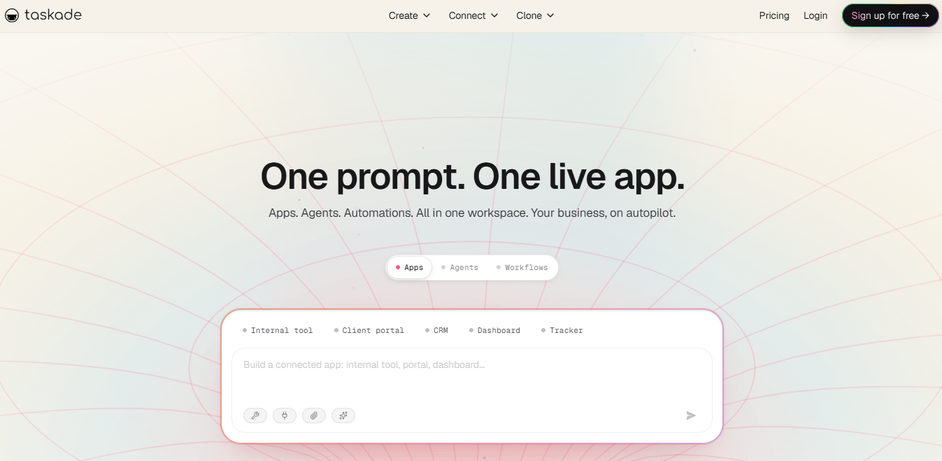
Illustration de Taskade sur la page du deal de Freelance Stack
2 deals disponibles
Deal Gratuit
Deal Premium #1

-20% sur l'abo. annuel

Tous nos les deals sont négociés par notre équipe pour vous permettre de bénéficier de la meilleure réduction et sont mis à jour régulièrement.
Ce deal nécessite de vous créer un nouveau compte pour bénéficier de la réduction. Il est réservé aux nouveaux clients

-25% en plus à vie sur les offres

Tous nos les deals sont négociés par notre équipe pour vous permettre de bénéficier de la meilleure réduction et sont mis à jour régulièrement.
Ce deal est disponible pour les nouveaux clients ou client sur un plan gratuit de l'outil.
Save Money !
Logo Freelance Stack blanc
Freelance Stack 
Premium
Accédez à nos 850+ codes promo exclusifs pour 55€ / an 💶.
et plus de 850 autres deals.
et +850...
INFORMATION Générale
ALTERNATIVES
VOUS AIMEREZ AUSSI...

📅 mai 2026 -

 Notre code promo vérifié avec le logiciel 

Taskade

Profitez d’une réduction de -25% en plus à vie sur les offres sur les services proposées par Taskade

Economisez -25% en plus à vie sur les offres sur l’adhésion à une offre chez Taskade grâce à notre partenariat exclusif. 

Freelance Stack est la première plateforme de deal à vous proposer des réductions, codes promos et crédits sur 650+ logiciels, SaaS et service en ligne pour les entrepreneurs et startups. Nous proposons des réductions exclusives validées que nous négocions directement avec les éditeurs afin de vous permettre de faire des économies. Nos codes promos permettent à des milliers d'entrepreneurs, de startups, d'indépendants, freelances ou encore consultants d'économiser des milliers d'euros lors de la souscription de ces logiciels.

N’attendez plus et économisez -25% en plus à vie sur les offres sur les services proposés par Taskade.

📄 Information sur le logiciel 

Taskade

Taskade is a task management and collaboration platform designed to enhance team productivity. It offers intuitive tools for creating task lists, notes, Kanban boards, and calendars, enabling users to organize their projects efficiently. With real-time collaboration features, Taskade facilitates communication among team members, making it easier to share ideas and track progress.

The platform also provides pre-made templates for various project types, speeding up the onboarding process. By choosing Taskade, users can optimize their project management and strengthen teamwork within their organization.

Use Taskade as a true collaboration and productivity tool. Gather your meeting notes, task lists, collaboration documents and processes in one place in your shared workspace.

The Ultimate To-Do List Application:

  • Manage tasks, write notes, and organize projects.
  • Taskade is the fastest way to get work done !

Organize & Manage Tasks & To-Do Lists:

  • Taskade is the ultimate task management software with unlimited flexibility, designed to help individuals and remote teams work together in one unified workspace.

Share Tasks Online:

  • Share your to-do lists, mind maps, and projects online for free with your teammates, and collaborate together in real-time, across any device.
  • Communicate with your team via built-in free and unlimited chat and video conferencing on every single project.

Manage Team Tasks:

  • Plan, organize, and prioritize upcoming tasks in the team roadmap.
  • Taskade lets you automate your workflows and get work done.

Plan Tasks & Calendar:

  • Track your tasks and progress across every project in one unified calendar.
  • Toggle the calendar view for each project.
  • Taskade helps you plan out and track multiple projects.

📋 Les principales fonctionnalités de Taskade :

Retrouvez dans cette section notre avis sur les principales fonctionnalités de Taskade. L'ensemble de ces fonctionnalités sont amenées à évoluer régulièrement. Nous vous conseillons de bien vérifier l'existance de celle-ci avant de souscrire à chaque logiciel.

Taskade positions itself as a unified workspace that seamlessly blends artificial intelligence with collaborative productivity tools, targeting teams and individuals who need more than traditional task management. Unlike conventional project management platforms that focus primarily on tracking and organizing work, Taskade functions as an AI-powered productivity ecosystem where planning, execution, and collaboration converge in real-time. The platform distinguishes itself by offering native AI assistance throughout every aspect of your workflow, from generating project outlines to automating routine tasks, making it particularly valuable for creative professionals, consultants, and distributed teams who require both structure and flexibility.

What sets Taskade apart in the crowded productivity software landscape is its visual versatility combined with intelligent automation. The platform allows you to seamlessly switch between different organizational views while maintaining the same underlying data structure, whether you prefer mind maps for brainstorming sessions, kanban boards for sprint management, or hierarchical outlines for detailed project planning. This adaptability, enhanced by AI capabilities that can suggest improvements, generate content, and automate workflows, creates a dynamic environment where your tools adapt to your thinking patterns rather than constraining them.

The integration of real-time collaboration with AI assistance means that team members can work simultaneously on projects while receiving intelligent suggestions and automated support. This combination proves particularly powerful for remote teams, freelancers managing multiple clients, and creative agencies that need to maintain both individual productivity and seamless team coordination across various project types and client requirements.

  • AI-Powered Project Generation: Taskade's artificial intelligence can automatically create comprehensive project templates, task breakdowns, and workflow structures based on simple prompts or descriptions. The AI analyzes your input and generates detailed project hierarchies complete with subtasks, deadlines, and resource assignments, significantly reducing the time spent on initial project setup while ensuring nothing important gets overlooked.
  • Dynamic View Switching: Transform your workspace instantly between multiple visualization formats including mind maps, org charts, action lists, kanban boards, and calendar views without losing any data or context. This flexibility allows you to adapt your view based on the current phase of your project, whether you need the broad overview of a mind map during brainstorming or the structured progression of a kanban board during execution phases.
  • Real-Time Collaborative Editing: Multiple team members can simultaneously edit documents, update tasks, and modify project structures with changes appearing instantly across all connected devices. The platform maintains detailed revision histories and provides conflict resolution tools that ensure smooth collaboration even when multiple people are working on the same elements simultaneously.
  • Integrated Video Conferencing: Conduct meetings directly within your project workspace without switching between applications, allowing participants to reference tasks, documents, and project timelines during discussions. The built-in video chat functionality includes screen sharing, recording capabilities, and the ability to create action items directly from meeting conversations.
  • Smart Task Automation: Configure intelligent workflows that automatically assign tasks based on project phases, send notifications when deadlines approach, and update project statuses based on completion criteria. The automation engine learns from your usage patterns and can suggest optimizations to streamline repetitive processes across different projects and team members.
  • Cross-Platform Synchronization: Access your complete workspace from desktop applications, web browsers, and mobile devices with full functionality maintained across all platforms. Changes made on any device sync immediately, ensuring that team members always have access to the most current project information regardless of their preferred working environment.
  • Template Library and Customization: Utilize pre-built templates for common project types and workflows, then customize them to match your specific requirements and branding preferences. The template system supports both individual and team-level customization, allowing organizations to maintain consistency while accommodating different department needs and project methodologies.

This comprehensive feature set transforms Taskade into more than just another productivity tool, creating an intelligent workspace that grows more valuable as teams integrate it deeper into their daily workflows and leverage its AI capabilities to enhance both individual and collective productivity.

📊 Avantages et inconvénients de Taskade :

Cette section vous permet de retrouver une synthèse des avantages et limites que peut représenter l'usage de Taskade au quotidien. Nous ne sommes pas rémunéré ou influencé par les marques et ce contenu n'engage que nous. Ces fonctionnalités, leurs avantages et inconvénients sont susceptibles d'évoluer très régulièrement positivement comme négativement. En cas de besoin complexe, nous vous invitons à contacter directement l'éditeur de logiciel afin d'obtenir plus d'informations sur votre besoin. 

👍 Ce que l'on aime avec Taskade :

  • AI-Powered Productivity Acceleration: Taskade integrates advanced artificial intelligence throughout its platform, offering smart task suggestions, automated project structuring, and intelligent content generation. The AI assistant can help you break down complex projects into manageable tasks, generate meeting agendas, create detailed workflows, and even write content outlines. This dramatically reduces the time spent on administrative tasks and project planning, allowing you to focus on execution rather than organization.
  • Seamless Real-Time Collaboration: The platform excels at bringing teams together with its sophisticated real-time collaboration features that go beyond basic sharing. Multiple team members can simultaneously edit documents, brainstorm in mind maps, participate in video calls directly within projects, and communicate through integrated chat without switching between applications. The live cursor tracking and instant synchronization ensure everyone stays aligned, making it particularly valuable for remote teams and distributed workflows.
  • Versatile Template Library and Customization: Taskade provides an extensive collection of pre-built templates covering everything from project management frameworks to creative brainstorming sessions and business processes. These templates serve as powerful starting points that you can fully customize to match your specific workflow requirements. The platform supports multiple view formats including lists, boards, calendars, mind maps, and organizational charts, giving you the flexibility to visualize and manage your work exactly how you prefer.
  • Cross-Platform Accessibility and Synchronization: Your workspace remains accessible across all devices with native applications for desktop, mobile, and web platforms. The seamless synchronization ensures that updates made on one device instantly appear on all others, enabling you to maintain productivity whether you're at your desk, commuting, or working remotely. The offline capability allows you to continue working even without internet connection, with changes automatically syncing once you're back online.
  • Integrated Communication and Video Conferencing: Rather than juggling multiple tools, Taskade consolidates communication directly within your projects through built-in video calls, voice messaging, and team chat features. You can conduct meetings, screen sharing sessions, and collaborative discussions without leaving your workspace, maintaining context and reducing the friction of switching between platforms. This integration particularly benefits teams who need to discuss tasks while simultaneously updating project details.
  • Automation and Workflow Optimization: The platform offers powerful automation capabilities that can eliminate repetitive tasks and streamline your processes. You can set up automated task assignments, recurring project templates, deadline reminders, and progress tracking without manual intervention. The workflow automation extends to team management, allowing you to create standardized processes that new team members can easily follow, ensuring consistency across projects and reducing onboarding time.

👎 Ce qu'on aime moins avec Taskade :

  • Limited advanced project management features: While Taskade has added a Gantt Chart view and covers the core project management needs well, it still lacks some capabilities that larger teams might require. Critical path analysis, comprehensive resource allocation tools, and workload balancing across team members aren't available. The reporting and analytics capabilities also remain fairly basic compared to dedicated project management platforms like Asana or Monday.com, making Taskade less suitable for complex, multi-phase projects that require detailed resource planning and performance reporting.
  • Template customization constraints: Although Taskade offers various templates, the customization options can feel restrictive for users with specific workflow requirements. The template editor doesn't provide the depth of customization that power users might expect, particularly when trying to create complex nested structures or custom field types. You may find yourself working around the platform's limitations rather than having it adapt perfectly to your existing processes, which can impact productivity over time.
  • Storage and file management limitations: The file storage capabilities in Taskade are relatively modest, especially on lower-tier plans. Large teams working with numerous documents, images, or multimedia files may quickly hit storage limits. Additionally, the file organization system within projects could be more robust - there's no advanced file tagging, version control, or sophisticated search functionality for attachments. This can become problematic for document-heavy workflows or teams that rely heavily on visual assets.
  • Integration ecosystem gaps: While Taskade offers integrations with popular tools, the ecosystem isn't as comprehensive as some competitors. You might find that certain specialized tools your team relies on don't have native integrations available, forcing you to use workarounds or third-party automation tools like Zapier. The depth of existing integrations can also vary significantly, with some offering basic functionality while others provide more comprehensive data synchronization. This limitation becomes more apparent as your tech stack grows more complex.
  • Performance issues with large datasets: Users have reported that Taskade can become sluggish when dealing with projects containing hundreds of tasks or extensive collaborative sessions with many participants. The real-time synchronization, while generally reliable, can occasionally lag during peak usage or when multiple team members are simultaneously editing complex documents. This performance degradation can impact team productivity, particularly for organizations managing large-scale projects or those with extensive historical data they need to maintain within the platform.

💰 Les tarifs de Taskade :

L'ensemble des tarifs indiqués proviennent du site du logiciel Taskade. Cependant, ces tarifs sont susceptibles d'évoluer réguilèrement. Nous vous conseillons de les vérifier directement sur le site de chaque logiciel pour vous en assurer. 

Taskade offers a flexible pricing approach with options suited to individuals as well as professional teams. The platform relies on a generous freemium model that allows users to explore its features before upgrading to paid plans.

Pricing is designed to support the growth of your projects, with advanced features gradually unlocking based on your collaboration and automation needs.


Plan Price Includes
Free Free 3 workspaces, up to 3 members per project, 1 GB storage, basic templates, real-time sync
Starter $4/month per user Unlimited workspaces, up to 50 members per project, 10 GB storage, premium templates, external guests, advanced export
Pro $8/month per user Unlimited members, 100 GB storage, AI automations, advanced integrations, permission management, detailed analytics
Business $16/month per user Unlimited storage, custom AI, custom domain, SSO, priority support, enterprise features


Taskade’s free plan stands out for its generosity, allowing you to efficiently manage small collaborative projects without time limitations. This approach gives you the opportunity to explore the interface and essential features before considering an upgrade. The Free plan already includes real-time synchronization, a crucial element for collaboration, as well as access to basic templates that cover most standard use cases.

The Starter plan at $4 per user represents an excellent compromise for small teams that have outgrown the free tier. This plan removes restrictions on the number of workspaces and more than triples storage capacity. The addition of external guests becomes particularly valuable for collaborating with clients or partners without requiring them to subscribe. Premium templates offer more sophisticated structures for complex projects, while advanced export options make it easier to integrate with other tools in your tech stack.

With the Pro plan at $8 per user, Taskade reveals its automation potential through built-in artificial intelligence features. These AI automations allow you to generate content, organize tasks, and structure projects more efficiently. Storage increases to 100 GB, sufficient for most teams, even those handling numerous media files. Advanced integrations open the door to deeper connectivity with your existing tool ecosystem, while granular permission management becomes essential for sensitive projects involving different access levels.

The Business plan at $16 per user is aimed at organizations with strict requirements in terms of security and customization. Unlimited storage removes any capacity constraints, particularly valuable for creative teams handling large volumes of data. Custom AI allows algorithms to be trained according to your specific business needs, providing more relevant suggestions and smarter support. The custom domain strengthens your brand image, while Single Sign-On (SSO) simplifies access management in complex enterprise environments.

Taskade’s pricing follows an annual billing logic with significant discounts compared to monthly payments. This approach encourages long-term commitment while reducing costs for loyal users. Price transparency, without hidden fees or unexpected add-ons, makes budget planning easier. Taskade also offers educational pricing for academic institutions and preferential conditions for non-profit organizations, demonstrating its commitment to accessibility in productivity tools.

The upgrade path between plans follows a logical progression aligned with the typical growth stages of a team or project. You often start by testing the platform for free, then move to Starter as your collaboration needs grow. The transition to Pro usually happens when automation becomes a productivity priority, while Business addresses the organizational constraints of mature structures. This pricing escalation reflects the increasing value delivered at each level without creating prohibitive thresholds that would hinder adoption.

💬 Questions fréquentes autour de cette promo avec Taskade :

Retrouvez dans cette section l'ensemble des principales questions que vous pourriez vous poser concernant l'accès à cette réduction. Nous avons voulu vous apporter un maximum d'informations pour vous permettre de faire un maximum d'économies sur vos abonnements logiciels. 

1️⃣ Comment accéder au deal avec Taskade ?

Ce code promo vous permet d’économiser ainsi que de profiter des fonctionnalités premium disponibles sur les formules et abonnement payants de Taskade. Consultez les critères d’éligibilité sur cette page pour vérifier si vous pouvez bénéficier de cette réduction. Ne ratez pas l’occasion de payer moins cher votre abonnement à cet outil grâce l'un des meilleurs outils du marché.

2️⃣ Pourquoi profiter de cette réduction avec Taskade en passant par Freelance Stack ?

En tant que partenaire de Taskade, vous pouvez économiser facilement sur votre adhésion à ce logiciel. Sans nous ou un autre partenaire affilié, vous n’aurez pas accès à cette réduction ni aux économies importantes qu’elle propose. Nous sommes la plus grosse plateforme de réductions et de codes promo sur les logiciels et SaaS dans le monde.

3️⃣ Comment utiliser ce deal Taskade ?

Pour utiliser ce deal Taskade, cliquez sur les différents boutons qui peuvent être disponibles à droite de la page du deal et suivez les instructions pour débloquer cette promo.

4️⃣ Qui peut profiter de la réduction avec Taskade ?

Nous précisons l'ensemble des conditions sur la page de chaque deal. Il faut alors cliquer sur les différents boutons sur la page du deal pour connaitre l'ensemble des conditions. Ce deal est disponible pour les nouveaux clients ou client sur un plan gratuit de l'outil Taskade.

🔄 Alternatives au logiciel Taskade :

Trouvez le bon logiciel grâce à nos propositions de solutions alternatives.

Quand on développe son activité, il est important de comparer les outils qui peuvent vous aider à développer votre activité. Il existe des milliers d'outils et logiciels différents. Ces outils sont des alternatives intéressantes à Taskade
En effet, Taskade est une solution qui peut s'adapter en fonction de vos besoins :

1️⃣ If you are a freelancer or consultant:

Notion represents an excellent alternative for freelancers seeking a comprehensive workspace that combines note-taking, project management, and client documentation. Its flexible database system allows you to create custom project templates, track time, and maintain detailed client portfolios within a single platform. The learning curve is steeper than Taskade, but the customization possibilities are virtually limitless. ClickUp offers another compelling option with its robust feature set designed for solopreneurs. You'll appreciate its time tracking capabilities, invoice generation, and client portal features that help professionalize your service delivery. The platform scales beautifully from simple task management to complex project orchestration. Todoist provides a more streamlined approach, focusing on personal productivity with natural language processing for quick task entry. Its project templates and label system work particularly well for managing multiple client projects simultaneously without overwhelming complexity.

2️⃣ If you are a startup:

Asana emerges as a top choice for growing teams, offering sophisticated project tracking, goal setting, and progress visualization that scales with your startup's evolution. Its portfolio management features help founders maintain oversight across multiple initiatives while team members focus on execution. The platform's automation capabilities reduce administrative overhead significantly. Monday.com provides exceptional visual project management with customizable workflows that adapt to your startup's unique processes. Its integration ecosystem connects seamlessly with sales, marketing, and development tools, creating a unified operational hub. The color-coded boards and timeline views make resource allocation and deadline management intuitive for rapidly changing priorities. Linear caters specifically to product-focused startups with its sleek interface and developer-friendly features. Issue tracking, roadmap planning, and cycle-based development workflows align perfectly with agile methodologies common in tech startups.

3️⃣ If you are an SMB or SME:

Microsoft Project delivers enterprise-grade project management capabilities with deep integration into the Microsoft ecosystem that many established businesses already use. Its Gantt charts, resource management, and budget tracking features support complex multi-departmental projects while maintaining familiar Office-style interfaces. Smartsheet bridges the gap between spreadsheet familiarity and modern project management, making adoption smoother for teams transitioning from traditional planning methods. Its reporting capabilities and approval workflows streamline compliance processes common in regulated industries. The platform handles both operational tasks and strategic planning effectively. Wrike offers comprehensive team collaboration with advanced proofing capabilities, making it ideal for marketing agencies and creative departments within larger organizations. Its custom request forms, approval processes, and detailed time tracking support billing accuracy and client transparency. The platform's scalability ensures it grows with expanding teams without requiring migration to new systems.

Sinon, ces autres logiciels peuvent également être une alternative intéressante à Taskade

🆕 Nos nouveaux deals Premium :

On vous propose des réductions sur plus de 650 logiciels différents. Nous ajoutons régulièrement de nouvelles réductions sur les meilleurs logiciels dédiés aux freelances, consultants et entrepreneurs.

Découvrez ces nouveaux logiciels en complément du deal que nous vous proposons avec Taskade.

👤 Nos membres viennent d'utiliser ces différents deals :

On vous propose des réductions sur plus de 850 logiciels différents. C'est à la fois beaucoup et peu par rapport à tous les logiciels qui peuvent exister et qui pourront vous aider dans votre activité en tant qu'indépendant ou entrepreneur.

Découvrez de nouvelles solutions et de nouveaux logiciels en complément du deal que nous vous proposons sur Taskade.