
logo anime freelance stack blanc
Logo de l'outil Routine sur Freelance Stack

Tous les deals (850+)

Logo de l'outil Routine sur Freelance Stack

Routine

Deal Gratuit
2 deals disponibles
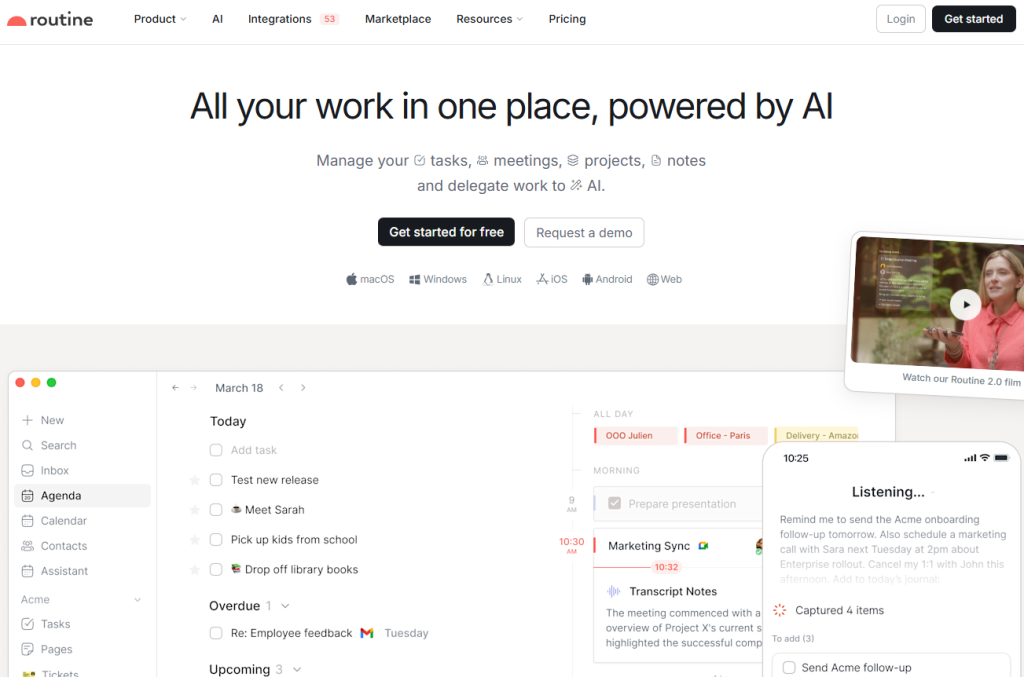
All your work in one place, powered by AI.
Manage your tasks, meetings, projects, notes and delegate work to AI.
Logo NotionLogo MakeLogo AirtableLogo BoltLogo StripeLogo Brevo
Faites le plein d’économies avec +850 deals 💶
Explorer tous des deals
Illustration de Routine sur la page du deal de Freelance Stack
2 deals disponibles
Deal Gratuit
Deal Premium #1

-15% sur l'abo. annuel

Tous nos les deals sont négociés par notre équipe pour vous permettre de bénéficier de la meilleure réduction et sont mis à jour régulièrement.
Ce deal nécessite de vous créer un nouveau compte pour bénéficier de la réduction. Il est réservé aux nouveaux clients

4 mois offerts

Tous nos les deals sont négociés par notre équipe pour vous permettre de bénéficier de la meilleure réduction et sont mis à jour régulièrement.
Ce deal est disponible pour les nouveaux clients ou client sur un plan gratuit de l'outil.
Save Money !
Logo Freelance Stack blanc
Freelance Stack 
Premium
Accédez à nos 850+ codes promo exclusifs pour 55€ / an 💶.
Logo NotionLogo MakeLogo AirtableLogo BoltLogo StripeLogo Brevo
et plus de 850 autres deals.
et +850...
INFORMATION Générale
ALTERNATIVES
VOUS AIMEREZ AUSSI...

📅 août 2026 -

 Notre code promo vérifié avec le logiciel 

Routine

Profitez d’une réduction de 4 mois offerts sur les services proposées par Routine

Economisez 4 mois offerts sur l’adhésion à une offre chez Routine grâce à notre partenariat exclusif. 

Freelance Stack est la première plateforme de deal à vous proposer des réductions, codes promos et crédits sur 650+ logiciels, SaaS et service en ligne pour les entrepreneurs et startups. Nous proposons des réductions exclusives validées que nous négocions directement avec les éditeurs afin de vous permettre de faire des économies. Nos codes promos permettent à des milliers d'entrepreneurs, de startups, d'indépendants, freelances ou encore consultants d'économiser des milliers d'euros lors de la souscription de ces logiciels.

N’attendez plus et économisez 4 mois offerts sur les services proposés par Routine.

📄 Information sur le logiciel 

Routine

Routine brings your tasks, calendar and notes together in a single interface, built for people who spend their days switching between a calendar, a to-do list and a note-taking app. Its universal inbox pulls together tasks, messages and notifications from your other services, while time blocking lets you drag tasks straight into your calendar to reserve real working slots. Capture happens through a desktop hotkey, or by voice from mobile when you are away from your desk.

For independent professionals, the built-in time tracking makes client billing easier, since each task can be timed without reaching for a separate tool. The app connects to more than 50 integrations (Google Calendar, Slack, Outlook, Linear, Asana, Notion and others) with two-way syncing, and the AI meeting notes work across Meet, Zoom and Teams without inviting a bot into the call. Routine runs on macOS, Windows, Linux, iOS, Android and the browser, with an offline mode.

Capture everything:

  • Universal inbox: Centralize all your tasks, messages & notifications and stop wasting time switching between apps and services.
  • Quick capture: Create tasks at the speed of light through a desktop hotkey, enrich them with context and stop switching between apps and services.
  • AI voice assistant: Delegate remembering or organizing through voice, in particular when you are on the go.
  • AI meeting notes: Summarize meetings and automatically turn action items into tasks to ensure nothing falls through the cracks. Works on all platforms, without any meeting bot!

Automate and delegate: Add specialized AI agents to your workforce, automate complex processes and focus on taking key decisions.

Organize and plan:

  • Planner: Plan your tasks and events through a single screen.
  • Time blocking: Block time for your most important tasks to make sure those get done.
  • Labels, priorities & projects: Categorize your your work with labels, assign priorities and organize everything through projects.
  • Recurrences: Schedule recurring tasks effortlessly, and never drop the ball anymore.

Data model:
Make Routine your own by defining the entities you manipulate every day: customers, projects, candidates, bug reports, marketing initiative etc.

Extend as you grow:

  • Databases: Integrate your third-party services to aggregate data into Routine databases and create additional databases to suit your workflows.
  • Views: Visualize data the way you need to build powerful dashboard, reports and workflows.
  • Workspaces: Split your organization into logical workspaces to keep data separated and manage access control.

Built for every team:

  • Founders: Never lose focus of what matters and move the needle every day.
  • Startups: Consolidate multiple apps into a single workspace to reduce costs and move faster.
  • Freelancers: Manage your entire workflow from meetings, notes to tasks to never lose track of projects & customers
  • SMBs: Adapt how you work and scale your operations thanks to Routine's extensibility.

📋 Les principales fonctionnalités de Routine :

Retrouvez dans cette section notre avis sur les principales fonctionnalités de Routine. L'ensemble de ces fonctionnalités sont amenées à évoluer régulièrement. Nous vous conseillons de bien vérifier l'existance de celle-ci avant de souscrire à chaque logiciel.

Routine brings together three things most professionals juggle across separate apps: your tasks, your calendar, and your notes. Instead of hopping between a to-do list, a calendar, and a note-taking tool, you work from a single workspace where everything is connected and, increasingly, driven by AI.

The heart of the product is a universal inbox that centralizes your tasks, messages and notifications so you stop losing time switching between services. Around it sits a quick capture system: a desktop hotkey lets you jot down a task in a second, attach the context it came from, and get back to what you were doing. That capture layer also works through voice, which is handy when you're away from your desk and simply want to offload something before it slips your mind.

On the AI side, Routine leans into features that go beyond a chatbot. Its meeting notes feature transcribes and summarizes calls, then turns action items into tasks automatically. Worth noting for anyone wary of intrusive tools: it works across platforms without any meeting bot joining the call, and it plugs into Google Meet, Zoom, Teams, Discord, and Slack. Beyond that, you can build AI agents and automations to handle repetitive processes, delegating the busywork and keeping your attention on decisions that actually matter.

Planning is where the calendar and task sides meet. You lay out tasks and events on a single planner, then drag tasks directly onto your calendar to block time for the work that counts. Recurrences, labels, priorities, and projects keep everything organized without much ceremony, and recurring tasks stay on autopilot once set up.

For teams and power users, Routine gets deeper. A customizable data model lets you define the objects you deal with every day, whether that's clients, projects, candidates, or bug reports, and turn the app into something closer to an operating system for how you work. Custom databases, flexible views for dashboards and reports, and separate workspaces for access control round out the picture. It connects to 53 integrations with two-way sync, runs on macOS, Windows, Linux, iOS, Android, and the web, and keeps working offline.

📊 Avantages et inconvénients de Routine :

Cette section vous permet de retrouver une synthèse des avantages et limites que peut représenter l'usage de Routine au quotidien. Nous ne sommes pas rémunéré ou influencé par les marques et ce contenu n'engage que nous. Ces fonctionnalités, leurs avantages et inconvénients sont susceptibles d'évoluer très régulièrement positivement comme négativement. En cas de besoin complexe, nous vous invitons à contacter directement l'éditeur de logiciel afin d'obtenir plus d'informations sur votre besoin. 

👍 Ce que l'on aime avec Routine :

  • One workspace instead of five: The strongest argument for Routine is consolidation. Tasks, calendar, and notes living in the same place removes the constant context-switching that fragments a working day, and for many users that single source of truth is reason enough to switch.
  • Genuine time-blocking: Because tasks and the calendar share one surface, dragging a task into a time slot feels natural rather than bolted on. If you plan your days by committing work to specific hours, this is one of the cleaner implementations available.
  • AI that does real work: The meeting notes feature stands out precisely because it needs no bot sitting in your call, and the agents and automations let you hand off recurring processes rather than just asking questions. This is closer to delegation than to a simple assistant.
  • Works everywhere, including offline: Native apps across every major platform plus a functional offline mode mean your setup travels with you and doesn't collapse when the connection drops.
  • Extensible when you need it: The custom data model and databases let the tool grow with you, from a personal task list to a lightweight operating system for a small team, without forcing you into a rigid structure from day one.

👎 Ce qu'on aime moins avec Routine :

  • AI usage is capped by plan: Each tier comes with a fixed pool of AI credits (250 on Free, 500 on Personal, 7,000 on Professional). Heavy users of meeting notes, agents, and automations will feel those ceilings and may need to move up a plan to stay comfortable.
  • Several features are still on the roadmap: A number of capabilities appear as coming soon rather than shipped, including the public API, webhooks, templates, comments, public sharing, and two-factor authentication. If one of those is essential to your workflow today, it's worth confirming its status before committing.
  • A younger ecosystem: Compared with long-established tools, Routine has a smaller library of community templates and third-party resources. You'll likely build your own setup rather than dropping in someone else's ready-made system.
  • Member cap on the lower tiers: Collaboration is limited to five members on the Free, Personal, and Professional plans, with unlimited members reserved for Business and Enterprise. Growing teams reach that wall fairly quickly.
  • Real adoption effort: The flip side of breadth is that consolidating your work into Routine takes intent. Migrating from existing tools and getting a team aligned on one system is an investment, even if the app itself is quick to pick up.

💰 Les tarifs de Routine :

L'ensemble des tarifs indiqués proviennent du site du logiciel Routine. Cependant, ces tarifs sont susceptibles d'évoluer réguilèrement. Nous vous conseillons de les vérifier directement sur le site de chaque logiciel pour vous en assurer. 

Routine keeps its pricing simple with four paid tiers plus a free plan, and the gap between them is mostly about how much AI you use and whether you're working solo or with a team. Prices below are shown in US dollars, per month, as listed on Routine's official pricing page, so it's worth confirming the exact currency and billing cycle at checkout before publication.


Plan Price Best for
Free $0 forever Tasks, calendars, notes, AI assistant, 3 integrations, 250 AI credits
Personal $5 / month Time blocking, exporting, 10 integrations, 500 AI credits
Professional $10 / month AI meeting notes, agents, automations, time tracking, 7,000 AI credits
Business $15 / seat / month Workspaces, access control, priority support, 10,000 AI credits per seat
Enterprise Custom quote Compliance, audit logs, SSO, analytics, dedicated success manager


The free plan is generous enough to genuinely test the workflow, and most solo users will find what they need on Personal or Professional. The jump to Business is really about team features rather than individual productivity.

💬 Questions fréquentes autour de cette promo avec Routine :

Retrouvez dans cette section l'ensemble des principales questions que vous pourriez vous poser concernant l'accès à cette réduction. Nous avons voulu vous apporter un maximum d'informations pour vous permettre de faire un maximum d'économies sur vos abonnements logiciels. 

1️⃣ Comment accéder au deal avec Routine ?

Ce code promo vous permet d’économiser ainsi que de profiter des fonctionnalités premium disponibles sur les formules et abonnement payants de Routine. Consultez les critères d’éligibilité sur cette page pour vérifier si vous pouvez bénéficier de cette réduction. Ne ratez pas l’occasion de payer moins cher votre abonnement à cet outil grâce l'un des meilleurs outils du marché.

2️⃣ Pourquoi profiter de cette réduction avec Routine en passant par Freelance Stack ?

En tant que partenaire de Routine, vous pouvez économiser facilement sur votre adhésion à ce logiciel. Sans nous ou un autre partenaire affilié, vous n’aurez pas accès à cette réduction ni aux économies importantes qu’elle propose. Nous sommes la plus grosse plateforme de réductions et de codes promo sur les logiciels et SaaS dans le monde.

3️⃣ Comment utiliser ce deal Routine ?

Pour utiliser ce deal Routine, cliquez sur les différents boutons qui peuvent être disponibles à droite de la page du deal et suivez les instructions pour débloquer cette promo.

4️⃣ Qui peut profiter de la réduction avec Routine ?

Nous précisons l'ensemble des conditions sur la page de chaque deal. Il faut alors cliquer sur les différents boutons sur la page du deal pour connaitre l'ensemble des conditions. Ce deal est disponible pour les nouveaux clients ou client sur un plan gratuit de l'outil Routine.

🔄 Alternatives au logiciel Routine :

Trouvez le bon logiciel grâce à nos propositions de solutions alternatives.

Quand on développe son activité, il est important de comparer les outils qui peuvent vous aider à développer votre activité. Il existe des milliers d'outils et logiciels différents. Ces outils sont des alternatives intéressantes à Routine
En effet, Routine est une solution qui peut s'adapter en fonction de vos besoins :

1️⃣ If you're a freelancer or consultant:

Your priority is usually a single, low-friction place to run your day and keep track of client work. Todoist is the natural pick if you want something lighter and faster to adopt, with excellent task capture and no learning curve. Sunsama takes the opposite approach, building a calm daily planning ritual that pulls your tasks and calendar into one intentional agenda, which suits anyone who wants to plan deliberately rather than react. If your friction is mostly around scheduling, Akiflow consolidates tasks and calendar events into one command-driven view, while Motion leans on AI to auto-schedule your work into open slots so you spend less time arranging your own calendar.

2️⃣ If you're a startup:

Here the goal is often to consolidate tools and move fast without paying for five overlapping subscriptions. Notion is the reference for an all-in-one workspace, combining docs, notes, and databases with enormous flexibility, though it asks for more setup. Coda sits in similar territory, blending documents and structured data into interactive tools your team can actually operate. For product and engineering teams that value speed and focus, Linear offers a fast, opinionated issue and project tracker, and Taskade brings AI-assisted task management and collaboration into a lighter package well suited to small, fast-moving teams.

3️⃣ If you're a small or medium business:

At this stage the emphasis shifts toward structured project management and keeping everyone aligned as operations scale. ClickUp is the most feature-dense option, covering tasks, docs, goals, and dashboards in one platform. Asana and Monday.com are strong choices when you want clear workflows, visual project views, and reporting that non-technical team members will actually use. Basecamp takes a deliberately simpler, calmer approach to team coordination, and Zoho Projects is worth a look if you're already invested in the broader Zoho suite and want project management that fits alongside your other business tools.

Sinon, ces autres logiciels peuvent également être une alternative intéressante à Routine

🆕 Nos nouveaux deals Premium :

On vous propose des réductions sur plus de 650 logiciels différents. Nous ajoutons régulièrement de nouvelles réductions sur les meilleurs logiciels dédiés aux freelances, consultants et entrepreneurs.

Découvrez ces nouveaux logiciels en complément du deal que nous vous proposons avec Routine.

👤 Nos membres viennent d'utiliser ces différents deals :

On vous propose des réductions sur plus de 850 logiciels différents. C'est à la fois beaucoup et peu par rapport à tous les logiciels qui peuvent exister et qui pourront vous aider dans votre activité en tant qu'indépendant ou entrepreneur.

Découvrez de nouvelles solutions et de nouveaux logiciels en complément du deal que nous vous proposons sur Routine.

🔗 Ressources et articles associés :

Nous avons rassemblé une sélection de ressources qui pourraient vous intéresser. Vous allez découvrir des contenus exclusifs en lien avec Routine

Notre blog vous permet de retrouver des guides, comparaisons, tutoriels pour vous aider à développer votre entreprise grâce aux meilleurs logiciels et SaaS disponibles sur le marché. N'attendez plus, les meilleurs astuces sont ici !

Aucune ressource actuellement disponible.