logo anime freelance stack blanc
Logo de l’outil Slab sur le deal de Freelance Stack
Tous les deals (850+)
Logo de l’outil Slab sur le deal de Freelance Stack

Slab

Deal Premium
1 deal disponible
The knowledge base
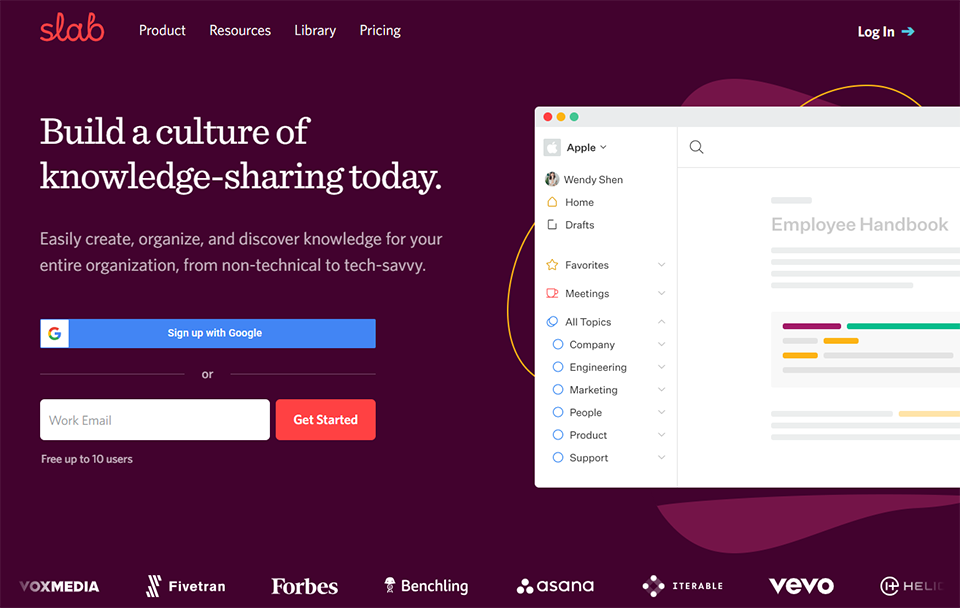
Slab is an attractive team wiki and knowledge base designed for modern growing teams. Think of it as a long-term memory for your team.
Faites le plein d’économies avec +850 deals 💶
Explorer tous des deals
Illustration de Slab sur la page du deal de Freelance Stack
1 deal disponible
Deal Premium #1

-40% sur le plan "Startup" et "Business"

Tous nos les deals sont négociés par notre équipe pour vous permettre de bénéficier de la meilleure réduction et sont mis à jour régulièrement.
Ce deal est disponible pour les nouveaux clients ou client sur un plan gratuit de l'outil.
Save Money !
Logo Freelance Stack blanc
Freelance Stack 
Premium
Accédez à nos 850+ codes promo exclusifs pour 55€ / an 💶.
et plus de 850 autres deals.
et +850...
INFORMATION Générale
ALTERNATIVES
VOUS AIMEREZ AUSSI...

📅 mai 2026 -

 Notre code promo vérifié avec le logiciel 

Slab

Profitez d’une réduction de -40% sur le plan "Startup" et "Business" sur les services proposées par Slab

Economisez -40% sur le plan "Startup" et "Business" sur l’adhésion à une offre chez Slab grâce à notre partenariat exclusif. 

Freelance Stack est la première plateforme de deal à vous proposer des réductions, codes promos et crédits sur 650+ logiciels, SaaS et service en ligne pour les entrepreneurs et startups. Nous proposons des réductions exclusives validées que nous négocions directement avec les éditeurs afin de vous permettre de faire des économies. Nos codes promos permettent à des milliers d'entrepreneurs, de startups, d'indépendants, freelances ou encore consultants d'économiser des milliers d'euros lors de la souscription de ces logiciels.

N’attendez plus et économisez -40% sur le plan "Startup" et "Business" sur les services proposés par Slab.

📄 Information sur le logiciel 

Slab

Slab is a knowledge management and documentation platform designed for teams and organizations. It allows users to collaboratively create, organize, and share documents and information. Slab provides tools to structure knowledge by creating centralized databases and company wikis, making it easier to access and search for information. The platform integrates real-time collaboration features, such as comments and suggestions, and enables users to organize documents using categories and tags for better management.

Slab also offers analytics tools to track engagement and contributions from team members. With its intuitive interface and robust organizational capabilities, Slab helps teams centralize their knowledge, improve internal communication, and enhance work processes.

Create:
Create content that looks good by default.

Slab features the modern editing capabilities you’ve come to expect, all within an intuitive interface. Your content on Slab looks good by default, so you can focus on the writing, not fixing the formatting.

Organize:
Make it easy for teammates to browse and discover.

Folders and tags are not enough. Slab Topics both organize and provide relevant context to make it easy for your team to learn about company policies and procedures, and each others' ideas and insights.

Search:
Not yet another place to search.

With Unified Search, we'll pull answers from your Slab content and all of your integrated tools, bringing you the most relevant results — all in one place.

Integrate:
Integrate with your favorite tools.

Slab is a knowledge base, pure and simple. It's a best-in-class product that isn't trying to replace the rest of your stack. That's why it integrates with everything else, including your spreadsheets, slide decks, flowcharts, task managers, and much more.

📋 Les principales fonctionnalités de Slab :

Retrouvez dans cette section notre avis sur les principales fonctionnalités de Slab. L'ensemble de ces fonctionnalités sont amenées à évoluer régulièrement. Nous vous conseillons de bien vérifier l'existance de celle-ci avant de souscrire à chaque logiciel.

Slab positions itself as a modern team wiki and knowledge base that transforms how organizations capture, organize, and share their collective knowledge. Unlike traditional documentation tools that often feel rigid and bureaucratic, Slab brings a fresh, collaborative approach to knowledge management that feels as intuitive as your favorite social media platform. The platform serves as a central hub where teams can create, edit, and discover information seamlessly, making it particularly valuable for remote and distributed teams who need instant access to up-to-date documentation.

What sets Slab apart in the crowded knowledge management space is its emphasis on discoverability and user experience. The platform understands that the best documentation system is useless if people can't find what they're looking for or feel intimidated by complex interfaces. Slab addresses this challenge by combining powerful search capabilities with an interface that encourages contribution rather than gatekeeping. Teams ranging from startups to enterprise organizations use Slab to maintain everything from technical documentation and process guides to company policies and project updates.

The platform's real-time collaboration features ensure that knowledge stays current and accurate, while its integration capabilities make it a natural extension of existing workflows rather than another isolated tool. This approach has made Slab particularly popular among engineering teams, product organizations, and growing companies that need to scale their knowledge sharing without sacrificing accessibility or creating information silos.

  • Real-time collaborative editing: allows multiple team members to work on the same document simultaneously, with changes appearing instantly across all users. The system includes commenting and suggestion features that enable asynchronous feedback and discussion directly within the content, eliminating the need for separate communication channels when refining documentation.
  • Advanced search and discovery: goes beyond simple keyword matching to help users find relevant information quickly, even when they're not sure exactly what they're looking for. The search functionality includes smart suggestions and contextual results that surface related content and popular pages, making it easier to discover both new and existing knowledge.
  • Flexible content organization: supports multiple ways to structure information, from traditional hierarchical folders to tag-based categorization and custom collections. This flexibility allows teams to organize content in ways that match their natural workflows rather than forcing them into rigid structures that don't reflect how they actually work.
  • Rich media support: enables teams to create engaging, comprehensive documentation that goes beyond plain text. Users can embed images, videos, code snippets, and interactive elements directly within their pages, making complex concepts easier to understand and reference materials more accessible.
  • Integration ecosystem: connects Slab with popular tools like Slack, GitHub, Figma, and Google Workspace, ensuring that knowledge flows naturally between different parts of your workflow. These integrations support automatic content updates and notifications, keeping teams informed when relevant documentation changes without overwhelming them with unnecessary alerts.
  • Analytics and insights: provide visibility into how knowledge is being used across your organization, showing popular content, search patterns, and contribution metrics. This data helps teams identify knowledge gaps and understand what information is most valuable to their colleagues, enabling more strategic content creation.
  • Access controls and permissions: offer granular control over who can view, edit, and manage different pieces of content. The system supports team-based permissions and guest access, making it easy to share specific information with external partners or clients while maintaining security for sensitive internal documentation.
  • Version history and change tracking: ensure that no information is ever truly lost, with detailed revision logs that show exactly what changed and when. This feature provides confidence for teams making significant updates to critical documentation, knowing they can always revert to previous versions if needed.

These features work together to create a knowledge management experience that feels more like using a modern social platform than wrestling with traditional enterprise software, encouraging widespread adoption and consistent use across organizations of all sizes.

📊 Avantages et inconvénients de Slab :

Cette section vous permet de retrouver une synthèse des avantages et limites que peut représenter l'usage de Slab au quotidien. Nous ne sommes pas rémunéré ou influencé par les marques et ce contenu n'engage que nous. Ces fonctionnalités, leurs avantages et inconvénients sont susceptibles d'évoluer très régulièrement positivement comme négativement. En cas de besoin complexe, nous vous invitons à contacter directement l'éditeur de logiciel afin d'obtenir plus d'informations sur votre besoin. 

👍 Ce que l'on aime avec Slab :

  • Intuitive Knowledge Architecture: Slab excels at organizing information through its sophisticated topic-based structure that mirrors how teams naturally think about their work. Unlike traditional wikis that rely on rigid hierarchies, Slab allows you to create interconnected topics that can be easily cross-referenced and discovered. The platform's intelligent tagging system and automatic content suggestions help maintain consistency across your knowledge base, while the visual topic map provides an instant overview of how information connects throughout your organization.
  • Real-Time Collaborative Editing: The platform delivers seamless collaborative experiences through its Google Docs-style editor that supports simultaneous editing without conflicts or version confusion. Multiple team members can work on the same document while seeing each other's cursors and changes in real-time, complete with threaded comments and suggestions that maintain context. The revision history feature automatically tracks all changes with detailed timestamps and contributor information, making it effortless to review modifications or revert to previous versions when needed.
  • Advanced Search and Discovery: Slab's Unified Search goes beyond your knowledge base to surface relevant content across all connected tools simultaneously, whether it's a Slack message, a GitHub issue, or a Google Drive doc. Results are ranked by relevance based on views, links, and mentions rather than simple keyword matching, helping users quickly find the most authoritative answers. Smart filters let you narrow by author, date, or topic, significantly reducing the time spent hunting for information in large knowledge bases.
  • Flexible Permission Management: Slab offers solid control over content access through permissions that can be set at the topic or individual post level, making it straightforward to keep sensitive information contained while keeping general knowledge open. Team-based permissions and role inheritance simplify access management for larger groups, and guest access features allow secure collaboration with external partners or clients. While section-level permissions within a single document aren't supported, the topic-level structure provides enough granularity for most organizational needs.
  • Seamless Integration with Core Tools: Slab connects natively with the tools most knowledge-driven teams rely on daily, including Slack, GitHub, Google Workspace, Asana, and Linear. These integrations allow you to embed live content, trigger notifications, and search across platforms without leaving Slab. While the integration library is more focused than all-in-one platforms like Notion, it covers the essentials well and the API allows technical teams to build custom connections where needed.
  • Smart Content Templates and Automation: The platform streamlines content creation through intelligent templates that can be customized for different types of documentation, from meeting notes to technical specifications. These templates include dynamic fields and automated formatting that ensure consistency across all team contributions. Slab also offers content automation features like automatic table of contents generation, cross-reference linking, and scheduled content reviews that help maintain the accuracy and relevance of your knowledge base over time.

👎 Ce qu'on aime moins avec Slab :

  • Limited customization options: While Slab offers a clean and intuitive interface, users have limited control over the visual appearance and layout customization of their knowledge base. You cannot extensively modify themes, colors, or structural elements beyond the basic templates provided. This can be restrictive for organizations with specific branding requirements or those wanting to create a more unique user experience that aligns with their corporate identity.
  • Search limitations for complex queries: While Slab's Unified Search is genuinely useful for everyday lookups, it lacks AI-powered semantic understanding that some competing platforms now offer. Complex or ambiguous queries can still return imprecise results, and there's no natural language querying or AI chat interface to surface answers dynamically. Teams migrating from more advanced search tools may notice these gaps, particularly when dealing with very large or loosely organized knowledge bases.
  • Minimal integration ecosystem: Slab's integration library is notably smaller than competitors like Notion or Confluence. While it covers essential tools like Slack and Google Workspace, you'll find gaps when trying to connect with specialized software, CRM systems, or industry-specific tools. This limitation can force teams to rely on manual processes or workarounds to maintain their existing workflows.
  • Limited collaborative editing features: Although Slab supports real-time collaboration, it lacks some advanced features found in other platforms. There's no granular permission system for different sections within documents, limited commenting and suggestion capabilities, and no advanced workflow management for content approval processes. Teams with complex editorial workflows may find these limitations restrictive.
  • Pricing structure for smaller teams: While Slab's pricing is competitive for larger organizations, smaller teams or freelancers may find the cost per user relatively high, especially when compared to alternatives that offer more generous free tiers. The feature limitations in lower-tier plans can also push small teams toward more expensive plans to access essential functionality, making it less accessible for budget-conscious users.

💰 Les tarifs de Slab :

L'ensemble des tarifs indiqués proviennent du site du logiciel Slab. Cependant, ces tarifs sont susceptibles d'évoluer réguilèrement. Nous vous conseillons de les vérifier directement sur le site de chaque logiciel pour vous en assurer. 

Slab offers a transparent pricing structure suitable for teams of all sizes, with scalable features to match your collaborative documentation needs.

The platform provides a generous free version to get started, as well as premium plans that unlock advanced integration, customization, and team management features.


Plan Price Includes
Free Free Up to 10 users, unlimited posts, basic search, comments
Startup $6.67/user/month Unlimited users, advanced search, integrations, basic analytics
Business $12.50/user/month SSO, advanced permissions, detailed analytics, API, priority support
Enterprise Custom pricing Custom deployment, HIPAA/SOC2 compliance, dedicated support

💬 Questions fréquentes autour de cette promo avec Slab :

Retrouvez dans cette section l'ensemble des principales questions que vous pourriez vous poser concernant l'accès à cette réduction. Nous avons voulu vous apporter un maximum d'informations pour vous permettre de faire un maximum d'économies sur vos abonnements logiciels. 

1️⃣ Comment accéder au deal avec Slab ?

Ce code promo vous permet d’économiser ainsi que de profiter des fonctionnalités premium disponibles sur les formules et abonnement payants de Slab. Consultez les critères d’éligibilité sur cette page pour vérifier si vous pouvez bénéficier de cette réduction. Ne ratez pas l’occasion de payer moins cher votre abonnement à cet outil grâce l'un des meilleurs outils du marché.

2️⃣ Pourquoi profiter de cette réduction avec Slab en passant par Freelance Stack ?

En tant que partenaire de Slab, vous pouvez économiser facilement sur votre adhésion à ce logiciel. Sans nous ou un autre partenaire affilié, vous n’aurez pas accès à cette réduction ni aux économies importantes qu’elle propose. Nous sommes la plus grosse plateforme de réductions et de codes promo sur les logiciels et SaaS dans le monde.

3️⃣ Comment utiliser ce deal Slab ?

Pour utiliser ce deal Slab, cliquez sur les différents boutons qui peuvent être disponibles à droite de la page du deal et suivez les instructions pour débloquer cette promo.

4️⃣ Qui peut profiter de la réduction avec Slab ?

Nous précisons l'ensemble des conditions sur la page de chaque deal. Il faut alors cliquer sur les différents boutons sur la page du deal pour connaitre l'ensemble des conditions. Ce deal est disponible pour les nouveaux clients ou client sur un plan gratuit de l'outil Slab.

🔄 Alternatives au logiciel Slab :

Trouvez le bon logiciel grâce à nos propositions de solutions alternatives.

Quand on développe son activité, il est important de comparer les outils qui peuvent vous aider à développer votre activité. Il existe des milliers d'outils et logiciels différents. Ces outils sont des alternatives intéressantes à Slab
En effet, Slab est une solution qui peut s'adapter en fonction de vos besoins :

1️⃣ If you are a freelancer or consultant:

Notion represents an excellent alternative for solo professionals who need flexibility without complexity. Its modular approach allows you to build custom knowledge bases that adapt to your specific workflow, whether you're managing client projects or organizing research materials. The template system saves considerable setup time, while the database functionality helps track project progress and client information seamlessly. Obsidian appeals particularly to consultants who work with interconnected concepts and ideas. Its unique linking system creates a visual web of knowledge that's invaluable for strategy work or research-heavy projects. The markdown-based approach ensures your content remains portable, while the graph view helps identify patterns and connections across different client projects. Both tools offer robust offline capabilities, essential for professionals who travel frequently or work in environments with unreliable internet connectivity.

2️⃣ If you are a startup:

GitBook provides startups with a professional documentation platform that grows with their technical needs. Its integration with development workflows through GitHub makes it particularly valuable for tech startups building product documentation alongside their codebase. The collaborative editing features allow distributed teams to contribute efficiently, while the publishing options help create both internal knowledge bases and public-facing documentation. Confluence offers enterprise-grade capabilities at startup-friendly pricing tiers. Its tight integration with Atlassian's ecosystem, including Jira and Trello, creates a unified workspace for product development teams. The template library accelerates common documentation tasks like project planning and meeting notes, while the permission system ensures sensitive startup information remains secure. Both platforms provide the scalability that startups need as they transition from small teams to larger organizations.

3️⃣ If you are a small or medium business (SMB):

Microsoft SharePoint integrates seamlessly into existing Microsoft 365 environments, making it a natural choice for businesses already using Office applications. Its document management capabilities combined with team sites create comprehensive workspaces for different departments or projects. The workflow automation features help standardize business processes, while the search functionality ensures information remains discoverable across the organization. DokuWiki offers a cost-effective solution for businesses seeking complete control over their documentation infrastructure. This self-hosted platform eliminates recurring subscription costs while providing powerful wiki functionality. Its file-based structure simplifies backup and migration processes, while the plugin ecosystem allows customization to meet specific business requirements. The minimal system requirements make it suitable for companies with limited IT resources, yet it scales effectively as organizations grow and their documentation needs become more sophisticated.

Sinon, ces autres logiciels peuvent également être une alternative intéressante à Slab

🆕 Nos nouveaux deals Premium :

On vous propose des réductions sur plus de 650 logiciels différents. Nous ajoutons régulièrement de nouvelles réductions sur les meilleurs logiciels dédiés aux freelances, consultants et entrepreneurs.

Découvrez ces nouveaux logiciels en complément du deal que nous vous proposons avec Slab.

👤 Nos membres viennent d'utiliser ces différents deals :

On vous propose des réductions sur plus de 850 logiciels différents. C'est à la fois beaucoup et peu par rapport à tous les logiciels qui peuvent exister et qui pourront vous aider dans votre activité en tant qu'indépendant ou entrepreneur.

Découvrez de nouvelles solutions et de nouveaux logiciels en complément du deal que nous vous proposons sur Slab.