

Code Promo Document360

Réductions Document360 : 1 offre disponible, mise à jour en novembre 2026
- Offre Premium : 6 mois offerts (jusqu'à 3 600$ d'économie)
Cette offre est accessible avec l'abonnement Premium (55 € par an).
6 mois offerts







Notre code promo vérifié avec le logiciel Document360
Économisez 6 mois offerts sur Document360 grâce à notre partenariat exclusif.
Freelance Stack est la première plateforme de deals à vous proposer des réductions, codes promo et crédits sur plus de 950+ logiciels, SaaS et services en ligne pour les entrepreneurs et les startups. Nous proposons des réductions exclusives que nous négocions directement avec les éditeurs de logiciels afin de vous permettre de faire des économies. Nos codes promo permettent à des milliers d'entrepreneurs, de startups, de freelances et consultants d'économiser des milliers d'euros sur les abonnements logiciels.
N’attendez plus et économisez 6 mois offerts avec Document360.
📄 Information sur le logiciel Document360
Document360 is a comprehensive knowledge management platform that empowers businesses to create, maintain, and share internal and external documentation with ease. It provides organizations with an intuitive, robust, and highly customizable solution to manage their knowledge base, FAQs, product manuals, and technical guides.
Whether for customer support, employee onboarding, or internal knowledge sharing, Document360 offers a centralized platform to ensure that everyone has access to the right information at the right time.
Key Benefits of Using Document360:
- Create Structured Knowledge Bases:
Document360 enables businesses to design detailed knowledge bases with rich content that can include articles, images, videos, diagrams, and more. Its WYSIWYG (What You See Is What You Get) editor ensures a smooth writing and formatting experience, even for those with minimal technical skills.
- Ease of Navigation:
The platform offers an intuitive structure that allows you to create organized categories, sections, and sub-sections for your content, making it easy for both internal teams and customers to quickly find relevant articles or documents. This improves the efficiency of both your team and your customers.
- Collaborative Content Creation:
Multiple team members can collaborate on documents in real-time, creating a streamlined workflow for content creation. With version history and content review processes, teams can work together seamlessly, ensuring that only the most up-to-date and accurate content is published.
- Custom Branding & Personalization:
Customize your knowledge base with your company's logo, colors, and branding. You can also personalize the URL to align with your domain, making the knowledge base feel like a seamless part of your website or customer portal.
- Multi-Language Support:
For businesses with international customers or teams, Document360 supports multi-language documentation, allowing you to create and manage content in several languages. This ensures that your global audience can access the knowledge they need in their preferred language.
- Search Functionality with Filters:
Document360 comes with an advanced search engine that allows users to quickly find articles and content. With filtering options based on categories or tags, users can narrow down their searches and access relevant articles within seconds. This makes the knowledge base more efficient and user-friendly.
- Advanced Analytics & Insights:
Track how your knowledge base is being used with built-in analytics. Document360 offers reporting tools that provide valuable insights, such as which articles are viewed the most, search terms that return no results, and user feedback on article quality. These insights can guide you in improving and optimizing your documentation over time.
- Security and Permissions Management:
Document360 prioritizes security by offering role-based access and permission controls. You can ensure that only authorized users have access to sensitive documents or sections of the knowledge base, and set permissions for creating, editing, and deleting content.
- Third-Party Integrations:
Document360 integrates with a variety of third-party applications, including customer support platforms, CRM systems, helpdesk software, and productivity tools like Slack, Zendesk, and others. This helps streamline your workflow and improves cross-platform efficiency.
- Self-Service Portal for Customers:
Document360 allows you to build a customer-facing knowledge base that functions as a self-service portal. This empowers customers to search for and resolve issues themselves, reducing the number of support requests and increasing overall customer satisfaction.
- Scalability and Customization:
Whether you’re a small startup or a large enterprise, Document360 is designed to scale with your business. As your content grows, the platform can handle increasing amounts of documentation, articles, and users, without compromising performance. You can customize workflows, categories, and reporting to fit your unique business needs.
- SEO-Friendly Features:
Document360 is optimized for search engines, making it easier for search engines to index your knowledge base articles. This increases visibility and helps both customers and internal users find content through Google or other search engines.
📋 Les principales fonctionnalités de Document360 :
Document360 is a knowledge base platform specifically designed to help businesses create, organize, and maintain professional documentation that truly serves their audience. Whether you're building customer-facing help centers, internal wikis, or detailed API documentation, this platform provides the infrastructure and tools necessary to transform scattered information into organized, searchable knowledge hubs that users actually want to engage with.
What sets Document360 apart in the crowded documentation space is its dual focus on creation efficiency and user experience. The platform recognizes that great documentation isn't just about having the right content, it's about presenting that content in ways that help people find answers quickly and intuitively. This philosophy permeates every aspect of the tool, from its writing interface to its advanced analytics capabilities that show you exactly how your documentation is performing.
The platform caters to a wide range of documentation needs, supporting everything from simple FAQ sections to complex, multi-layered knowledge bases with advanced categorization and cross-referencing capabilities. Teams across different industries rely on Document360 to bridge the gap between their expertise and their audience's understanding, creating documentation that reduces support tickets while improving user satisfaction.
- Advanced Editor with Collaborative Features: The platform provides a sophisticated yet intuitive editor that supports real-time collaboration, allowing multiple team members to work on documentation simultaneously. The editor includes advanced formatting options, embedded media support, and version control that tracks every change, making it easy to maintain consistency across large documentation projects while ensuring nothing gets lost in the editing process.
- Intelligent Content Organization System: Document360 offers a flexible hierarchical structure that lets you organize content through categories, subcategories, and tags, with powerful cross-referencing capabilities that create natural pathways between related topics. The system automatically suggests relevant articles to readers and helps maintain content relationships even as your knowledge base grows and evolves.
- Customizable Reader Experience: The platform provides extensive customization options for your documentation's appearance and functionality, including branded themes, custom domains, and responsive design templates that ensure your knowledge base looks professional across all devices. You can tailor the reading experience to match your brand identity while maintaining optimal readability and navigation flow.
- Advanced Search and Discovery Tools: Built-in search functionality goes beyond basic keyword matching, incorporating intelligent algorithms that understand context and user intent to deliver more relevant results. The search system learns from user behavior and can surface frequently needed information more prominently, while also providing search analytics to help you understand what your users are looking for.
- Comprehensive Analytics and Performance Insights: Document360 provides detailed analytics that show you which articles are most valuable, where users encounter difficulties, and how your documentation impacts overall user satisfaction. These insights include reading patterns, search queries, feedback scores, and conversion metrics that help you continuously improve your content strategy.
- Multi-format Publishing and Integration Capabilities: The platform supports various output formats and integration options, allowing you to embed documentation widgets into your applications, export content for offline use, or integrate with existing workflows through APIs. This flexibility ensures your documentation can reach users wherever they need it most, whether that's within your product interface or as standalone resources.
- Team Management and Workflow Controls: Sophisticated permission systems and workflow controls let you manage who can create, edit, and publish content, with approval processes that ensure quality while maintaining publishing velocity. The platform supports reviewer assignments, editorial calendars, and automated notifications that keep documentation projects moving forward efficiently.
Document360's strength lies in its ability to scale with your organization's needs while maintaining the simplicity that makes great documentation possible. The platform recognizes that documentation success depends on both powerful features and ease of use, delivering tools that help you create knowledge bases that genuinely serve your users' needs.
📊 Avantages et inconvénients de Document360 :
👍 Ce que l'on aime avec Document360 :
- Comprehensive Knowledge Base Builder: Document360 excels at creating structured, searchable documentation that scales with your business needs. The platform offers advanced categorization systems, nested folder structures, and powerful tagging capabilities that make information retrieval effortless for both internal teams and external customers. Its intelligent content organization ensures that users can find answers quickly, reducing support tickets and improving overall user satisfaction. The system automatically generates navigation menus and breadcrumbs, creating an intuitive user journey through your documentation.
- Advanced Analytics and Content Performance Tracking: The platform provides detailed insights into how your documentation performs, showing you which articles are most viewed, where users drop off, and what content gaps exist. These analytics help you identify knowledge base weaknesses and optimize your content strategy based on real user behavior. You can track search queries that return no results, monitor user feedback scores, and analyze reading patterns to continuously improve your documentation quality. This data-driven approach ensures your knowledge base evolves to meet actual user needs rather than assumptions.
- Seamless Integration Ecosystem: Document360 connects effortlessly with popular business tools including Slack, Microsoft Teams, Zendesk, Intercom, and numerous project management platforms. These integrations streamline your workflow by allowing teams to access documentation directly within their existing tools, reducing context switching and improving productivity. The API capabilities enable custom integrations and automated content synchronization, making it easy to maintain consistency across all your business systems. This interconnected approach transforms your knowledge base from an isolated resource into an integral part of your operational ecosystem.
- Multi-Brand and White-Label Capabilities: For agencies and businesses serving multiple clients or managing various product lines, Document360 offers robust multi-brand functionality that allows you to create distinct knowledge bases with unique branding, domains, and user access controls. Each brand can maintain its own visual identity while leveraging the same powerful underlying platform features. The white-label options enable you to present documentation as a seamlessly integrated part of your main product offering, enhancing your professional image and user experience consistency.
- Collaborative Content Creation and Review Workflows: The platform transforms documentation from a solo effort into a team-driven process with sophisticated collaboration tools. Multiple team members can contribute simultaneously using version control, comment systems, and approval workflows that ensure content accuracy and consistency. The review and approval processes help maintain quality standards while enabling subject matter experts to contribute their knowledge without technical barriers. Real-time collaboration features allow teams to work together efficiently, reducing the time from content creation to publication.
- Advanced AI Assistant and Semantic Search: The platform has moved far beyond simple keyword matching by integrating Eddy, its AI-powered engine. It understands the context of a user's question, allowing customers to find answers even when they don't use the exact technical terms found in your articles. This reduces the friction of finding information and helps provide direct answers through an AI chat interface, which significantly lowers the volume of basic support tickets hitting your team.
👎 Ce qu'on aime moins avec Document360 :
- Technical barriers for deep design customization: Although writing and organizing articles is very straightforward, pushing the platform to match a highly specific brand identity can be tricky. If you want to go beyond the standard templates and do deep CSS or JavaScript modifications, you will definitely need a front-end developer. For teams without technical resources, you might find yourself stuck with the default layouts, which are functional but might not feel perfectly integrated into a custom-coded website.
- Limited offline functionality: Document360 is entirely cloud-based, which means users cannot access or edit content without an internet connection. This dependency becomes problematic for teams working in areas with unreliable connectivity or those needing to present documentation during travel or client meetings without guaranteed internet access. Unlike some competitors that offer downloadable versions or offline sync capabilities, Document360 requires constant connectivity for both readers and content creators.
- Pricing can escalate quickly for growing teams: While the starter plans appear reasonable, costs can multiply rapidly as your team and content volume expand. Advanced features like custom branding, detailed analytics, and increased storage limits are locked behind higher-tier plans. Organizations with multiple knowledge bases or extensive documentation needs may find themselves paying substantially more than initially budgeted, especially when factoring in add-ons for enhanced security or priority support.
- Content maintenance for AI accuracy: While the AI search is powerful, it is only as good as the raw data you feed it. To keep the AI assistant from providing vague or outdated answers, your team needs to be disciplined about archiving old articles and clearly tagging new content. If your knowledge base becomes cluttered with conflicting information, the AI can struggle to prioritize the correct version, meaning the benefit of automation comes with a higher requirement for content hygiene.
- Dependency on third-party connectors for niche tools: The platform has excellent native integrations for the big names like Zendesk or Slack, but it can feel a bit isolated if you use less common project management or CRM tools. In these cases, you will often have to rely on Zapier or Make to bridge the gap. This adds an extra layer of cost and a potential point of failure in your workflow, making the setup more complex than it would be on a more horizontal platform.
💰 Les tarifs de Document360 :
Document360 offers a flexible pricing structure tailored to the needs of teams of all sizes. The platform provides a 14-day free trial to explore all features before choosing the most suitable plan.
Rates are calculated per admin user per month, with attractive discounts for annual subscriptions. Each plan includes an unlimited number of readers, allowing your customers and teams to access your knowledge base without constraints.
| Plan | Pricing | Includes |
|---|---|---|
| Free | Free | Up to 3 users, 1 project, 100 articles, Document360 branding |
| Standard | $149/month | 10 users, unlimited projects, unlimited articles, custom domain, basic analytics |
| Professional | $299/month | 25 users, advanced integrations, advanced analytics, priority support, full API |
| Business | $399/month | 50 users, white-labeling, advanced SSO, granular permissions, custom workflows |
| Enterprise | By quote | Unlimited users, dedicated infrastructure, dedicated support, advanced compliance, guaranteed SLAs |
💬 Questions fréquentes autour de cette promo avec Document360 :
1️⃣ Comment accéder au deal avec Document360 ?
2️⃣ Pourquoi profiter de cette réduction avec Document360 en passant par Freelance Stack ?
3️⃣ Comment utiliser ce deal Document360 ?
4️⃣ Qui peut profiter de la réduction avec Document360 ?
5️⃣ Combien peut-on économiser sur Document360 avec Freelance Stack ?
6️⃣ La réduction Document360 est-elle accessible gratuitement ?
7️⃣ Les réductions Document360 sont-elles à jour ?
🔄 Alternatives au logiciel Document360 :
Quand on développe son activité, il est important de comparer les outils qui peuvent vous aider à développer votre activité. Il existe des milliers d'outils et logiciels différents. Ces outils sont des alternatives intéressantes à Document360.
En effet, Document360 est une solution qui peut s'adapter en fonction de vos besoins :
1️⃣ If you are a freelancer or consultant:
For freelancers and consultants looking for simpler alternatives to Document360, Notion offers an excellent all-in-one workspace that combines documentation with project management capabilities. Its flexibility allows you to create client-facing knowledge bases while managing your internal processes, making it perfect for solo professionals who need versatility without complexity. The collaborative features help you work seamlessly with clients on documentation projects. Gitiles presents another compelling option, especially for technical consultants who need to document code-related processes. Its integration with version control systems makes it ideal for developers who want to maintain documentation alongside their codebase. For those seeking a more visual approach, Craft provides an intuitive documentation platform with beautiful formatting options, perfect for consultants who need to create visually appealing guides for their clients while maintaining professional presentation standards.
2️⃣ If you are a startup:
Startups often need cost-effective solutions that can scale with their growth, making GitBook an excellent choice for technical documentation with its clean interface and developer-friendly features. It integrates well with GitHub workflows, which many startups already use, and offers collaborative editing that grows with your team. Bookstack provides a self-hosted alternative that gives you complete control over your documentation while keeping costs minimal, particularly valuable for early-stage companies watching their budget. The platform offers robust organizational features without the complexity of enterprise solutions. Slab deserves consideration for startups prioritizing team collaboration, as it combines knowledge base functionality with team communication features. Its modern interface appeals to younger teams, and the search capabilities help growing organizations maintain knowledge accessibility as they scale from a few employees to dozens.
3️⃣ If you are a SMB:
Small and medium businesses require documentation tools that balance functionality with ease of use for non-technical team members. Helpjuice excels in this area with its focus on customer support documentation and internal knowledge sharing, offering analytics that help businesses understand how their documentation performs. The platform includes features specifically designed for customer-facing content, making it ideal for companies that need both internal and external documentation. Zendesk Guide integrates seamlessly with customer support workflows, perfect for SMEs that handle customer inquiries and need centralized knowledge management. Its templating system helps maintain consistency across different types of documentation. Confluence remains a solid choice for growing businesses that need enterprise-level features without overwhelming complexity, offering extensive integration options with other business tools and robust permission management that scales with organizational needs.
Sinon, ces autres logiciels peuvent également être une alternative intéressante à Document360.

Deskpro
Le logiciel d'assistance tout-en-un, dans le cloud ou sur site
-30% sur le plan "Professional"
Économisez jusqu'à 212$
Reamaze
Better Conversations. Happier Customers.
3 mois offerts
Économisez jusqu'à 186$

LiveAgent
Stand out from your competitors with a strong customer service
-20% sur l'abo.
Économisez jusqu'à 117$

HelpCrunch
Plusieurs canaux de communication, un seul outil !
-30% en plus sur l'abo.
Économisez jusqu'à 1 782$

Freshdesk
Enchantez vos clients et gardez-les à vie
-15% sur l'abo.
Économisez jusqu'à 214$

Help Scout
Shared Inbox, Help Center, & Live Chat Software
-15% en plus sur l'abo.
Économisez jusqu'à 81$
🆕 Nos nouveaux deals Premium :
Découvrez ces nouveaux logiciels en complément du deal que nous vous proposons avec Document360.

Gamma
Créateur de présentations et sites web propulsé par l’IA.
-30% en plus sur l'abo. annuel
Économisez jusqu'à 324$
BrowserAct
Turn one prompt into a reusable web scraper.
-20% sur l'abo. pendant 6 mois
Économisez jusqu'à 115$

Emergent
Build full-stack apps with AI agents: no code, no developers needed.
-20% en plus sur l'abo. "Pro"
Économisez jusqu'à 400$

Sell it today
La plateforme tout-en-un qui rend tous vos abonnements inutiles.
-20% sur l'abo. mensuel
Économisez jusqu'à 832€
v0
Create at the speed of thought.
Jusqu'à 30k$ de crédits offerts
Économisez jusqu'à 30 000$

Replit
Turn your ideas into apps with AI.
-10€ sur l'abo.
Économisez jusqu'à 10€
👤 Nos membres viennent d'utiliser ces différents deals :
Découvrez de nouvelles solutions et de nouveaux logiciels en complément du deal que nous vous proposons sur Document360.
Emergent Code Promo
Build full-stack apps with AI agents: no code, no developers needed.
-20% en plus sur l'abo. "Pro"
Économisez jusqu'à 400$
Dreamlit AI crédits
Vibe code your app's emails.
6 mois offerts sur le plan "Pro"
Économisez jusqu'à 96$
Mux réduction
How developers build online video
500$ de crédits
Économisez jusqu'à 500$

SuperAGI réduction
One platform, all your teams, infinite potential.
-25% sur l'abo.
Économisez jusqu'à 300$
Front crédits
The efficiency of a help desk with the familiarity of email
500$ de crédits
Économisez jusqu'à 500$

LinkedIn Ads réduction
BOOSTEZ vos résultats marketing avec LinkedIn Ads
250€ de crédits ads offerts (pour 250€ dépensés)
Économisez jusqu'à 250€
🔗 Ressources et articles associés :
Notre blog vous permet de retrouver des guides, comparaisons, tutoriels pour vous aider à développer votre entreprise grâce aux meilleurs logiciels et SaaS disponibles sur le marché. N'attendez plus, les meilleurs astuces sont ici !
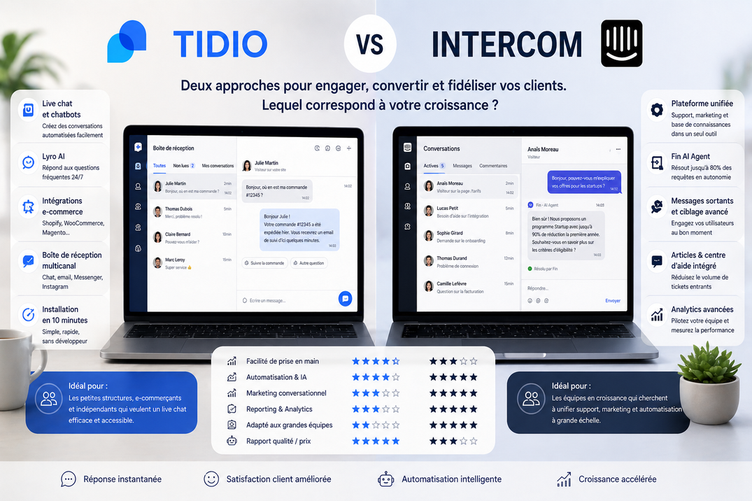
Tidio vs Intercom : fonctionnalités, différences et cas d'usage

10 bonnes raisons d'ajouter un chatbot à son site web en 2026

Zendesk ou Gorgias : quel logiciel choisir pour gérer son support client en 2026 ?
